Translating a Portuguese video to English might seem easy, but spoken Portuguese is fast, drops vowels, and is full of false friends that trick automatic translators. You can translate it live while watching, translate the subtitles if the video has them, or upload the file to a website to get it subtitled or dubbed.
Here are the four methods with their real requirements, how to tell if you are watching Brazilian or European Portuguese (and why it matters before you click anything), and the false friends that make an automatic translation say the exact opposite. We tested it with a short video in Brazilian Portuguese.
In short
- Hear it in English, or the video has no subtitles → voice translator on your PC (method 1).
- It’s on YouTube and has Portuguese subtitles → the player’s own automatic translation (method 2).
- Reading is enough and it’s in the browser → Chrome’s automatic subtitles, free (method 3).
- You need the subtitled or dubbed file → video translation website (method 4).
- First of all: figure out if it’s Brazilian or European Portuguese. It changes the result.
In this article
- First: Brazil or Portugal?
- The false friends that ruin a translation
- Which method to choose
- 1. Translate a Portuguese video in real time on your PC
- 2. If it’s on YouTube: translate the subtitles
- 3. Chrome’s translated subtitles
- 4. Websites that subtitle or dub the video
- What gets lost when translating from Portuguese
- More questions about translating Portuguese videos
- So, which one do we use?
First: Brazil or Portugal?
For an automatic translator, these aren’t just accents of the same language, but two different languages. Speech recognizers have separate models for each, and picking the wrong one shows from the very first sentence: missing words, cut-off phrases, and translations that don’t fit.
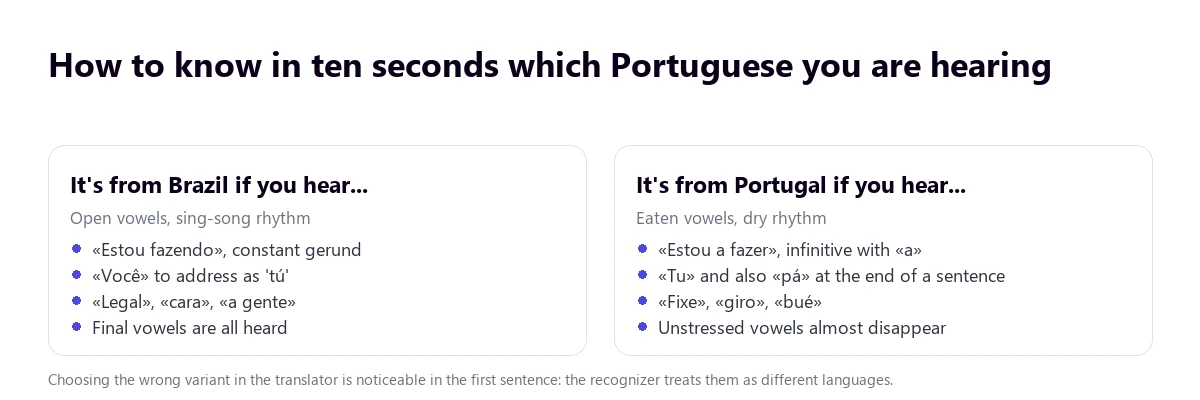
The most reliable clues, in order of usefulness:
- The gerund. In Brazil, they say “estou fazendo”, “estou vendo”. In Portugal, “estou a fazer”, “estou a ver”. It’s the grammatical difference that stands out first.
- Unstressed vowels. European Portuguese reduces them until they almost disappear, making it sound more closed and faster; Brazilian Portuguese pronounces them all and sounds more melodic. This is also why speech recognition fails more often with European Portuguese.
- Pronouns. “Você” in Brazil; “tu” in Portugal, with their corresponding verb forms.
- Filler words. “Cara”, “legal”, “a gente” point to Brazil. “Fixe”, “giro”, “bué”, and a “pá” at the end of the sentence point to Portugal.
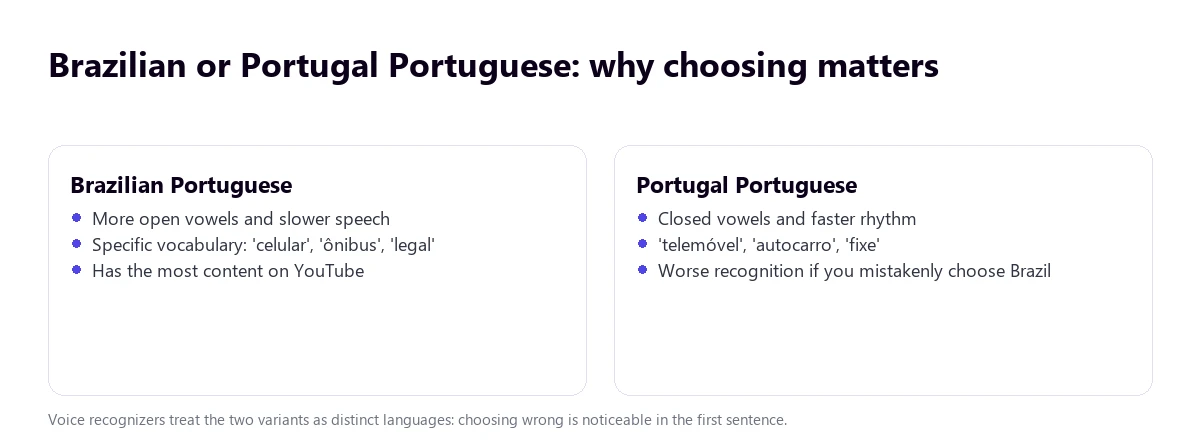
Everyday vocabulary also changes more than it seems: celular / telemóvel (mobile phone), ônibus / autocarro (bus), trem / comboio (train), café da manhã / pequeno-almoço (breakfast), bala / rebuçado (candy). If the video is a mobile or transport tutorial, these words will come up in the first sentence.
The false friends that ruin a translation
Portuguese shares many roots with other languages, which affects translation engines trained on multiple language pairs. There is a group of words that look or sound like one thing but mean another. An automatic translator usually handles them well when the sentence is clear, but messes up when the sentence is short or cut in half. It’s good to keep an eye on them if you are going to rely on subtitles:
| In the video you hear… | It looks like it means | It actually means |
|---|---|---|
| esquisito | exquisite | weird, strange |
| embaraçada | pregnant | embarrassed |
| salsa | salsa (sauce) | parsley |
| oficina | office | workshop |
| borracha | drunk | eraser |
| polvo | dust / powder | octopus |
| largo | large | wide |
| apelido | surname | nickname (in Brazil) |
The practical consequence: when a translated sentence sounds weird but grammatically correct, suspect a false friend rather than a system error. Go back a few seconds and listen to it again.
Which method to choose
| Method | Brazil and Portugal | Without subtitles | You hear it in English | Where | Price |
|---|---|---|---|---|---|
| Voice translator on the PC | Yes, you choose the variant | Yes | Yes, voice and subtitles | Windows 10 or 11, any website or program | 15 free mins a day; more time, paid |
| YouTube’s automatic translation | Depending on the video’s subtitles | No | No | Only YouTube | Free |
| Chrome subtitles | Portuguese, without distinguishing variant | Yes | No | Only in Chrome for desktop | Free |
| Video translation websites | Yes | Yes | If they dub | Uploading the file | Usually paid |
1. Translate a Portuguese video in real time on your PC
This is the method that doesn’t depend on anything: not on the video having subtitles, nor on the platform hosting it. The program listens to the app’s audio—the browser, a media player, an online class—and returns the translation as voice and floating subtitles. Traducore works like this on Windows and lets you choose the Portuguese variant, which is exactly what is needed here.
Step by step
- Open the video in your browser or media player.
- Open the program and sign in with your account, or create one for free here.
- Choose the Video / talk mode, which waits for each sentence to finish.
- Under LISTEN FROM (ORIGINAL VOICE), select the video window.
- Under I HEAR, choose Portuguese (Brazil) or Portuguese (Portugal), and English under TRANSLATE TO.
- Tick On-screen subtitles and Translated voice, click START TRANSLATION, and hit play.
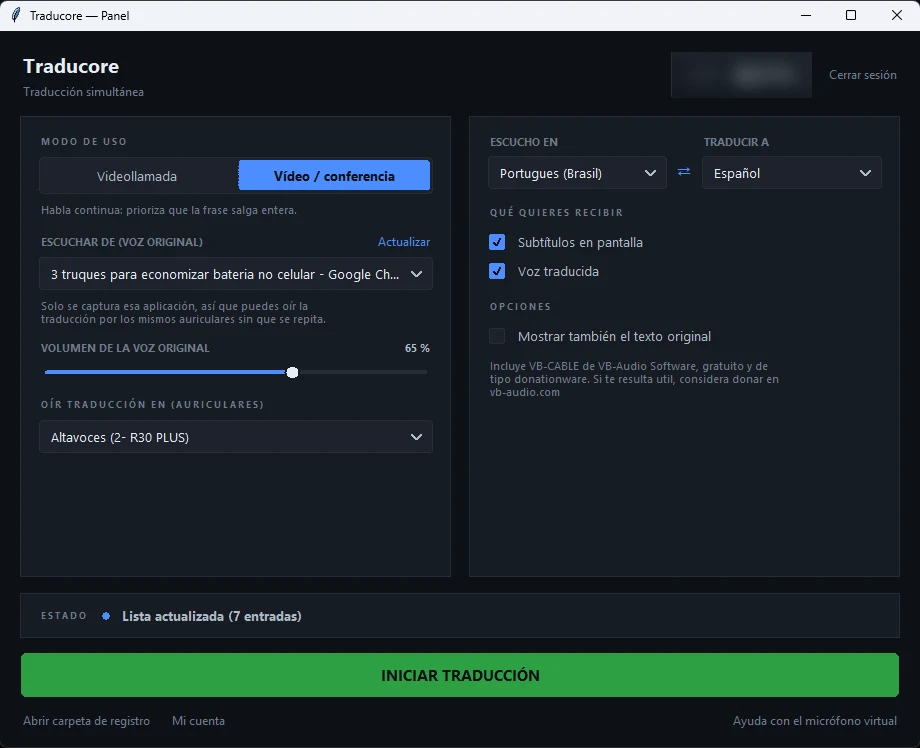
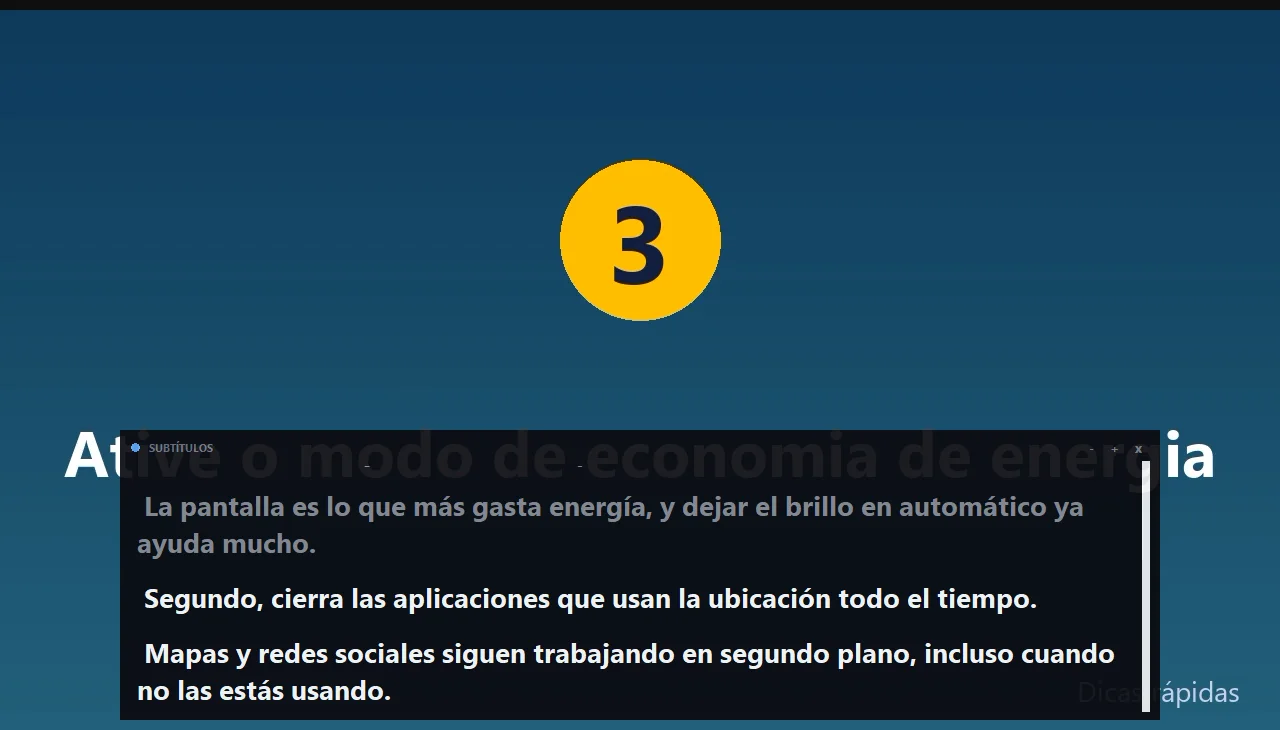
What we saw in the test
- The translation was accurate and natural: “feche os aplicativos que usam localização” came out as “close the apps that use location”, and the numbers (“vinte por cento”) were kept.
- There is a 3 to 6-second delay per sentence. You can see it in the screenshot: the slide has already changed while the translation is still on the previous sentence. For videos with a lot of on-screen text, pause if you need to.
- The variant matters: Brazil and Portugal are chosen separately, and getting it right improves recognition.
- It doesn’t translate the text written inside the video, only what is heard. In tutorials with on-screen labels, that part stays in Portuguese.
It works on Windows 10 or 11 PCs, includes 15 free minutes a day, no credit card required, and for more time, there are hourly plans.
Understand Portuguese videos effortlessly
Brazil or Portugal, with or without subtitles. Try it for free: 15 minutes a day, no credit card required.
2. If it’s on YouTube: translate the subtitles
Portuguese is among the 68 languages that YouTube transcribes automatically, so most Brazilian videos have subtitles even if the creator didn’t add them. To translate them: Settings → Subtitles/CC, choose the Portuguese track, and when you open the menu again, click Auto-translate → English. The previous step of choosing the track is mandatory and is the number one reason people think the option doesn’t exist.
You have the full details, including the four reasons why it might not appear, in our guide on how to translate YouTube subtitles.
Why automatic dubbing won’t save you
Many people expect YouTube to dub the video into English and solve the problem. While YouTube’s automatic dubbing table does include English as a destination from Portuguese, it still rarely happens in practice. The bulk of combinations start from English (dubbing into about twenty languages). From Portuguese, English is practically the only destination, but its availability is still very limited.
Furthermore, dubbing is activated by the creator, not the viewer: if the channel hasn’t enabled it, there is nothing you can do from your side. And videos over 120 minutes long, those with very fast speech, and those with copyright claims are left out.
How to know if a video is already dubbed
When a video has multiple audio tracks, Settings → Audio track appears in the player. If that menu isn’t there, the video only has its original audio. It’s worth checking before setting anything up: if there is an English track, it’s the most convenient option of all.
3. Chrome’s translated subtitles
Chrome for desktop generates subtitles for the audio playing in the browser and can translate them: Settings → Accessibility → Live Caption, and then Live Translate with English as the target. Portuguese is among the source languages it recognizes.
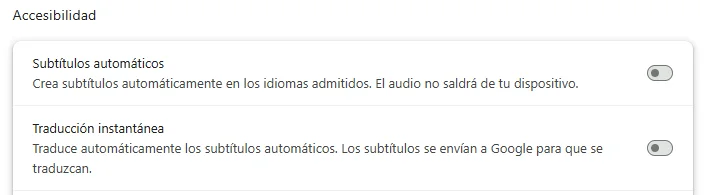
Three limits you should know before trusting it with a whole class. It only works inside Chrome: if the video is in a desktop app, it won’t hear it. It only provides text, never voice. And it doesn’t distinguish between Brazilian and European Portuguese, so it misses more words with European videos.
There is also a privacy nuance: according to Chrome’s help page, subtitles are generated on your device, but when you turn on translation, the text is sent to Google to be translated. The audio doesn’t leave your computer; the text does.
4. Websites that subtitle or dub the video
If you need to keep the translated video—to publish it, send it to someone, or study it carefully—the way to go is to upload it to a website like HappyScribe, Clideo, or Veed and download it with English subtitles or dubbing.
What makes the difference between them:
- Whether it lets you choose the Portuguese variant when transcribing. Those that only offer plain “Portuguese” usually give worse results with videos from Portugal.
- Whether it returns the subtitle separately (SRT or VTT) or hardcodes it into the image. A separate file can be corrected; hardcoded text cannot.
- How long the video is. They charge by the minute, and a one-hour video exceeds almost any free plan.
- What you do with the original. Uploading someone else’s video to a third-party service to redistribute it has copyright implications; for personal use, there are none.
If you want to compare tools in more detail, we have gathered them in the best real-time voice translators for PC.
What gets lost when translating from Portuguese
Automatic translation performs well with this language pair because there is a massive amount of training material. Even so, some things always fall through the cracks:
- Idioms and set phrases. “Nossa!”, “pois é”, “tá bom”, “se vira” are translated literally and lose their tone.
- The register. Brazilian Portuguese in an informal video is very colloquial; the translation returns it in a neutral, flat English.
- On-screen text. No audio translator touches the labels, menus, or screenshots that appear in the video.
- Proper names and brands. They get turned into common words that sound similar.
More questions about translating Portuguese videos
How to translate a video that is in Portuguese to English?
To translate a Portuguese video on your PC, use a voice translator and choose Portuguese (Brazil or Portugal) as the source: you hear and read it in English while it plays. If it’s on YouTube and has subtitles, you can also translate them right from the player.
How can I translate what a video says?
With a tool that listens to the audio: a simultaneous translator on Windows for any program, or Chrome’s subtitles if the video is in the browser. Subtitle-based methods only work if the video already has them.
How to translate audio from a video to English?
Play the video on your computer and turn on the translated voice: you will hear the English audio over the original. If you need a new file with dubbed audio, you will have to use a dubbing website. The steps for standalone audio are in how to translate audio to English.
What app can I use to translate videos?
It depends on where you watch it. On a PC, a real-time voice translator for any video, into 78 target languages. On YouTube, its automatic subtitle translation. To work on the file itself, a subtitle or dubbing website.
So, which one do we use?
If the video is on YouTube and the Portuguese is clear, sometimes the translated subtitles are enough: it’s free and you don’t have to open anything else. But with fast-spoken Brazilian Portuguese, social media videos, or classes that don’t have subtitles, we rely on the PC translator: we choose the correct variant and hear it in English without losing the thread. And if the result needs to be saved, then yes, a subtitling website.
Translate Portuguese videos live
On any website or program on your PC. 15 free minutes a day, no credit card required.