
How to translate a movie into English depends on where it is: the first thing is to check if the platform already has English audio or subtitles; if it doesn’t, or if it’s your own file, you can generate subtitles on your computer or hear it translated while it plays. You almost never need to upload the movie to a video translation website, which is what comes up most on Google for this search and is meant for short clips, not for two hours of copyrighted cinema.
In this guide, we go over why a movie might not have English in your country or on your device, what you gain and lose with dubbing, subtitles, and automatic translation, why a movie’s sound is the hardest for a machine, and what to do in each case: on a platform, in the theater, with a PC file, or with something that only exists in a foreign language. What we say about Netflix comes from their official help and subtitle style guide, checked in November 2026.
In short
- On a streaming platform: open “Audio & Subtitles” in the player and look for English; if it’s not there, try another device or check the profile language (way 2).
- If the movie only exists in a foreign language and plays on your computer: a voice translator on your PC gives it to you in English, with subtitles or voice (way 1).
- Your own file on the drive: locally generated subtitles loaded into the player, without uploading anything (way 3).
- In the theater: choose the dubbed or English-subtitled session; translating the room with your phone doesn’t work well (way 4).
In this article
- First things first: check if the movie is already in English
- Dubbing, subtitles, or automatic translation: what you gain and what you lose
- Why a movie’s sound is the hardest for a machine
- The four ways, at a glance
- 1. The movie plays on the computer and doesn’t have English: a voice translator on the PC
- 2. On a platform: changing the audio and subtitles
- 3. A file on your computer: English subtitles without uploading anything
- 4. In the theater: the right session is worth more than any app
- Watching foreign movies to learn a language
- More questions about translating movies into English
- So, which one do we use?
First things first: check if the movie is already in English
Most studio movies that reach a platform come with at least English subtitles, and many also have dubbing. The problem is that they don’t always show up, and not because of a bug: each platform decides which languages to offer per title, per country, and per device. Before looking for tools, it’s worth ruling out the most common causes.
Netflix’s help explains this in quite some detail. The available languages depend on four things: your location, your profile’s language preferences, the specific movie or show, and the device you watch it on. It adds that licenses and distributor agreements can limit the languages for some titles, so a movie might have an English dub in the US but not in the UK, or vice versa.
There are lesser-known details that explain many weird cases:
- Downloads only keep two languages. Streaming shows all available ones, but on a downloaded title Netflix leaves only “the two most relevant languages”. If English is missing, the help recommends deleting the download and choosing the audio or subtitles again.
- The menu hides languages on TVs. On televisions, the options might appear at the bottom, without an icon, and you have to press “Other” to see the full list.
- Older devices fall short. According to the same help page, devices made before 2014 might not support subtitles in languages like Arabic, Chinese, or Japanese. This doesn’t usually happen with English, but it’s good to know that the device matters.
- The profile language filters. In the profile’s “Audio & Subtitles” settings, you choose your preferred languages; if English isn’t ticked, some options might not show up at first.
Netflix also lets you search for titles by audio or subtitle language from its website, at netflix.com/browse/audio and netflix.com/browse/subtitles. It’s a quick way to know what’s dubbed into English in your country before picking a movie.
On other platforms, the menu has a similar name and is in the player itself, but we haven’t checked their official help for this article, so we won’t detail their steps or exceptions.
Dubbing, subtitles, or automatic translation: what you gain and what you lose
Watching a foreign movie in English can be done in three ways, and they aren’t equivalent. Knowing what each one does helps you choose and, above all, not expect from an automatic translation what only professional work can provide.
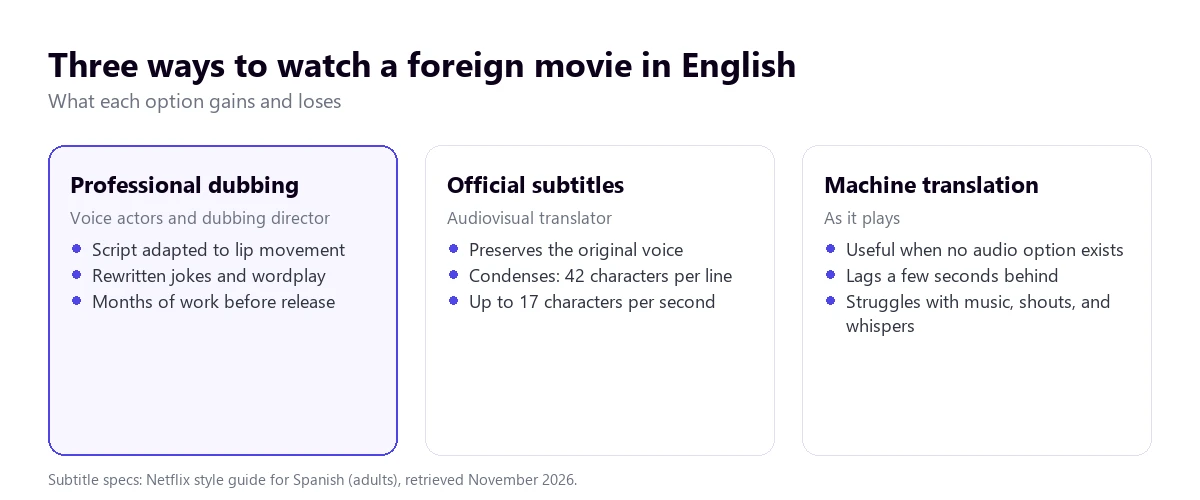
Dubbing: a rewritten movie
A professional dub isn’t a translation read out loud. An adapter rewrites the script so the sentences last the same amount of time and match the lip movements, especially in close-ups. Jokes, wordplay, and songs are swapped for ones that work in English. Then, a dubbing director casts actors and records scene by scene.
That’s why the dubbing sometimes says something different from what’s in the subtitles of the same movie: each one adapts to a different restriction. And that’s also why there are sometimes two English dubs for many movies, one for the US and one for the UK, with different expressions, forms of address, and even titles. On a platform, they usually appear as separate tracks, though both aren’t always there.
Subtitles: condensing without it showing
Subtitles have another limit: the time it takes us to read. The style guide Netflix gives its providers for English sets a maximum of 42 characters per line, two lines, and a reading speed of up to 17 characters per second for adult content (13 for kids). Fast dialogue doesn’t fit entirely within those margins, so the translator summarizes.
What gets lost is usually the accessories: filler words, repetitions, half-finished sentences, and what background characters say. For someone who understands some of the original language, that difference between what they hear and what they read might seem like a mistake, and it almost never is.
Automatic translation: what’s there when there’s nothing else
An automatic tool doesn’t adapt or condense: it translates what it understands, sentence by sentence. It’s the option for movies that don’t have English anywhere: new releases that haven’t arrived yet, classics with no edition in your country, documentaries, independent festival cinema, or a movie on a platform that doesn’t offer your language. It works reasonably well with clear dialogue and struggles with everything we’ll see next.
Why a movie’s sound is the hardest for a machine
A podcast or a recorded class is the easy case for speech recognition: one or two people, a good microphone, no noise. A movie is the opposite, and it’s good to know this so you don’t blame the tool for what is a limit of the material.
- Music and effects go over the voices. In an action scene, the dialogue competes with explosions, engines, and a blaring soundtrack.
- Dialogue lives in the center channel. In multi-channel cinema mixes, voices are placed mostly in the center. When the computer reduces that mix to two speakers, the dialogue can end up quiet compared to the rest.
- Whispers, shouts, and overlapping voices. Actors don’t speak like in a meeting: they lower their voices, interrupt each other, speak with their backs turned or off-camera.
- Accents and slang. A British movie, a New York neighborhood one, and one set in Australia sound very different, and slang or period terms confuse any translator.
- Songs and on-screen text. Lyrics translate poorly, and what appears written on screen, a letter or a text message, no one hears.
Two settings help quite a bit: turning on the option to enhance dialogue or normalize volume on the platform or player, if it exists, and not turning up the effects above the voices in the system equalizer.
The four ways, at a glance
With the tree, you find your case in four questions; with the table, what each option offers.
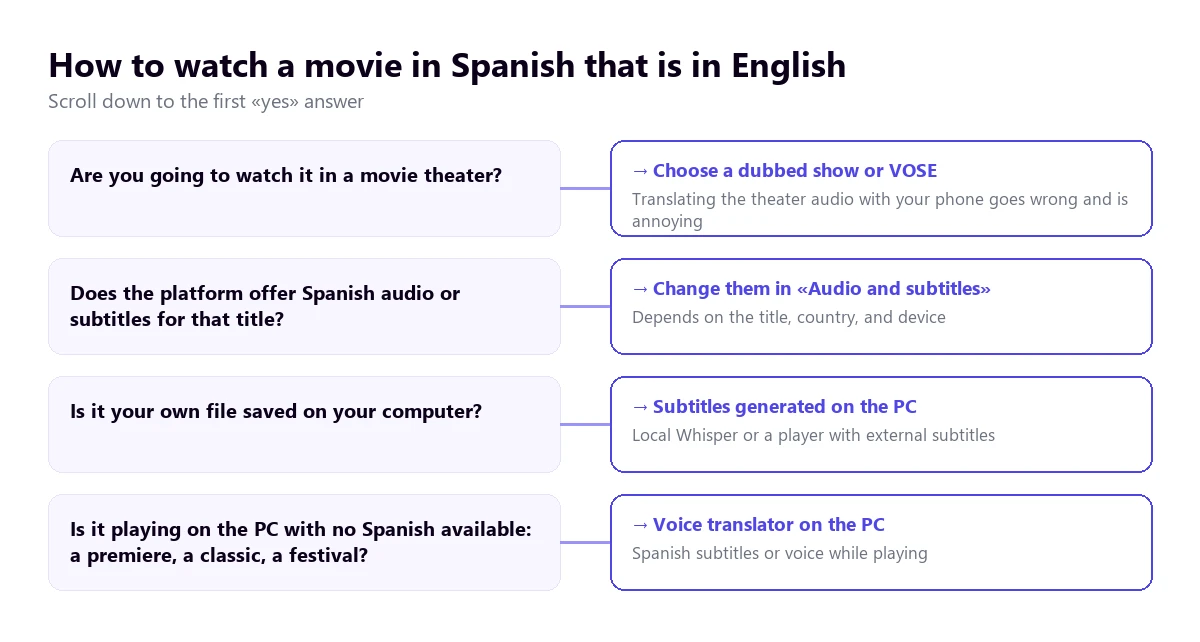
| Way | Where the movie is | What you get | Quality | Cost |
|---|---|---|---|---|
| Voice translator on the PC | Any Windows application | Subtitles and English voice while it plays | Good with clear dialogue; low with music and overlapping voices | 15 free mins a day; paid plans |
| Platform audio and subtitles | Netflix and other platforms | Professional dubbing or subtitles | The best, if they exist | Included in the subscription |
| Locally generated subtitles | A file on your drive | English subtitle file | Depends on the model and the sound; can be corrected | Free, takes processing time |
| Dubbed or subtitled session | A movie theater | Dubbing or on-screen subtitles | Professional | The ticket |
Left out of the table are the websites that top Google with this search, which dub or subtitle a file you upload to them. They work for a short video of your own; with a commercial movie, they clash with the file size, the minutes in their plans, and copyright.
1. The movie plays on the computer and doesn’t have English: a voice translator on the PC
The case platforms don’t solve is the movie that only exists in a foreign language: a new release in its original version, an online festival documentary, a classic in a digital film library, or a movie your platform doesn’t offer dubbed in your country. That’s what a program that listens to the application where it plays and gives you English while you watch is for.
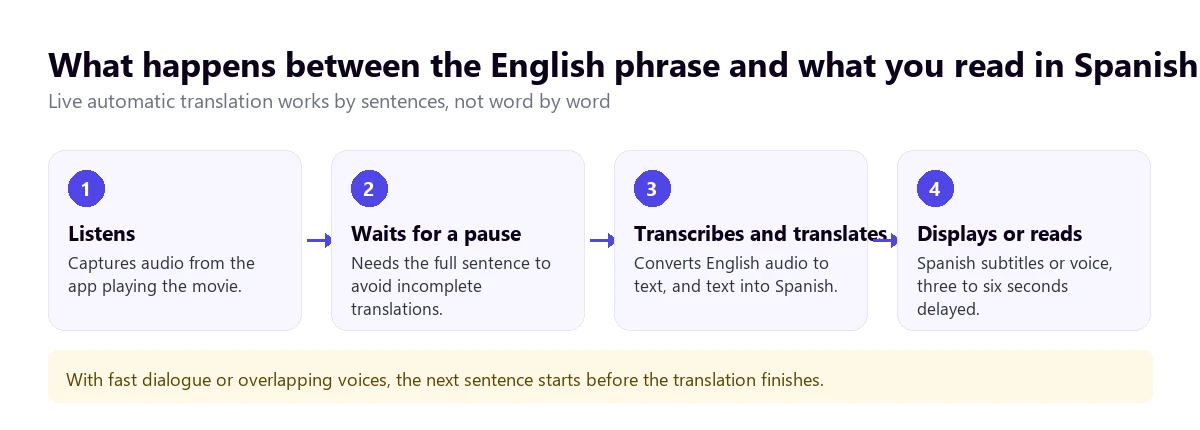
Traducore is the one we make, for Windows 10 and 11. On Windows 11, it captures only the application you choose, so if the movie is in the browser, everything playing in it comes through, with all its tabs; you should close the others. It works sentence by sentence, waiting for the pause, and shows English subtitles, reads the translation with a voice, or does both, with the original voice in the background at 65%.
Step by step
- Open the movie in the application or browser where you’re going to watch it.
- In “LISTEN FROM (ORIGINAL VOICE)”, choose that application.
- In “I HEAR”, tick the original language or leave automatic detection.
- In “TRANSLATE TO”, choose English and decide if you want to read, hear, or both.
- Click start and play the movie.
What you need to know first
The translation arrives with a three to six-second delay, so in very fast dialogue scenes, the next sentence starts before the previous one ends. For a movie, subtitles usually work better than voice: they let you hear the original performance and you read them at your own pace. Nothing is saved, neither audio nor text, and there is no version for Mac, TV, or mobile.
Platforms protect the image against copying, but a translator of this type works with the sound. Even so, each service behaves in its own way, so the sensible thing is to test with your platform during the free minutes before setting up the session: the Free plan gives 15 minutes a day, no card required and no expiration. For a whole movie, you need a paid plan; you have them on the pricing page.
Test it with the scene you’re missing
English subtitles or voice for whatever plays in any Windows program. 15 free minutes every day, no card required.
2. On a platform: changing the audio and subtitles
If the movie has English, the best possible translation is already done. On Netflix, according to their help, the path is the same on the computer, the browser, and the mobile: start playing the movie, tap or click the screen to bring up the controls, and choose “Audio & Subtitles”, at the top or bottom depending on the device. There you change the audio language and the subtitle language separately.
On the TV, you do it with the remote’s arrows, and the list might appear at the bottom, without an icon, with the “Other” option to see all languages. If you want English to come up by default, change it in your profile’s language settings and save.
A combination few people use that works very well is original audio with English subtitles: you keep the actors’ voices, with their intonation and accents, and you read a translation done by professionals. Netflix also distinguishes descriptive subtitles, marked as CC on the title page, which include sounds and music besides the dialogue.
If the movie is on YouTube, things change: there, the subtitles and dubbing depend on the creator. We explain it in the guide to translate a YouTube video.
3. A file on your computer: English subtitles without uploading anything
With a movie saved on your drive, the classic route is a subtitle file. It’s a text with the timings for each sentence, usually with a .srt extension, which the player shows over the image. In VLC, you load it from the “Subtitle” menu and, if the file has the same name as the movie and is in the same folder, it loads by itself.
If there isn’t an English subtitle file for that movie, you can generate one on your own computer: a speech recognition model like Whisper transcribes the original language and translates it to English without the movie leaving the PC. It takes a while, depends on the computer’s power and the sound, and leaves a text that can be corrected before watching it. The steps and options, with their privacy advantages, are in the guide to translate a video into English without uploading it to any website.
For your own file, the difference with way 1 is clear: generated subtitles take time upfront, but then you watch them without delay and you can review them; the live translator prepares nothing, but runs a few seconds behind.
4. In the theater: the right session is worth more than any app
The question of which app translates movies in the theater comes up a lot on Google, and the honest answer is that none do it well. A phone listening to the room picks up the echo, the music, and voices at a volume meant for speakers, not for a microphone. The translation would arrive late, in pieces, and the lit screen bothers the rest of the audience.
What works is choosing the session. In non-English speaking countries, versions are usually advertised as dubbed or subtitled in the local language. If you are looking for English, you need to find original version sessions (often marked as OV or similar) if the movie is originally in English, or look for specific English-subtitled screenings, which are rare outside of festivals or major cities. Movies for kids are mostly scheduled dubbed.
There are also accessibility apps that sync subtitles or audio description on the phone with some sessions, meant for deaf or blind people. They are useful for what they are made for, but they don’t translate: they show a text prepared beforehand in the movie’s language.
Watching foreign movies to learn a language
Many people looking to translate a movie actually want to understand it without losing the original language. For that, what works best goes in stages:
- Start with English subtitles and original audio, to follow the plot without exhausting yourself.
- Switch to subtitles in the original language once you understand the plot: you read the same thing you hear and learn how fast speech is written.
- Repeat scenes: a five-minute scene watched three times teaches more than a whole movie straight through.
- Choose the accent well: a modern city comedy is understood sooner than a rural historical drama.
On the computer, a translator that shows both the original text and the translation at the same time also works for this with movies that don’t have original subtitles. If what you want to translate is just the sound, without the image, you have the guide to translate audio into English.
More questions about translating movies into English
Where can I translate a movie into English?
First, on the platform itself: if the movie comes with English audio or subtitles, they are in the player’s “Audio & Subtitles” menu. If it’s your own file, you can generate subtitles on your computer with a model like Whisper. If it plays on the PC and there’s no English anywhere, a voice translator for Windows gives it to you in English while you watch.
What is the app that translates movies in the theater?
There isn’t one that does it well: the phone picks up the echo and the music of the room, the translation arrives late, and the screen is annoying. The practical thing is to choose a session with English audio or subtitles. The accessibility apps used in some theaters show subtitles already prepared in the movie’s language, not a translation.
Can you translate a long movie into English?
Yes. On a platform, the length doesn’t matter: the dubbing or subtitles are already done. With your own file, generating subtitles locally takes more time the longer the movie is, but there is no limit. Video translation websites, on the other hand, usually limit the file size and the minutes of each plan.
So, which one do we use?
If the movie has English on the platform, that one, and almost always with the original audio and subtitles. If it’s our own file, subtitles generated on the PC and reviewed before watching. And when something plays on the computer and doesn’t have English anywhere, a documentary, a talk, or an online festival movie, we use our voice translator on Windows, with subtitles. If you’re looking for other options for the PC, you have the voice translators comparison. And if you ever wonder again how to translate a movie into English, the order is that: platform, file, live.
The movie that is only in a foreign language
English subtitles or voice for any Windows program, while it plays. 15 free minutes a day, no card required.