To translate YouTube songs, the most reliable method isn’t asking a machine to listen to the music, but starting from the written lyrics: the ones in the video itself if it has subtitles, the ones Spotify or Apple Music show with their translation underneath, or the official lyrics pasted into a text translator. Listening and translating at the same time works well with spoken voice; with sung voice over a musical track, it fails much more.
In this guide, we explain why that happens, which route is best depending on what you’re looking for (understanding the lyrics, singing them, or learning the language), and what is always lost along the way. The data for YouTube, Spotify, and Apple Music comes from their official help pages and announcements, checked in October 2026. Where the source doesn’t state something, we point it out instead of guessing.
In short
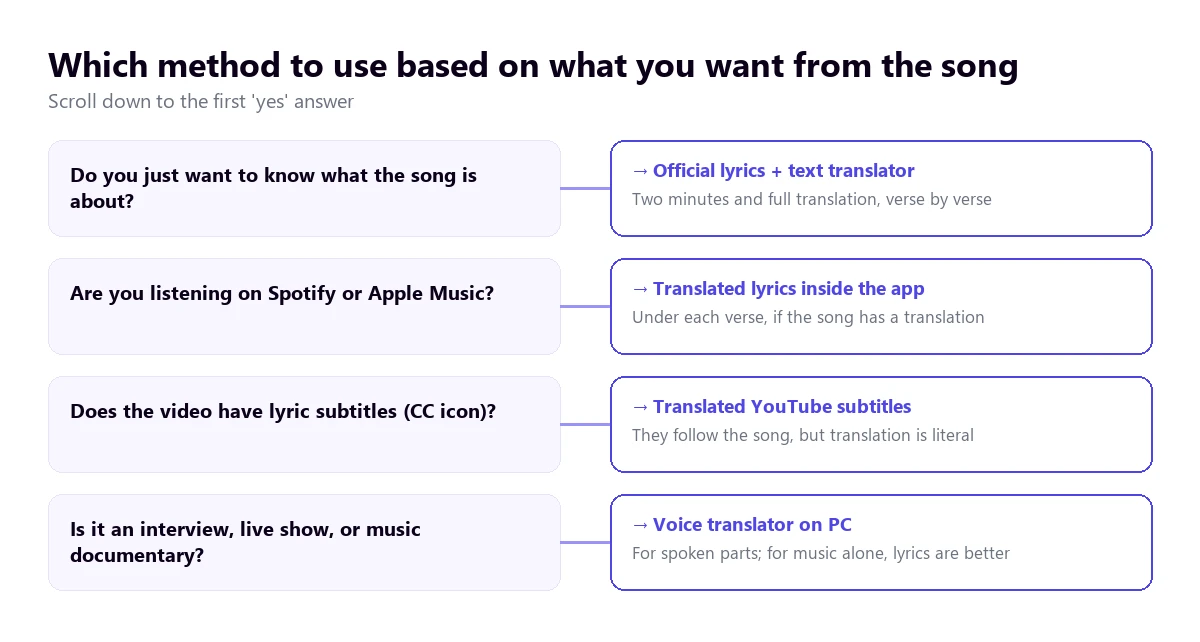
- The video is an interview, a live stream with chatting, or a music documentary: a voice translator on your PC for the spoken parts (route 1).
- The video has subtitles with the lyrics: YouTube’s automatic translation, knowing it will be literal (route 2).
- You listen to the same song on Spotify or Apple Music: their translated lyrics, line by line (route 3).
- You want to fully understand the lyrics: official lyrics plus a text translator or an AI assistant (route 4).
- You are looking for a careful or singable translation: one done by a person, on lyrics websites or communities (route 5).
In this article
- Why a song is the hardest thing to translate by ear
- What exactly are you looking for in the song
- The five routes, at a glance
- 1. When there is also speaking in the video: a voice translator on the PC
- 2. The video’s own subtitles and their automatic translation
- 3. Translated lyrics on Spotify and Apple Music
- 4. Official lyrics in a text translator or AI assistant
- 5. Translations done by people
- What is always lost when translating lyrics
- How to learn a language with YouTube songs
- More questions about translating songs
- So, which one do we use?
Why a song is the hardest thing to translate by ear
An automatic voice translator works like an assembly line. First, it isolates the voice from the rest of the sound, then it converts it to text, cuts it into sentences, translates each sentence, and finally, shows it on screen or reads it out loud. With a person speaking into a microphone, that chain works reasonably well. With a song, almost every link suffers.
The first is the most obvious: the voice isn’t alone. The drums, bass, guitars, and backing vocals occupy the same frequencies as consonants, which are exactly what distinguish one word from another. YouTube’s own help page cites background noise and overlapping voices among the reasons its automatic subtitles fail or aren’t generated at all. In a track with backing vocals, there is background noise and overlapping voices throughout the entire song.
The second is the way of singing. A singer stretches vowels that last a fraction of a second when speaking, joins syllables to fit the melody, and changes the stress of words to fall on the strong beat of the measure. Speech recognizers are trained mostly on speech, so a vowel stretched for two seconds is harder for them than any regional accent.
The third is the structure. A line of a song isn’t a grammatical sentence: it can cut a clause in half or repeat the same idea four times in a row in the chorus. The translator receives chunks without a subject or verb and translates them as best it can. And the final link is time: by the time the translation appears, the line has already passed and the next one is playing.
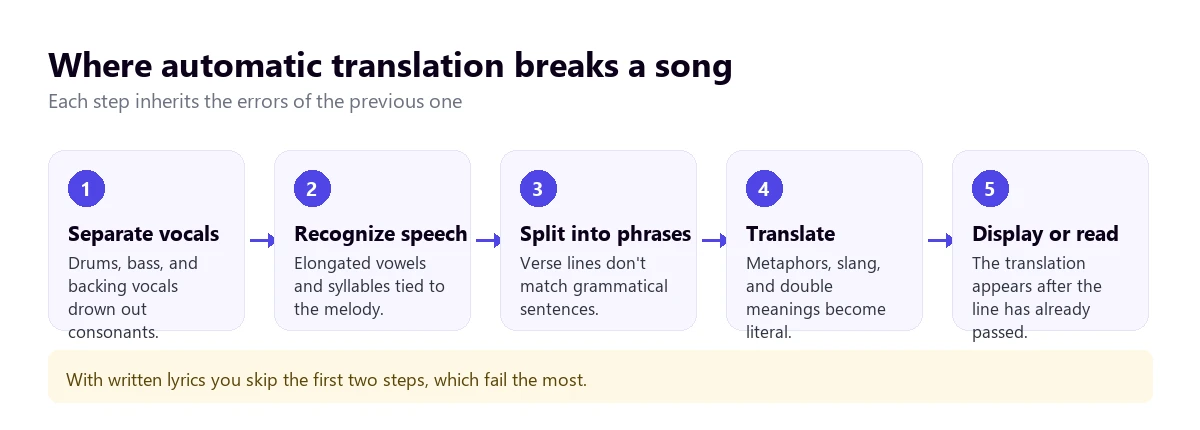
That’s why all the routes that work well with music have something in common: they start from already written lyrics, whether in subtitles, in a music app’s database, or on a lyrics website. Someone else did the transcription beforehand, with time and without the musical track in the way, and the machine just has to translate.
What exactly are you looking for in the song
Before choosing a tool, you should know what you want the translation for, because “translating a song” means very different things depending on who asks. There are three common situations, and each requires a different route.
The most common is curiosity: you like a song in Spanish, Korean, or Portuguese and want to know what it’s about. Here, a complete translation is enough, even if it isn’t elegant, and ideally, you have it in front of you while you listen. The second is learning the language: you want to see the original and the translation line by line to connect words. You want the translation to be literal, even if it sounds weird, because you’re trying to understand each piece.
The third is singing it or publishing it in your language: a cover, a karaoke track, a video for your channel. Here, no automatic tool will help you much, because what you need is an adaptation that respects the melody. And there is a fourth case, the one that is most like translating a normal video: when the video features speaking as well as singing, like in an interview, a live stream with the audience, a documentary, or a reaction video.
The five routes, at a glance
| Route | What it’s for | Where the text comes from | Quality with music | Cost |
|---|---|---|---|---|
| Voice translator on the PC | Spoken parts: interviews, live streams, documentaries | Listens and transcribes on the fly | Good with spoken parts; weak with sung parts | 15 mins free per day; paid plans |
| YouTube subtitles | Reading the translated lyrics while watching the video | Creator or automatic subtitles | Depends on whether they exist and are good | Free |
| Spotify and Apple Music | Listening with the translation under each line | Licensed lyrics from the app | Good, for songs that have it | Spotify: free and Premium; Apple Music: subscription |
| Lyrics + text translator | Fully understanding the lyrics | Official lyrics or from a lyrics website | The best for understanding | Free |
| Translation by a person | Meaning, nuances, or singable version | Lyrics websites and communities | Variable: depends on who does it | Free or commissioned |
1. When there is also speaking in the video: a voice translator on the PC
Many music videos on YouTube aren’t just music. There are artist interviews, tour press conferences, live streams where the singer talks to the audience between songs, documentaries about an album, and reaction videos. In all of these, the hardest thing to follow is what is said, not what is sung, and they almost never have translated subtitles.
That’s what a voice translator running on your computer is for. Traducore is a program for Windows 10 and 11 that listens to the sound from your browser or media player, transcribes it, and shows the translation in a subtitle band at the top of the screen. It can also read it out loud and leaves the original sound in the background, at 65% by default. It translates into 78 languages and detects the source language.
Step by step
- Open the video in your browser and pause it.
- In the program, choose the Video / talk mode and select the browser as the audio source. On Windows 11, the entire application is captured, with all tabs, so you should mute the others.
- Choose the language you want to translate to.
- For a music video, tick subtitles only: translated voice over a song gets in the way more than it helps.
- Click start and resume the video.
What you should know
We need to be clear here: the program is designed for spoken voice. With the song itself, it is much less accurate, for the same reasons we explained above, and the translation of each line arrives with a three to six-second delay, when the next one is already playing. To understand the lyrics of a track, routes 3 and 4 are better. Where it does add value is in the spoken parts, which is exactly what no lyrics app translates.
It doesn’t save the audio or the text. The Free plan gives you 15 minutes a day, no card required and no expiration; the free voice is available in English, Spanish, French, German, Italian, and Portuguese, and for the rest of the languages, the Free plan gives you subtitles. It only works on Windows. If you are interested in other ways to translate a non-music video, check out our guide to translating a YouTube video.
Understand your artists’ interviews and live streams
Translated subtitles over any video playing on your PC, without downloading anything. 15 free minutes every day, no card required.
2. The video’s own subtitles and their automatic translation
Many official music videos and almost all lyric videos come with the lyrics as subtitles, added by the label or the artist themselves. If the video has that subtitles (CC) icon, YouTube can translate them on the fly into your language using the “Auto-translate” option in the subtitles menu. YouTube’s help page only documents this option for mobile: on the computer, the current version of their help page no longer gives the steps, although the menu is usually in the same place.
It’s the most convenient way to translate YouTube songs without leaving the video, but it has three conditions. The first is that the video has subtitles: according to the help page, if you don’t see the option, they aren’t available for that video. The second is that they are good. If they are automatic, generated by speech recognition, they suffer from everything we’ve mentioned about music. YouTube warns that their quality “may vary” and that they fail with accents, pronunciation, or background noise.
The third condition is accepting a literal and sometimes censored translation. YouTube’s help page explains that, by default, words that might be inappropriate are replaced by “[__]”, even in auto-translated subtitles, unless the creator changes it. In rap and much of today’s pop, that leaves gaps in entire lines.
If the video doesn’t have subtitles or the option doesn’t appear, in our guide to translating YouTube subtitles we review the causes and what to do in each case, including Chrome’s automatic subtitles.
3. Translated lyrics on Spotify and Apple Music
If the song is also on a music app, there is a better route than the video: its translated lyrics. These apps don’t transcribe by ear; they use licensed lyrics, synced with the song, and now many include a translation under each line.
Spotify
Spotify announced in February 2026 that lyrics translations are available worldwide, for free and paid users. They had launched them in 2022, and the year before they reached more than 25 markets. To see them, open the lyrics of a song that has a translation and tap the translate icon on the lyrics card: the translation appears below the original, and you can switch back to the original lyrics at any time.
Two details from the fine print. The translation appears according to the device’s language, not a language you choose in the app. And, according to Spotify’s help page, not all songs have lyrics: it depends on the market, the device, and agreements with rights holders. On the computer, the lyrics are opened with the lyrics icon at the bottom of the window; the translation announcement doesn’t specify if the translate button is also there, so we can’t confirm it.
Apple Music
On the iPhone and iPad, Apple Music offers translation and pronunciation of lyrics. Open the lyrics, tap the Translation and pronunciation button, and choose between showing the translation, showing the pronunciation, or hiding the original. The pronunciation is useful for languages with a different alphabet, like Korean or Japanese, if you want to sing it.
The conditions, according to their help page: you need an Apple Music subscription, an internet connection, or the downloaded song, and the translation language comes from the device’s preferred language list. If the button doesn’t appear or its options are grayed out, that song or language doesn’t have a translation. On its artist page, Apple explains that translations are done with machine learning and adjusted by language experts, and that they are only available for selected songs, with no guarantee they will reach all of them.
4. Official lyrics in a text translator or AI assistant
If you want to translate YouTube songs at your own pace, the most complete route is still the simplest: find the lyrics, copy them, and translate them as text. It’s the one that gives you the most time to think about each line and the only one that lets you ask about what you don’t understand.
The tricky step is the first one: getting correct lyrics. Lyrics websites are largely fed by user transcriptions, and hearing mistakes are common, especially in tracks with a lot of slang or multiple voices. If the artist has published the lyrics in the video description, on their website, or in the album booklet, that’s the definitive version. If two websites don’t match on a line, distrust both.
With the lyrics in front of you, a text translator like Google Translate or DeepL gives you a literal version in seconds. A conversational AI assistant lets you go further: ask it to explain a metaphor, tell you if an expression is slang from a specific city, or suggest a version that sounds natural in English. You should treat these explanations as a hypothesis, not a fact: an assistant can confidently invent the origin of an expression. The artist’s own interviews about the song, if they exist, are worth more than any interpretation.
A trick that works: translate stanza by stanza, not the whole song at once. Automatic translators tend to smooth out repetitions and reorder lines when they receive a long text, making it easier this way to compare each chunk with what you hear.
5. Translations done by people
When we searched for this topic on Google in October 2026, many of the top results weren’t tools, but websites and communities where people translate lyrics: pages of Spanish lyrics translated into English, Reddit threads asking for help with a line, and websites for learning languages with karaoke, like LyricsTraining. It’s a clue to what people are looking for: not just a translation, but someone to explain it.
The advantage of a human translation is that it usually catches double meanings and references that a machine misses. The downside is that there is no way to know who did it or their skill level. Those that include notes explaining their decisions (“here the original plays with…”) are usually more reliable than those that just give the text.
If you need a translation to publish, for example, to subtitle a cover on your channel or for an album booklet, the professional thing to do is commission it. And keep in mind that a song’s lyrics are copyrighted: publishing the lyrics or their translation in your own video may require permission from the rights holder, even if you did the translation yourself.
What is always lost when translating lyrics
No route, not even the human one, manages to transfer everything. A song is written to be heard, not read, and there are layers that only exist in the original language. Knowing what they are helps you read any translation with the right eye.
- Rhyme and rhythm. A faithful translation almost never rhymes, and one that rhymes is almost never faithful. That’s why English covers of a Spanish hit often change the content of the lyrics.
- Wordplay. If a line plays with two meanings of the same word, the translation has to choose one. Good human translations point this out in a note.
- Slang and jargon. Rap, reggaeton, or K-pop use expressions from a specific neighborhood, generation, or community. An automatic translator converts them to their literal meaning, and the line loses its charm or changes meaning.
- Cultural references. Street names, brands, characters, or previous songs that the original audience recognizes instantly and the foreign audience doesn’t even perceive as a reference.
- How it sounds, not what it says. Many lyrics repeat meaningless syllables, mix languages in the same line, or choose a word for how it sounds. Translated, those parts are left empty.
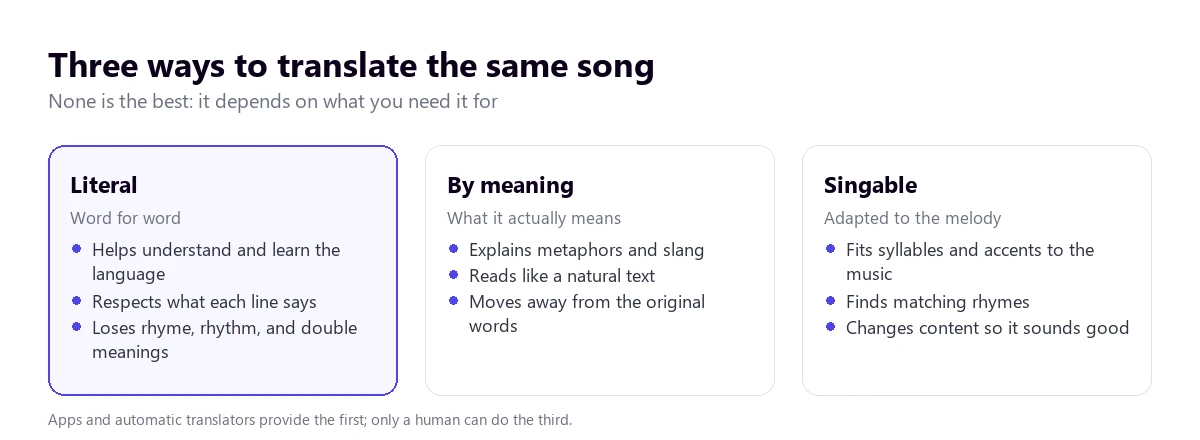
The profession of translating songs distinguishes between these three ways of doing it. The literal one respects what each line says and is the one you need to learn the language. The meaning-based one explains what the author means, even if it changes the words. The singable one adapts the text to the melody, with its syllables and stresses, and sacrifices content to make it sound right. When a translation seems weird to you, ask yourself first which of the three you are reading.
How to learn a language with YouTube songs
One of the most frequent reasons for translating YouTube songs is to learn the language, and here the order matters. Listening to the song with the translation in front of you from the beginning makes you read in English and not pay attention to the original. It works better the other way around.
- Listen first with nothing and write down the words you think you recognize.
- Then, play it with the original lyrics, untranslated, and check what you heard.
- Look up only the words and phrases you don’t understand, with the literal translation.
- Finally, read a complete translation to understand the general meaning.
- Listen to it again without support a few days later: you’ll be surprised how much you understand.
Songs have an advantage that no book has: they repeat. A chorus that plays twenty times locks in expressions that you would forget in a week in a class. Their disadvantage is that sung pronunciation is far from spoken pronunciation, and that the grammar of lyrics is free: not everything a song says is correct or said that way on the street. To hear the language as it is spoken, complement them with interviews or podcasts.
More questions about translating songs
How to change the translation language on Spotify?
According to Spotify’s announcement in February 2026, lyrics translations appear based on the device’s language. To see them in another language, you have to change the language of your phone or computer, not a setting within the app. If the song doesn’t have a translation into that language, the translate icon won’t appear on the lyrics card.
Who translates better, Google or ChatGPT?
For lyrics, it depends on what you’re looking for. A translator like Google Translate gives a literal, fast, and fairly predictable translation, useful for learning. A conversational assistant like ChatGPT can explain metaphors and slang, or suggest a more natural version, but sometimes it confidently invents explanations. The sensible thing is to use both: the literal one to know what each line says and the assistant to understand why.
How to search for a song’s name?
If you remember a piece of the lyrics, type it in quotes in the search engine: a line from the chorus is usually enough. If you only remember the melody, music recognition apps identify a song that is playing, and the Google app lets you search for it by humming. In a YouTube video, also check the description: many videos that use music indicate which song is playing there.
So, which one do we use?
To translate YouTube songs and truly understand them, the official lyrics and a text translator, with Spotify’s translation when the song has it: it’s what works best and costs nothing. To learn the language, the original lyrics first and the translation second. And for what is spoken around the music, which is what no lyrics app translates (interviews, live streams, documentaries), we use our own voice translator on the PC, with subtitles on and the voice off.
If you are looking for a broader comparison of programs to translate what plays on your computer, you can find it in our comparison of PC voice translators.
Translated subtitles for everything playing on your PC
Interviews, live streams, and documentaries in other languages, translated while you watch them. 15 free minutes every day, no card required and no expiration.