To translate a podcast into another language, there are two paths: use the limited translation features of the app itself, or listen to the episode on your computer with a tool that translates it as it plays. Spotify, Apple Podcasts, and YouTube have transcripts, subtitles, or dubbing, but almost everything depends on the creator having enabled them, and none of the three translates the voice of just any episode.
This guide covers what each platform does on its own, the four ways to understand a podcast when the app doesn’t help, and what to do if the podcast is yours and you want to publish it in other languages. The data for Spotify, Apple, YouTube, and Google comes from their official help pages, checked in September 2026; where the source doesn’t confirm something, we say so.
In short
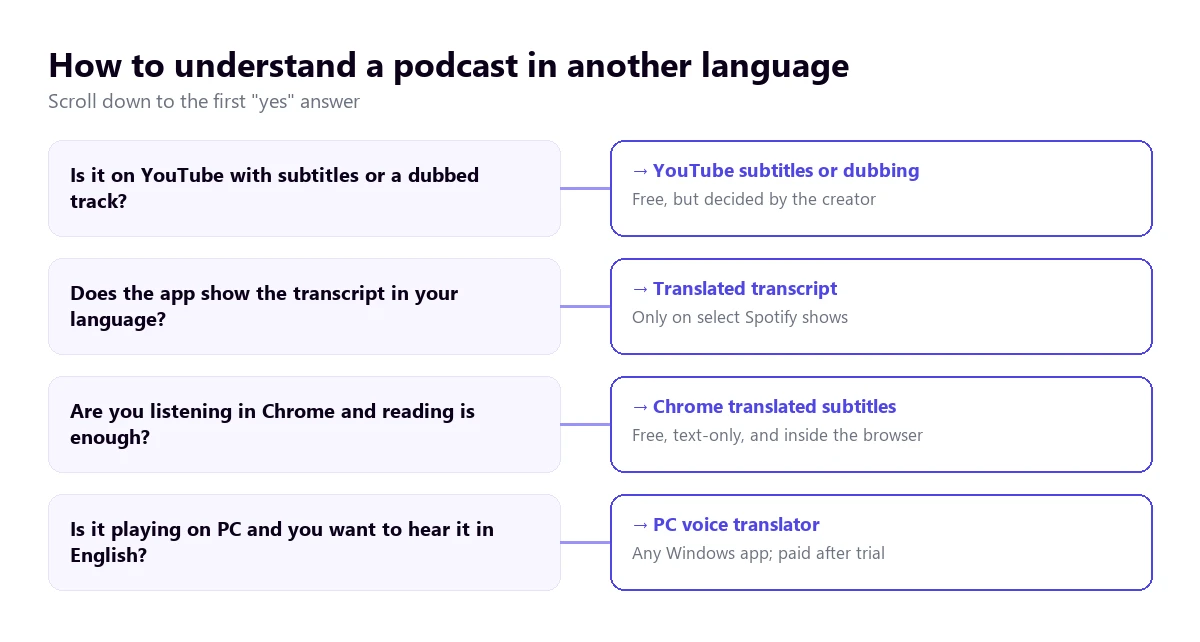
- Is the podcast on YouTube? → check if it has subtitles to translate or a dubbed audio track (path 3).
- Are you listening on your computer and want to hear it in English? → a voice translator for PC over the app or browser (path 1).
- Is reading enough and you listen on Chrome? → the browser’s translated subtitles, for free (path 2).
- Do you need the full text of the episode? → download the file and run it through a transcription service (path 4).
- Is the podcast yours? → transcription, reviewed translation, and a separate feed per language (last section).
In this article
- What Spotify, Apple Podcasts, and YouTube translate on their own
- Which path suits you depending on where the podcast plays
- 1. Listen to it on your computer with a voice translator
- 2. Chrome’s translated subtitles with the web player
- 3. Make the most of what each app already has
- 4. Download the episode and run it through a web service
- Why a podcast is one of the hardest things to translate
- How to get a cleaner translation from a podcast
- If the podcast is yours: publishing it in other languages
- More questions about translating a podcast
- So, which one do we use?
What Spotify, Apple Podcasts, and YouTube translate on their own
Before installing anything, you should know what the app you listen with already offers. The short answer is little and not always, and the reason is the same across all three: the translation is decided by the publisher, not the listener.
Spotify: transcripts for some shows
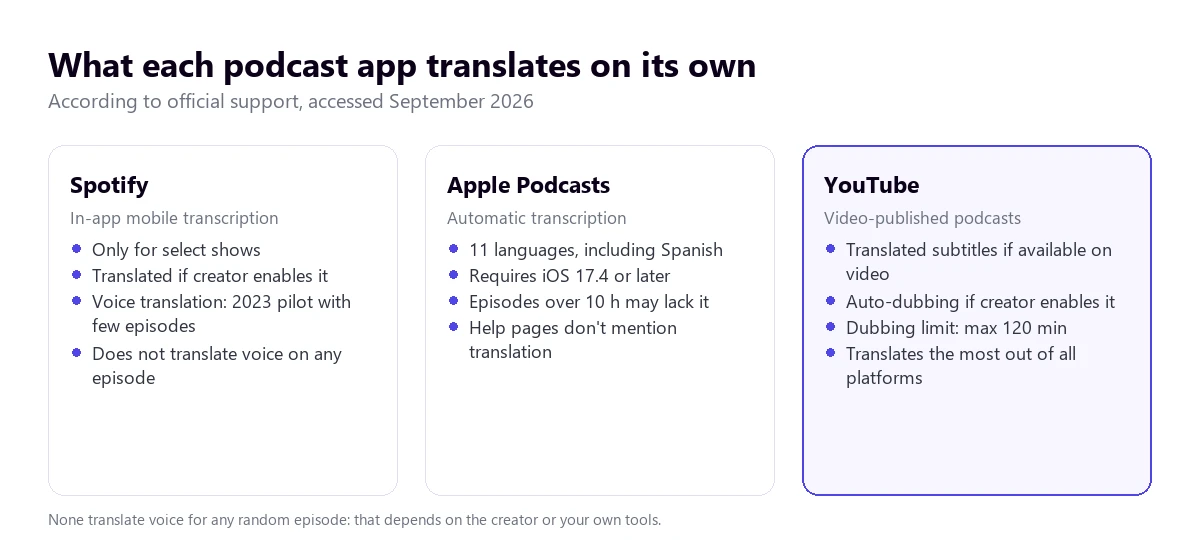
Spotify’s help for creators explains that some shows have automatically generated transcripts and that the listener sees them on the Now Playing view and the episode page in the mobile app. The same help page clarifies that transcripts aren’t available to all creators. It says nothing about the desktop app and the web player.
There is an interesting detail for those looking for translation: according to that help page, some shows can have translated transcripts, with the main text converted into several languages. The creator controls this with a toggle, “Allow transcript translation”, in the transcript settings. Spotify doesn’t publish the list of languages, so you won’t know if a show has English until you open it.
Translated voice exists, but as an experiment. In September 2023, Spotify announced an AI voice translation pilot that dubbed episodes of a few podcasters, including Lex Fridman and Steven Bartlett, into Spanish, French, and German, keeping each speaker’s voice. It was done with OpenAI’s voice technology and was open to free and paid users. What we haven’t found in their help pages is that this feature has been extended to any show, so don’t count on it for the podcast you’re interested in.
Apple Podcasts: automatic transcription in eleven languages
Apple generates automatic transcripts when each episode is published, with a short processing delay. According to its help for creators, it supports them in English, Danish, Dutch, Finnish, French, German, Italian, Norwegian, Portuguese, Spanish, and Swedish, they can be read in over 170 countries and regions, and require iOS 17.4 or later. Episodes over ten hours long might not get one. The listener can share snippets of up to 200 words.
What Apple’s help doesn’t mention is translation. The transcript comes out in the episode’s language. If the podcast is in Spanish, it helps you read what you can’t catch by ear and copy a snippet to run it through a translator, but it won’t give it to you in English.
YouTube: the platform that translates the most
More and more podcasts are also published on video, and that’s where YouTube has an advantage. If the episode has subtitles, the “Auto-translate” option in the subtitles menu switches them to another language; the current help page documents this for the mobile app and no longer gives the steps for the computer. If the creator has enabled automatic dubbing, the listener chooses the track under “Settings” → “Audio track”.
Dubbing has some fine print that directly affects podcasts: according to YouTube’s help, it doesn’t apply to videos over 120 minutes long, or those with little conversation or speech that is too fast. Many interview episodes run over two hours. If you’re interested in this path, we explain it in detail in our guide to translate a YouTube video into English.
Which path suits you depending on where the podcast plays
| Path | Where | What you get | Translates the voice | Cost |
|---|---|---|---|---|
| Voice translator on PC | Any Windows app | Subtitles and voice in English | Yes, for any episode | 15 free mins a day; more time, paid |
| Chrome subtitles | Web player in Chrome | Translated text on screen | Yes, as text | Free |
| App features | YouTube, Spotify, Apple | Subtitles, transcript, or dubbing | Only if the creator enabled it | Free |
| Web service with the file | Web, after downloading | Translated transcript or subtitles | Yes, delayed | Almost always per minute |
The fundamental difference is between listening live and working with the file. The first three paths let you follow the episode as it plays, which is what almost everyone wants. The fourth gives you a document, useful for studying or quoting, but forces you to wait.
1. Listen to it on your computer with a voice translator
If the podcast plays on your PC, it doesn’t matter which app: the Spotify app, the browser with Apple Podcasts or iVoox, VLC with a downloaded MP3. A voice translator for PC listens to the sound of that window and provides subtitles or an English voice with a few seconds of delay. It doesn’t depend on the creator having enabled anything, which is why it’s the most direct way to translate any podcast.
Traducore works like this on Windows 10 and 11. On Windows 11, it captures only the chosen app, so the podcast doesn’t mix with the sound from other windows. It can show subtitles, provide an English voice, or both, and leaves the original voice in the background, at a lower volume, so you don’t lose the speaker’s tone.
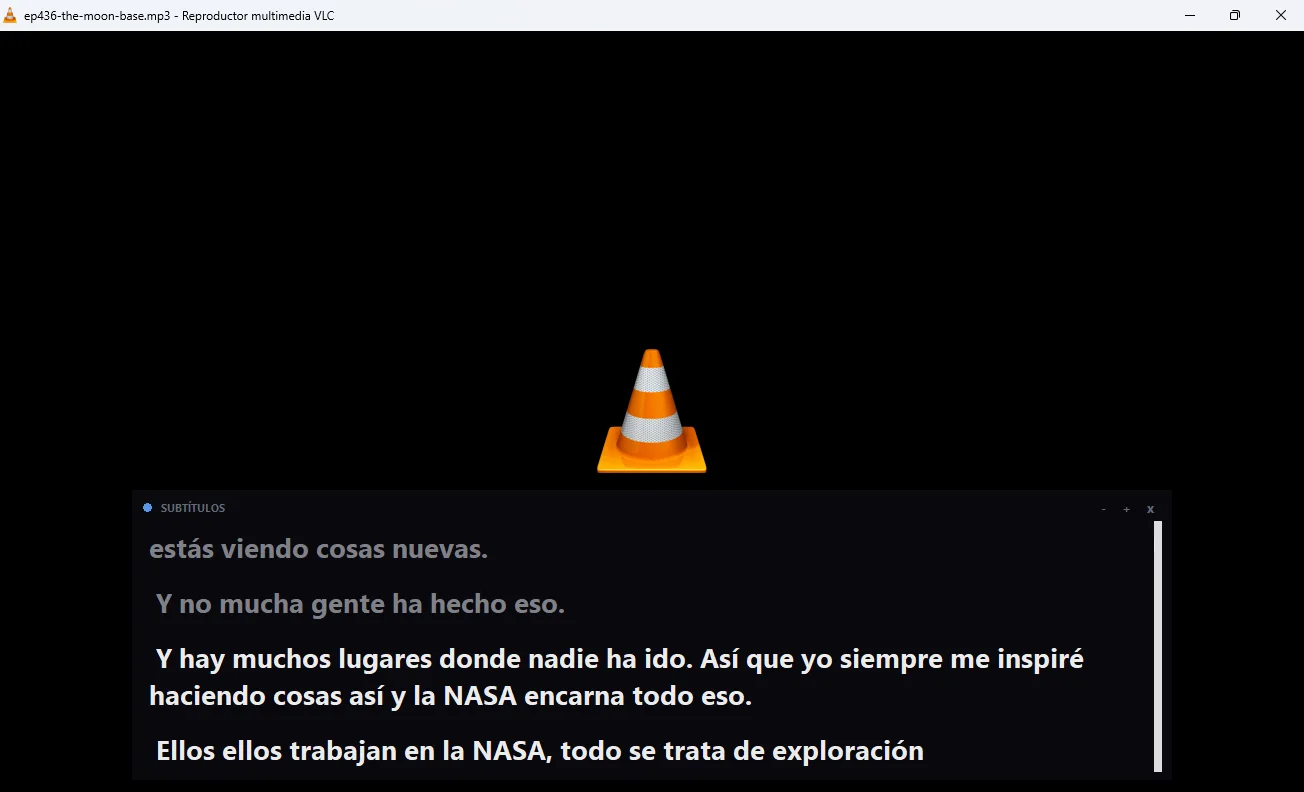
Step by step
- Open the episode in the app or website where you listen to it and leave it paused.
- On the panel, choose that window under “LISTEN FROM (ORIGINAL VOICE)” and select the podcast’s language and yours.
- Decide if you want to read, hear the English voice, or both, and start the translation.
- Play the episode at normal speed and let it run for a few seconds before judging the translation.
What you should know
The translation arrives with a three to six-second delay, which is barely noticeable in a podcast because there is no video to fall out of sync. With two people interrupting each other, a sentence might come out strange or get lost. Nothing is saved, neither the audio nor the text: if you want the episode in writing, that’s path 4. It’s a Windows program, with no phone or Mac version, so the podcast has to play on your PC.
A specific warning for Spotify on Windows: its desktop app has an exclusive mode that, according to its help, takes full control of the sound device, and while active, no other app can play sound through it. If you have it turned on, you won’t hear the translated voice. You can disable it in Spotify’s playback settings.
The Free plan gives you 15 minutes a day, no card required. For more time, you pay by the hour: the Video plan starts at €7.95 for 2 hours according to the pricing page, so a one-hour episode costs about €4. For two-hour podcasts, you should do the math before listening to an entire season.
Listen in English to the next episode you don’t understand
English subtitles or voice for whatever plays on your PC. 15 free minutes a day, no card required.
2. Chrome’s translated subtitles with the web player
Many podcasts can be listened to in the browser: the Spotify web player, the iVoox website, the show’s own website, or YouTube. If you do this in Chrome, the browser can generate subtitles for what’s playing and translate them. Its help page explicitly mentions podcasts among the things it can subtitle.
You enable it under “Settings” → “Accessibility”, with Live Caption and Live Translate. Under “Translate to”, you choose English. If the podcast isn’t in English, you first have to add its language under “Manage languages” so Chrome downloads the recognition pack.
It has three limits. It only provides text, in a small box you have to look at, and a podcast is usually listened to while doing something else. It only hears what plays inside Chrome, not the Spotify desktop app. And although the voice recognition is local, the subtitles are sent to Google to be translated. We haven’t verified that it works with all podcast web players, so test it with yours before relying on it.
3. Make the most of what each app already has
Even if they don’t translate the voice of any episode, each platform’s features help more than it seems when combined with a text translator.
- YouTube: open the episode’s subtitles menu. If there’s an English track, perfect; if not, “Auto-translate” on mobile. If English appears under “Audio track”, the episode is dubbed.
- Spotify: in the mobile app, check if the episode shows the transcript on the Now Playing view and if it offers another language. If it’s only in the original, it’s useful for reading a snippet you didn’t understand.
- Apple Podcasts: with iOS 17.4 or later, the transcript appears on episodes in one of its eleven languages. You can share a snippet of up to 200 words and paste it into a translator.
- Show notes: many shows publish links, guest names, and sometimes the full transcript in the description. Translated with the browser, they provide the context that the voice doesn’t.
None of these options work for listening to a whole episode in English without looking at the screen. They are a complement: to clarify a passage, look up a name, or review what you’ve already heard.
4. Download the episode and run it through a web service
If you need the full text of an episode—to study, quote a guest, or prepare a summary—the path is the file. It’s the slowest way to translate a podcast, but the only one that leaves a document. Most podcasts are distributed via an RSS feed that links to the audio of each episode, and many shows let you download it from their website. That file is uploaded to a transcription service, which returns the text and, in many cases, its translation.
Maestra, for example, works on files with transcription, subtitles, and dubbing, and charges per use starting at $12 for 60 credits according to its website, checked in September 2026. There are many similar services, and almost all charge per minute of audio: with one-hour episodes, the bill adds up fast. What to look for before choosing one is in our guide to convert audio to text and translate it.
Two warnings. Paid or platform-exclusive episodes cannot be downloaded freely, and downloading them through other means might violate their terms. And the episode still belongs to its author: translating it to understand it is not the same as republishing it in another language.
Why a podcast is one of the hardest things to translate
Anyone who tests a tool with a prepared speech and then with a talk show podcast notices the difference right away. It’s not the tool: it’s how people speak on a podcast. You should know this before translating a podcast and blaming the software.
- Unscripted conversation. Sentences that start one way and end another, filler words, laughter, and half-finished comments. Voice recognition is mostly trained on orderly speech, and there is none here.
- Overlapping voices. In an interview, the person asking usually nods or interrupts. When two people speak at once, almost any system mixes the sentences or only catches one.
- Different microphones. The host sounds like they’re in a studio and the guest connects from home with a laptop microphone. The quality changes from one voice to another, and so does the translation.
- Inside references. Jokes from previous episodes, listener nicknames, segment names. All of this gets translated literally and loses its meaning.
- Host-read ads. They sound just like the content and are translated the same way, with brands, discount codes, and web addresses coming out distorted.
- Speed. Many podcasters speak fast, and some listeners also speed up the playback. The faster it is, the more words are lost in the first layer, the listening phase.
What does work in your favor is the length. A one-hour episode gives the translator a lot of context: names are repeated, the topic is clear from the start, and difficult sentences are understood by what comes after. If the audio is good, the first few minutes are the worst and then it improves.
How to get a cleaner translation from a podcast
- Listen at normal speed. The 1.5x you use in your language costs you dearly in another: voice recognition loses words with sped-up speech.
- Choose the source language yourself. Automatic detection can get confused during the intro music or if the guest mixes languages.
- Skip the intro and ads. Music with voice over it and commercials are the hardest to translate, and on an hourly plan, they also count against your time.
- Read the show notes first. Knowing who the guest is and what they will talk about prevents mistranslated proper nouns from throwing you off.
- Use headphones if you turn on the translated voice: you’ll hear both layers better, the original in the background and the translation on top.
- Don’t be afraid to rewind. Translating a recorded podcast isn’t like translating a live stream: if an important sentence comes out confusing, go back ten seconds and listen to it again.
If the podcast is in Spanish and you just want to practice the language, subtitles with the original text and the translation at the same time help more than the voice. You have more ideas for this scenario in our guide to translate audio from Spanish to English.
If the podcast is yours: publishing it in other languages
A large part of those looking for how to translate a podcast don’t want to listen to one, but rather bring their own to another audience. It’s a different job, and a longer one, but the platforms provide some pieces.
The cheapest option: transcripts and subtitles
On Spotify, if your show has transcripts, you can leave “Allow transcript translation” enabled so the platform offers the translated transcript. You can also upload your own transcript in VTT or SRT format, up to 5 MB and with timestamps, because without them it won’t sync with the audio. On Apple Podcasts, you can provide the transcript via the RSS feed or, for subscriber episodes, upload it from Apple Podcasts Connect.
If you also publish on YouTube, automatic dubbing is available to all creators as of February 2026, according to the YouTube blog, as long as the episode doesn’t exceed 120 minutes. The creator can review the dubs before publishing them, but cannot edit them.
The most complete option: one feed per language
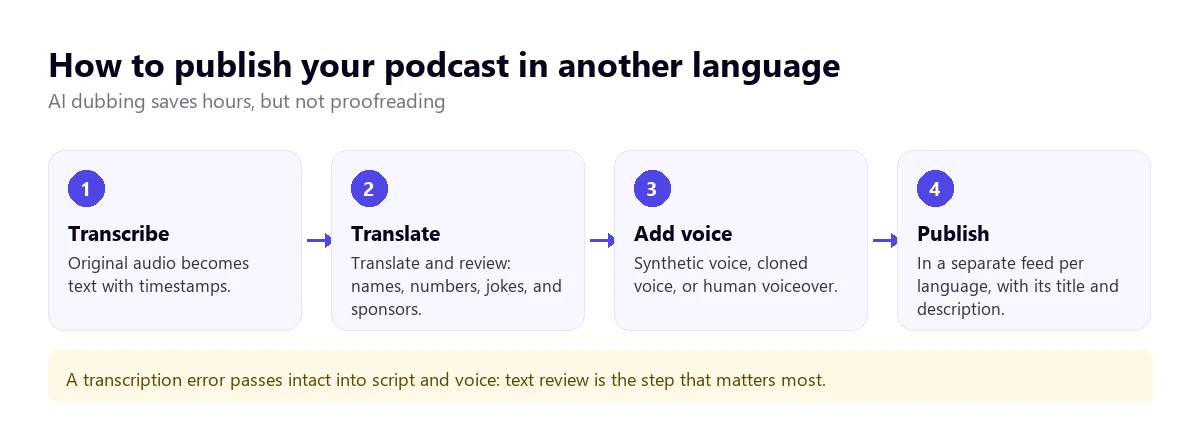
For a listener from another country to find you and listen in their language, the standard practice is to create a separate show with its own translated feed, title, and description. The audio can come from AI dubbing—with a synthetic voice or a clone of yours—or from a human voiceover. AI dubbing services charge per minute and the result depends mostly on the quality of the transcript.
The step that stands out the most is reviewing the translated text before adding a voice to it. Guest names, numbers, sponsorships, and jokes are the first things to get ruined, and a cloned voice saying nonsense with your tone does more damage than a subtitle with a typo.
More questions about translating a podcast
How can I translate a podcast into English?
If the episode is on YouTube, check if it has subtitles to translate or an English audio track. On Spotify, some shows offer the translated transcript in the mobile app. For any other case, listen to it on your computer with Chrome’s translated subtitles, free and text-only, or with a voice translator for PC if you want to hear it in English.
How to translate a Spotify podcast?
Spotify doesn’t translate the voice of just any episode. What it does do, for some shows, is show the transcript in the mobile app and, if the creator allows it, translated. If yours doesn’t have it, open the episode in the Windows desktop app or the web player and use a voice translator for PC, with Spotify’s exclusive mode turned off.
How to translate a podcast in Spanish?
Spanish is a widely supported language: YouTube generates automatic Spanish subtitles for many episodes, though not all, Apple Podcasts transcribes it, and it’s usually one of the languages voice translators recognize best. If you want to practice the language, use subtitles with the original text and the translation at the same time; if you just want to understand it, the English voice lets you listen while you do something else.
How can I transcribe a podcast on Spotify?
As a listener, you can only read the transcript if the show has one, on the Now Playing view of the mobile app; Spotify’s help doesn’t mention an option to download it. As a creator, you can upload your own transcript in VTT or SRT, up to 5 MB and with timestamps. If you need the text of someone else’s episode, the path is a transcription service on the file, when the show allows you to download it.
So, which one do we use?
When we are interested in a podcast in another language, we listen to it on our computer with our own voice translator: English voice to follow it while we work, and subtitles when we want to catch a name or a number. If the episode is on YouTube, we check first if it has a dubbed track, which is free. And if we need to quote the guest, we look for the show’s transcript before paying for one. To compare other voice tools for PC, you have our comparison of voice translators.
Your podcasts in another language, in English
Subtitles and translated voice for whatever plays on your PC, without waiting for the creator to translate it. 15 free minutes a day, no card required.