A German to English voice translator works well with the standard German of a class, a news broadcast, or a work meeting, but it stumbles over the verb coming at the end, numbers spoken backwards, and Swiss German. The good news is that German is, after English, one of the best-covered languages: there is translated voice in Teams, subtitles in Zoom and Chrome, and computer programs. The hard part is choosing the right one depending on where the audio is playing.
In this guide, we explain what spoken German has that forces a machine to wait, what gets lost with formal address, titles, and particles, and what each method offers today: mobile, Teams, Zoom, Meet, Chrome, YouTube, WhatsApp, and a PC program. We also look at the opposite case, when you are the one speaking and the other person needs to hear you in German. The data for each platform comes from their official help pages, checked between September and October 2026; where that help doesn’t clarify things, we point it out.
In short
- Audio of a video, a course, a live stream, or a call on the computer: a Windows program that listens to that app and gives you subtitles or voice in English (method 1).
- With someone in front of you: the Google Translate app, taking turns to speak and with an internet connection (method 2).
- A Teams meeting with a Copilot license: the Interpreter translates voice-to-voice between German and English. On Zoom, for now, only subtitles (method 3).
- A video in Chrome: its live captions list German among its languages, free and text-only (method 4).
In this article
- The German you will hear: Germany, Austria, and a Swiss that is something else
- Why spoken German forces a machine to wait
- Sie, Herr Doktor, and particles: what a translation flattens
- Which tool to use depending on where the German is playing
- 1. German in any Windows program, with a PC voice translator
- 2. Google Translate on mobile, with the person in front of you
- 3. Meetings in German: Teams translates the voice, Zoom and Meet not yet
- 4. Chrome, YouTube, and WhatsApp
- From English to German: when you are the one speaking
- Numbers, times, dates, and false friends: where to look twice
- How to get a cleaner translation from German
- More questions about translating German by voice
- So, which one do we use?
The German you will hear: Germany, Austria, and a Swiss that is something else
German is spoken as an official language in Germany, Austria, and a large part of Switzerland, as well as Liechtenstein, Luxembourg, and a northern strip of Italy. The form used in the news, universities, and companies is “Hochdeutsch”, standard German. It is the most abundant in the data used to train speech recognizers, and the one that comes out best in any tool.
Austrian German is the same language with a different accent and a handful of its own words: “Jänner” for January, “Erdäpfel” for potatoes, “Paradeiser” for tomatoes. An automatic system understands it almost always and, at most, stumbles over a regional word it doesn’t know. With the Bavarian or Saxon accent, something similar happens: more effort, but the same underlying language.
Switzerland is another matter. In daily life, German-speaking Swiss people speak “Schweizerdeutsch”, a set of dialects with a different pronunciation, vocabulary, and even different verb tenses. They write in standard German, but speak in dialect, even on local radio or in many internal meetings. A recognizer trained on standard German understands this audio much worse, and the translation drags because of it. If your supplier is from Zurich, ask them to speak in standard German: they all know how to do it, even if they don’t use it among themselves.
And the content matters as much as the country. A technical conference, an engineering tutorial, or a news broadcast come out well. A comedy show from Cologne, a football talk show, or a series with a lot of youth slang, much worse. It’s not the language: it’s the speed, the noise, and the register.
Why spoken German forces a machine to wait
Any voice translator chains three steps: it converts sound into text, translates that text, and shows or reads it in English. German is recognized well because it is pronounced almost exactly as it is written. Its difficulty lies in the second step: where it places the words that decide the meaning.
The verb goes to the end
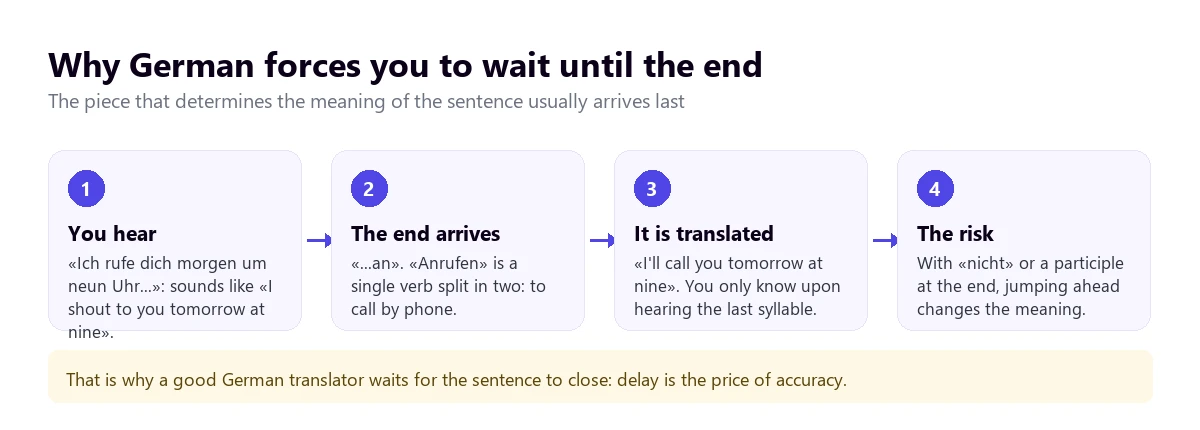
In sentences with an auxiliary or modal verb, German splits the verb in two: the conjugated part goes in the second position and the rest goes at the end. “Wir haben den Vertrag gestern nach langer Diskussion…” can end in “unterschrieben”, signed, or in “abgelehnt”, rejected. Until the last word, you don’t know what happened with the contract. In subordinate clauses, it is even clearer: the entire verb waits at the end of the sentence.
Verbs that separate
Many German verbs have a prefix that, in the present tense, separates and travels to the end. “Anrufen” is to telephone, but you say “ich rufe dich an”. “Aufhören” is to stop, and you say “ich höre auf”. “Ankommen”, to arrive; “abholen”, to pick up; “zusagen”, to confirm. Without the prefix, the verb means something else, so a translator that gets ahead of itself gets the words right but misses the idea.
This explains part of the delay you will notice in any voice tool. A system that translates while you listen cannot wait indefinitely, but it also cannot close the sentence before the last piece arrives. The best ones wait for the pause. With a speaker who chains long subordinate clauses, the translation arrives later than with English, and that is normal.
Negation also waits
“Nicht”, not, usually goes at the end or just before the final verb. “Ich kann morgen leider nicht” means “unfortunately I can’t tomorrow”, and the negation arrives in the penultimate word. If the audio cuts out or there is noise right there, the translation can come out affirmative. In a meeting where dates are agreed upon, it is the most expensive mistake.
Words that are sentences
German joins nouns without spaces: “Kundendienstmitarbeiter” is “customer service representative”, and “Datenschutzgrundverordnung” is the General Data Protection Regulation. For the recognizer, it is not a big problem if the word is common. With a compound that the speaker invents on the fly, which is common in German, the translation might split it poorly or leave it half done.
Good news: German is regular
Not everything works against it. The pronunciation is very regular, words almost always have the stress on the first syllable of the root, and formal speech is clear and well-articulated. Technical vocabulary, moreover, is similar to English: “Software”, “Meeting”, “Deadline”, and “Feedback” are everywhere in German offices. With clean audio and a speaker who doesn’t rush, German is one of the languages that translates best by voice.
Sie, Herr Doktor, and particles: what a translation flattens
German distinguishes between “du”, informal you, and “Sie”, formal you, and at work the formal you is the norm for much longer than in many English-speaking cultures. Switching to the informal you is proposed by the older or higher-ranking person, and doing it prematurely sounds disrespectful. The translation into English usually flattens this distinction, since English only uses “you”, so an English speaker will miss the shift in tone that is obvious in German.
Titles carry weight. A medical doctor or a university doctor introduces themselves as “Doktor” and, in formal contexts, is called “Herr Doktor Müller” or “Frau Doktor Schmidt”. An automatic translation might turn it into “Mr. Doctor Müller”, which sounds forced in English, but dropping it when replying would be abrupt in German. If someone signs with a title, use it.
What gets lost the most are the particles, small words without a direct translation that set the tone. “Doch” is used to say “yes” to a negative question: to “Aren’t you coming?”, “Doch!” means “yes I am”, and a literal translator might leave it as a meaningless “but”. “Ja”, “mal”, “halt”, and “eben” soften a statement or treat something as known. “Na ja” is a hesitant “well…”, and “genau”, which translates to “exactly”, is often just a “yes, yes” to show you are listening.
Finally, German gets straight to the point. A criticism is delivered bluntly, a “nein” is not sugarcoated, and punctuality is taken for granted. It is not coldness, and the translation reproduces it as is: do not read it as anger.
Which tool to use depending on where the German is playing
With German, the map is broader than with Russian or Arabic. It is among the translated voice languages of the Teams Interpreter and Meet’s voice translation, although Meet only pairs it with English. Zoom announced its German voice for later in 2026, but today it only provides subtitles. The tree takes you to your case in four questions, and the table summarizes what each option offers.
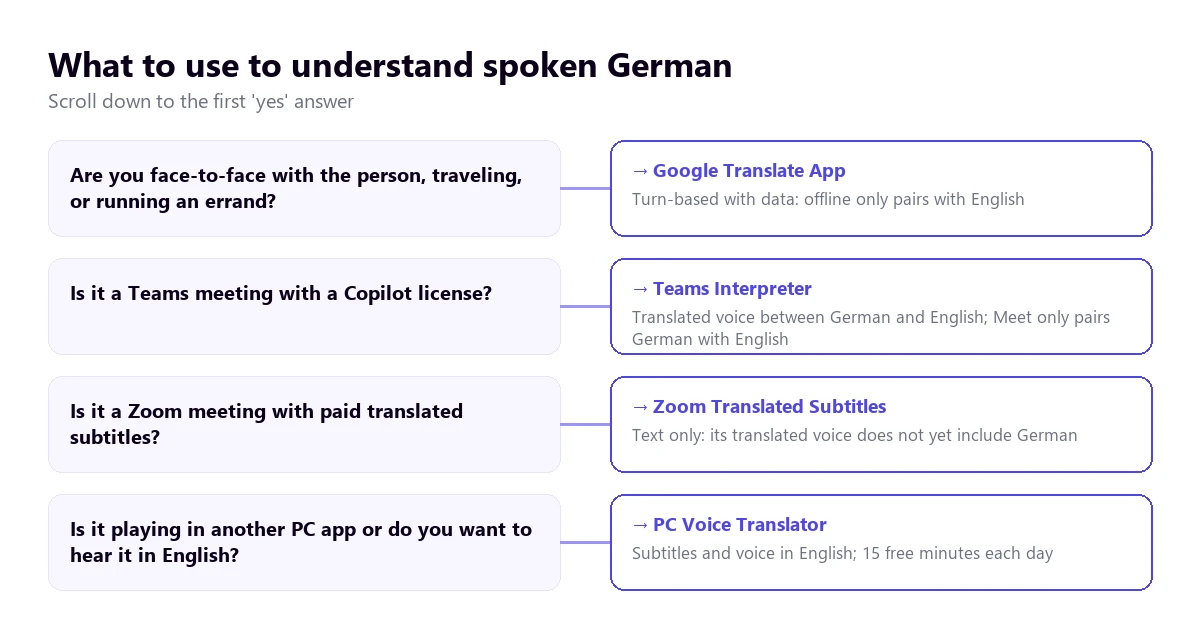
| Method | Where the German plays | What you get | German to English | Cost |
|---|---|---|---|---|
| PC voice translator | Any Windows application | Subtitles and voice in English | Yes | 15 min free per day; paid plans |
| Google Translate app | In front of you, on mobile | Turn-based conversation | Yes, with connection | Free |
| Teams, Interpreter | Teams meetings | Translated voice | Yes: both are among its ten languages | Copilot license (20 h per month per person) |
| Teams, translated subtitles | Teams meetings | Text only | Likely: both appear as destinations; German as spoken language, unconfirmed | Teams Premium or Copilot |
| Zoom, translated subtitles | Zoom meetings | Text only | Yes, with full support | Business Plus or higher, or add-on with no published price |
| Zoom Voice Translator | Zoom meetings | Translated voice | Not yet: announced “later in 2026” | Add-on |
| Google Meet, voice translation | Meet meetings | Translated voice | Yes: German pairs with English | Paid Workspace editions |
| Chrome subtitles | Browser tabs | Text only | Yes, German appears on its help list | Free |
| Voice notes and messages | Text transcription and translation | Not on Android: German is not on either of its two lists | Free |
The websites that top Google for this search, like Happy Scribe, VMEG, or TransMonkey, do not appear in the table. They work with a file you upload and return the text, subtitles, or a dub: they are useful for your own video, not for following something live. Neither are the pocket translators sold on Amazon, nor the app store apps whose help pages we couldn’t read.
1. German in any Windows program, with a PC voice translator
A lot of the German that reaches a computer doesn’t come from a licensed meeting. It’s a webinar from a machinery manufacturer, a course from a German university, a video from an educational channel, a broadcasted trade fair, or a call with a client from Munich on an app that isn’t Teams. For all of that, a program that listens to that specific application and translates while it plays is what you need.
Traducore is a German to English voice translator of this type, for Windows 10 and 11. On Windows 11, it captures only the application you choose, so the sound from other programs doesn’t slip in; if you choose the browser, everything playing in it comes through. German is among its languages, but we haven’t tested it as thoroughly as Portuguese: with standard German and good audio, the translation is useful, and with Swiss German or very fast speech, it’s best to do a test first with a similar video.
It fits well with what we mentioned about the final verb. The program translates by sentences, so it waits for the end to arrive before giving the English version. The translated voice plays over the top and the original remains in the background, at 65% by default, so you can still hear the speaker’s tone.
Step by step
- Open the application where the German will play and select it in “LISTEN FROM (ORIGINAL VOICE)”.
- In “I HEAR”, choose “German”. Fixing the language prevents it from mistaking borrowed words for English.
- In “TRANSLATE TO”, check English and decide if you want subtitles, voice, or both.
- If you understand some German, turn on “Also show the original text” to compare.
- Click start and play the video or start the call.
What you should know
The English version arrives with a delay of three to six seconds, sometimes more with long sentences. In a video, it isn’t bothersome; in a conversation, it leaves pauses. The program doesn’t save the audio or the text, and it only exists for Windows.
The Free plan gives 15 minutes every day, with no card required and no expiration. With this pair, there is an advantage: the translated voice of the Free plan includes both English and German, so both directions have voice without paying. Paid plans are on the pricing page.
Test it with a webinar in German
Hear in English what plays in any Windows program, with subtitles or voice. Every day, 15 minutes free and no credit card required.
2. Google Translate on mobile, with the person in front of you
On a trip to Berlin, dealing with an Austrian landlord, or with a client visiting you, the practical choice is the Google Translate app. Its help page describes a live mode with several ways to use it: Listening, with headphones, to follow someone speaking; Conversation, where you take turns speaking and the phone reads the translation; and Face-to-face, which splits the screen so each person reads in their language.
With German, the turn-based mode has an advantage: the app hears the full sentence, including the final verb and negation, before translating. That is why it usually gets it right more often than a system that runs alongside the speaker. Where it slips up is exactly where you’d expect: noisy bars, people in a hurry, and overlapping turns.
A limit worth knowing: according to the help page checked in September 2026, offline live translation only exists on the Pixel 9, 10, and 11, and only in pairs with English. German-English without data works. And on the computer, the Google Translate website doesn’t allow conversations, only dictating a sentence and clicking.
3. Meetings in German: Teams translates the voice, Zoom and Meet not yet
Here German fares better than almost any language other than English. If your company already pays for Copilot, you might have translated voice without knowing it.
Teams
The Teams Interpreter agent translates voice-to-voice, and its help page lists ten languages, including German and English. Each participant chooses which language they want to hear the meeting in and can listen to an automatic voice or one that imitates the speaker’s. It requires a Microsoft Copilot license, which includes 20 hours of interpretation per month per person, and it doesn’t work in impromptu meetings, town halls, or webinars.
A technical detail that matters with German: according to Microsoft’s documentation, the Interpreter turns speech into English text before translating it to the final language. Since you are translating into English, this intermediate step is actually your final output, which avoids the ambiguities that happen when translating to a third language. However, with numbers, there is a specific trap we will look at below. Teams’ translated subtitles, text only, list German and English among their destination languages; it is logical that they recognize spoken German, but the list of 57 languages we checked doesn’t detail it. They require Teams Premium or Copilot. The full requirements are in our guide to the Teams interpreter.
Zoom
Zoom’s translated captions include German and English with full support, provided the host has Business Plus or higher, or the Translated Captions add-on, whose price Zoom doesn’t publish. Its translated voice, Voice Translator, currently works with five languages: English, Chinese, French, Japanese, and Spanish. Zoom’s blog from July 2026 announces German “later in 2026”, with no date. We detail this in the guide to translating a Zoom meeting.
For an important meeting, Zoom allows human interpreters on dedicated audio channels, and German is among its nine default languages. You need a paid account and to hire the interpreter on your own.
Google Meet
Meet’s voice translation lists German, but it only translates between English and another language, and allows a single pair per meeting. A German-English meeting fits perfectly. It requires paid Workspace editions or Google AI Pro.
4. Chrome, YouTube, and WhatsApp
Chrome subtitles
Chrome generates live captions of what plays in the browser and translates them, for free. Unlike other languages, German does appear on the list of examples in its help page, although that list is not closed and changes between the Spanish and English versions. To activate it: “Settings” → “Accessibility” → “Live Caption”, add German under “Manage languages”, and choose English as the translation language. It only covers what plays inside Chrome.
YouTube and Windows
YouTube’s automatic subtitle translation requires the video to have them, and recognition errors carry over to the translation. The automatic dubbing, which the creator activates, dubs from English to German, and its blog includes German among the languages with expressive voice. From German, the help table points almost always only to English: so translating a German video into English is fully supported. As for Windows 11, its Live Captions translate the computer’s audio, although they require a Copilot+ PC and only provide the result in English or simplified Chinese.
With WhatsApp, German fares poorly. The transcription of voice notes supports, according to its Android help page, English, Portuguese, Spanish, and Russian, and message translation on Android works with six languages, none of them German. On iPhone, its blog mentions more than 19 languages without listing them. For a voice note in German, the safe route is to play it on the computer with a translator that listens to that application, or convert it to text with another service. You have more options in the guide to translating a WhatsApp audio.
From English to German: when you are the one speaking
Your English is recognized well by any system, and the challenge lies in what comes out. Translated voice produces correct and neutral German, almost always using “Sie”. It is the safe option: using the informal “du” with a German interlocutor without them proposing it is quite shocking.
It helps a lot to speak in short, closed sentences. If you chain subordinate clauses, the translation has to rearrange them all to send the verbs to the end, and that’s where errors appear. One idea per sentence, with subject, verb, and object, and a pause before the next one.
- Face-to-face: Google Translate’s conversation mode, taking turns.
- On Teams: the Interpreter, if both sides have a Copilot license.
- On Zoom or other Windows calling apps: a voice translator with a virtual microphone that sends your sentence in German. With speakers it goes by turns; with headphones, it’s more fluid.
With names and titles, it’s the same as in the other direction: if the person has a title, say it yourself, “Frau Doktor Weber”, because the translation won’t add it. And if your last name is uncommon, write it in the chat.
Numbers, times, dates, and false friends: where to look twice
There are features of German that no tool fully resolves. Knowing them tells you which sentences to always check, especially when money, schedules, or deadlines are involved.
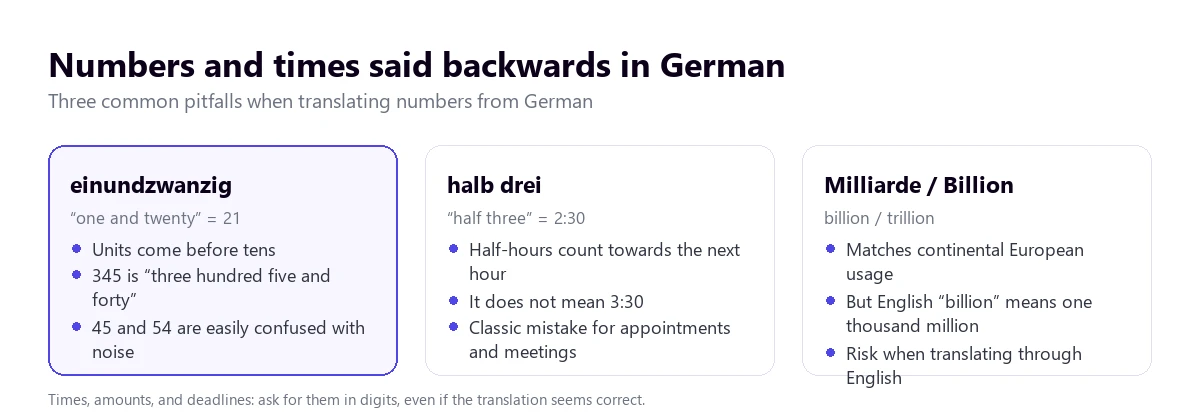
- Numbers are spoken backwards. From 21 to 99, the units come first: “einundzwanzig” is “one and twenty”, and “fünfundvierzig”, “five and forty”. A recognizer that misses a syllable due to noise can turn a 45 into a 54, and the translated sentence still sounds perfect.
- Half hours point to the next hour. “Halb drei” is “half of three”, meaning 2:30. A word-for-word translator might put 3:30, making you an hour late. The same goes for “Viertel vor drei”, 2:45.
- Milliarde and Billion. In German, “Milliarde” is a billion (1,000,000,000) and “Billion” is a trillion (1,000,000,000,000). The problem arises because “Billion” looks exactly like the English “billion”. A budget of “zwei Milliarden” must come out as two billion.
- Decimals and dates. German uses the decimal comma and the thousands dot, unlike in the US or UK where it’s the other way around. Dates go day, month, and year, and the day is spoken as an ordinal: “am dritten Mai”, the third of May.
- False friends. “Gift” is poison, not a present. “Handy” is a mobile phone. “Rente” is a pension, not rent. “Eventuell” means “perhaps”, not “eventually”. “Termin” is an appointment, not an end, and “bekommen” is to receive, not to become. The machine usually gets it right; the one who makes the mistake is the person relying on their ear.
A more expensive tool doesn’t fix any of this. What does work is asking for times, amounts, and dates to be written in the chat or in a confirmation email, something that is standard practice when working with German companies.
How to get a cleaner translation from German
- Fix the source language. Office German mixes in English words, and automatic detection can jump to English mid-sentence.
- Ask the Swiss for standard German. “Schweizerdeutsch” is what machines recognize worst; everyone speaks standard German.
- Let the sentence finish. The verb and negation arrive at the end: the delay is the price of accuracy.
- Lower the noise. Numbers and the word “nicht” carry the entire meaning, and they are short words that background noise easily covers.
- Prepare a list of terms. Product names, company acronyms, and long compounds that will come up, with their English equivalent.
- Confirm in writing times, amounts, and deadlines, especially if the meeting goes through a translation that uses a third language as an intermediary.
And a clear limit: the machine is useful for following a meeting and understanding a video, but a contract, a medical consultation, or a procedure with German documents deserve a human interpreter or a professional translator. If you want to understand what separates one from the other, check out our guide to real-time translation.
More questions about translating German by voice
How to translate a German audio into English?
It depends on where it is. When you are listening to it on the PC, the most direct way is a Windows voice translator that listens to the program where it plays. For a file you need to save, a transcription service that returns the translated text is better. If it’s a WhatsApp voice note, keep in mind that its transcription doesn’t support German: play it on the PC or convert it to text with another tool.
How can I translate a German text into English?
For written text, any text translator, like Google Translate or DeepL, by pasting the full paragraph. With German, it is best to translate whole sentences and not chunks, because the verb and negation are usually at the end. If the text is a voice transcription, check numbers and names first, which is where recognition makes the most mistakes.
Does Google have a German to English voice translator?
Yes, in the Google Translate app for Android and iOS, with the turn-based conversation mode and the listening mode with headphones. Offline translation for German-English is available, but only on some Pixel phones. On the computer, the website only allows dictating a sentence; for the audio of a video in Chrome, there are the browser’s live captions.
Is there a free English to German translator?
To speak with someone in front of you, Google Translate on mobile is free. To make yourself understood on a call from the PC, a voice translator with a free plan: ours gives 15 minutes a day with no card and, with this pair, translated voice in both directions. Teams and Meet translate voice to German, but only with paid licenses.
So, which one do we use?
For the German that plays on the computer, whether it’s a webinar, a course, or a call that isn’t on Teams, we use our own Windows voice translator, with German manually set and subtitles alongside the voice. If the meeting is on Teams and the company has Copilot, the Interpreter does its job well. With someone in front of you, Google Translate with data. And always, times and amounts in writing. If you want to calmly compare the options for the PC, you have our comparison of voice translators, and if you receive videos in other languages, the guide to translate a Portuguese video into English.
Understand the German that plays on your PC
English voice and subtitles from any Windows program, and German voice to reply. 15 minutes free a day, no credit card required.