
A Russian to English voice translator understands the clear Russian of a class, news broadcast, or interview well, but it struggles with fast speech, declined numbers, and figuring out who does what in a sentence, because in Russian, endings decide that, not word order. Also, Russian is less covered than it seems: none of the major meeting platforms translate it voice-to-voice. There are tools, but you have to know which one works for each case.
In this guide, we explain what makes spoken Russian complicated for a machine, what gets lost with forms of address, names, and numbers, and what each method offers today: mobile, Zoom, Teams, Meet, WhatsApp, Chrome, YouTube, and a computer program. We also cover the opposite direction, when you are the one who needs to be understood in Russian. What we say about each platform comes from their official help pages, checked between September and October 2026; when that help doesn’t clarify a point, we say so.
In short
- A video, a course, a live stream, or a call on the computer: a Windows program that captures the sound of that app and translates it as it plays (method 1).
- With the person in front of you: Google Translate on your mobile, taking turns and using data (method 2).
- A meeting: Zoom and Teams offer translated subtitles with Russian if the company pays for the feature, but no platform provides translated voice in Russian (method 3).
- A WhatsApp voice note: its transcription supports Russian, and then the text is translated (method 4).
In this article
- The Russian you will hear: a fairly uniform language, with similar neighbors
- Why spoken Russian tricks a machine
- You, formal address, and the patronymic: what a translation flattens
- Which tool to use depending on where the Russian is playing
- 1. Russian in any Windows program, with a voice translator on the PC
- 2. Google Translate on mobile, with the person in front of you
- 3. Meetings in Russian: subtitles yes, translated voice no
- 4. WhatsApp voice notes, Chrome, and YouTube
- From English to Russian: when you are the one speaking
- Numbers, dates, names, and false friends: where to look twice
- How to get a cleaner translation from Russian
- More questions about translating Russian by voice
- So, which one do we use?
The Russian you will hear: a fairly uniform language, with similar neighbors
Russian has an advantage over Arabic or Chinese: it is fairly homogeneous. A Russian from St. Petersburg and another from Vladivostok, nine thousand kilometers away, understand each other effortlessly, and regional differences are mostly noticeable in the accent and some words. The standard heard on the news, in universities, and in most videos is the Moscow standard, and it is also the one that dominates the data voice recognizers learn from.
That doesn’t mean all Russian sounds the same. It is spoken as a daily language in Belarus, Kazakhstan, and Kyrgyzstan, in much of Ukraine and the Baltic countries, and in immigrant communities around the world, including in the US and the UK. Each gives it their own accent, and in some areas, it mixes with the local language. In Ukraine, there is a mix of Russian and Ukrainian, “Surzhyk”, which is neither one nor the other.
That is the first point to watch out for. Russian, Ukrainian, and Belarusian are different languages, but they share a lot of vocabulary and sound similar to an automatic system. If you let the translator detect the language on its own and the speaker is Ukrainian, it might mistake isolated phrases for Russian, or vice versa, and the translation suffers. When you know what language it is, set it manually.
Finally, think about the content. A math class, a programming tutorial, or a commented chess match turn out well. A vlog with friends, a shouting hockey broadcast, or a movie with prison slang, much worse. It isn’t the language: it is the speed, the noise, and the register.
Why spoken Russian tricks a machine
Every voice translator chains three steps: it turns sound into text, translates that text, and shows or reads it in English. With Russian, the first two steps have their own traps, and almost all of them come from the same thing: the important information is at the end of the words, which is exactly what is hardest to hear.
Swallowed vowels
In Russian, only the stressed syllable is pronounced clearly. The other vowels are reduced: an unstressed “o” sounds like a weak “a”, so “moloko” (milk) is heard as “malako”. Also, the stress shifts depending on the word and its form, and it isn’t written. There are pairs that are only distinguished by it: “zamok” is a castle and “zamok”, a lock; “muka” is torment and “muka”, flour.
Final consonants also change: a “d” at the end sounds like a “t”, so “god” (year) is heard as “got”. None of this is strange to a Russian speaker, but it forces the recognizer to reconstruct words of which it only hears a part. With clean audio, it does it well. With background music or a fast speaker, the endings are the first thing to get lost.
Six cases and free word order
Russian declines nouns, adjectives, pronouns, and numerals into six cases. The ending of each word tells you if it is the subject, the direct object, the recipient, or the instrument. Thanks to that, word order is free and is used for emphasis, not to know who does what. In English, order rules; in Russian, the ending does.
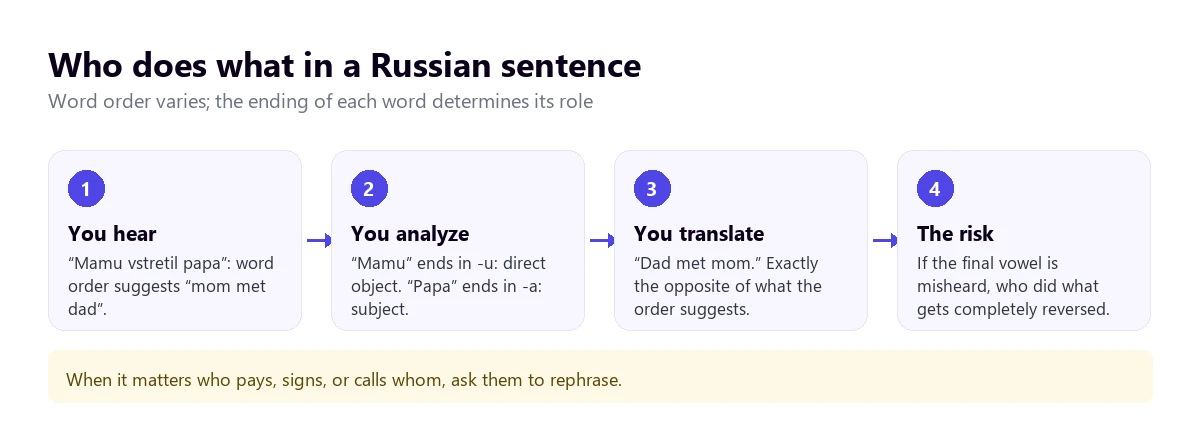
An automatic translator knows this rule and applies it well when it hears the full sentence. The problem appears when the ending is reduced or covered by noise: “mamu” and “mama” are distinguished by an unstressed vowel, and if they are confused, the meaning is inverted without the English sentence sounding strange. In a business meeting, that is the difference between who pays whom.
Fast speech
Colloquial Russian shortens things a lot. “Zdravstvuite”, hello in a formal register, becomes “zdrasti”. “Seichas”, now, is said as “shchas”. “Chto”, what, sounds like “shto” and in familiar speech “cho”. Recognizers trained on news and audiobooks understand the full form better than the abbreviated one, and in a vlog or a conversation between friends, more words are lost than in a class.
Good news: verbal aspect
Not everything works against it. Russian verbs distinguish whether an action was completed or not: “chital” is “was reading”, and “prochital”, “read” from start to finish. English makes a similar distinction with continuous and simple past tenses, so this part usually translates well. There are also no articles or verb “to be” in the present tense, “ya vrach” is “I doctor”, but the translator adds them without a problem.
You, formal address, and the patronymic: what a translation flattens
Russian distinguishes between “ty”, informal you, and “vy”, formal you, much like Spanish does. That part translates well into languages that have it, but in English, it all becomes “you”. What gets lost is another layer of politeness: the name with a patronymic. Among adults who aren’t close, and at work, people are called by their first name and their father’s name: “Ivan Petrovich”, “Olga Sergeyevna”. It is the respectful way, and it doesn’t take “Mr.” or “Ms.” in front.
An automatic translator leaves those names as they are, and to an English ear, they sound like a compound name. The information they convey, that someone is being treated with respect, disappears. The same happens with diminutives, which in Russian are almost mandatory among close friends and don’t look like the original name: Aleksandr is “Sasha”, Mikhail is “Misha”, Dmitri is “Dima”, and Vladimir is “Volodya”. If a “Sasha” appears in a meeting who was previously “Aleksandr Ivanovich”, it is the same person in a different tone.
There are phrases that a literal translation turns into the opposite. “Da net”, literally “yes no”, means “no, not at all”. “Nu da”, “well yes”, is often ironic. And “davai”, which translates as “give” or “come on”, is used to propose something, to accept, and also to say goodbye. The translation will be faithful to the words, and you will have to deduce the tone.
Finally, Russian sounds direct. A “no” is said bluntly, and the polite phrases that English adds out of habit are often missing. It isn’t rudeness, and the translation reproduces it as is: don’t read it as anger.
Which tool to use depending on where the Russian is playing
Russian has a curious gap. Zoom’s translated voice, Teams’ Interpreter, and Meet’s voice translation, the three new features this year, don’t include it. However, it is in translated subtitles, WhatsApp, and Google Translate. With the tree, you can find your case in four questions, and in the table, you can see what each option provides and how much it costs.
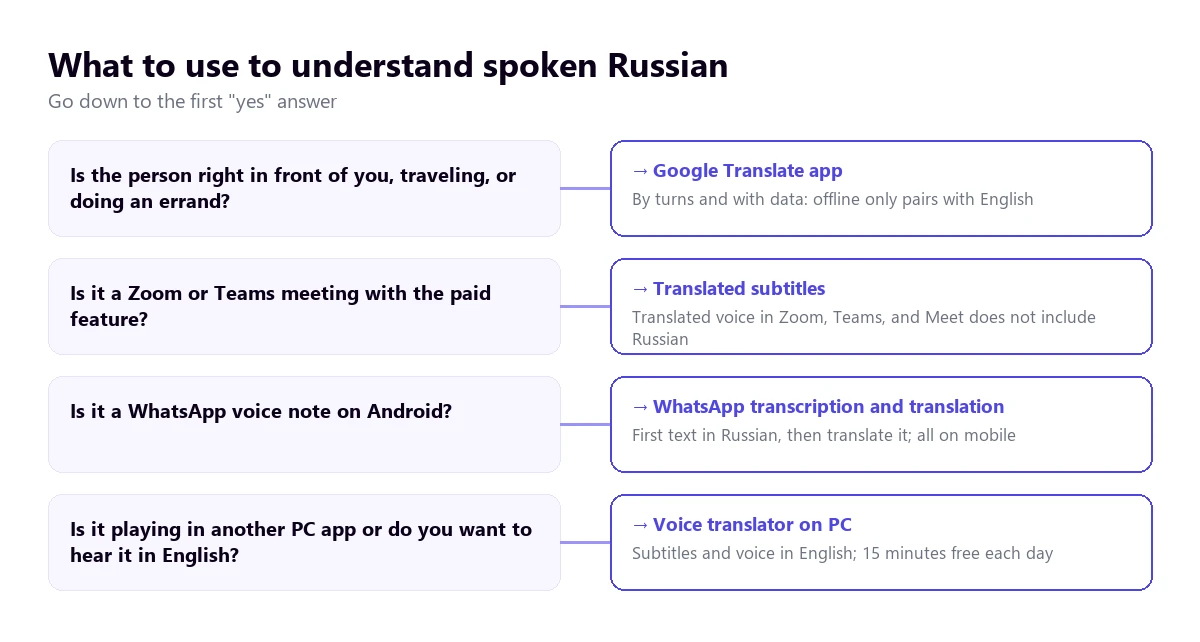
| Method | Where the Russian plays | What you get | Russian to English | Cost |
|---|---|---|---|---|
| Voice translator on PC | Any Windows app | Subtitles and voice in English | Yes | 15 min free per day; paid plans |
| Google Translate app | In front of you, on mobile | Turn-based conversation | Yes, with connection | Free |
| Zoom, translated captions | Zoom meetings | Text only | Yes, with full support | Business Plus plans or higher, or add-on with no published price |
| Zoom Voice Translator | Zoom meetings | Translated voice | No: Russian isn’t among its five languages | Add-on |
| Teams, translated captions | Teams meetings | Text only | Russian is listed as a destination; as a source, unconfirmed | Teams Premium or Copilot |
| Teams, Interpreter | Teams meetings | Translated voice | No: Russian isn’t on its list | Copilot license |
| Google Meet, voice translation | Meet meetings | Translated voice | No: only English with six languages | Paid Workspace editions |
| Voice notes and messages | Transcription in Russian and text translation | Yes, on Android | Free | |
| Chrome Live Caption | Browser tabs | Text only | Unconfirmed: Russian doesn’t appear on its help list | Free |
Left out of the table are the websites that rank high on Google for this search, like Happy Scribe or TransMonkey. They work with a file you upload and return the transcription or translated subtitles: they are useful for your own video, not for following a live stream. We also didn’t include mobile apps from the stores whose help pages we couldn’t check, nor the pocket translation devices sold on Amazon.
1. Russian in any Windows program, with a voice translator on the PC
A large part of the Russian that reaches a computer in the US or the UK doesn’t go through a company meeting. It is a programming tutorial, a chess conference, a course by a Russian teacher, a Soviet film on an archive website, or a call with a supplier through a messaging app. In all those cases, what is useful is a program that captures the audio of that specific app and translates it on the fly.
Traducore is a Russian to English voice translator of this type, for Windows 10 and 11. On Windows 11, it captures only the chosen app, so the sound from other programs doesn’t mix; if you choose the browser, everything playing in it comes through. Russian is on its language list, but we haven’t tested it as thoroughly as Portuguese: with standard Russian and good audio, the translation is useful, and with very fast speech or a lot of slang, it is best to test it first with a video of your own.
Curiously, the way it delivers the voice resembles a Russian custom. For decades, foreign films were watched in Russia with a single voice reading the translation over the original, which kept playing at a lower volume. Here it is the same in reverse: the English voice plays on top and the original stays in the background, at 65% by default, so you can hear the speaker’s tone.
Step by step
- Open the program where the Russian will play and choose it in “LISTEN FROM (ORIGINAL VOICE)”.
- In “I HEAR”, select “Russian”. Setting it prevents it from confusing isolated phrases with Ukrainian or English.
- In “TRANSLATE TO”, choose English and tick whether you want subtitles, voice, or both.
- If you read some Russian, activate “Also show the original text” to compare.
- Click start and play the video or start the call.
What you should know
The translation arrives with a three to six-second delay. In a video, it isn’t bothersome; in a conversation, you have to leave pauses. The program doesn’t save the audio or the text: if you want to keep it, you need a transcription service. It is only available for Windows.
Without paying, you get 15 minutes every day, with no card required and no expiration. A specific note for this pair: on that plan, the translated voice is available for English, so hearing a Russian video in English is included; what isn’t included is the Russian voice, for the opposite direction, which remains as subtitles. The paid plans are on the pricing page.
Try it with a Russian video
English subtitles or voice from the audio of any Windows app. 15 free minutes every day, no card required.
2. Google Translate on mobile, with the person in front of you
On a trip, running an errand with a neighbor, or with a client who has come to see you, the practical choice is the Google Translate app. According to its help page, the live mode has three uses: Listening, with headphones, to follow the speaker; Conversation, where each person speaks in turn and the phone reads the translation out loud; and Face-to-face, with the screen split in two so each person can read in their language.
With Russian, it works well if each person speaks in complete, not very long sentences. Since the app waits for the turn to end, it hears the whole sentence before deciding who did what, and that makes up for the problem with cases. It fails with the usual: noise, rushing, and two people speaking at once.
Keep a limit in mind: according to the help page checked in September 2026, offline live translation only exists on the Pixel 9, 10, and 11 and only in pairs with English. Russian to English without data is supported on those models. And on the computer, the Google Translate website doesn’t allow conversations: only dictating a sentence.
3. Meetings in Russian: subtitles yes, translated voice no
If you work with a team or a client who speaks Russian, the situation is different from French or Japanese. None of the three translated voice features on the major platforms include Russian today. What they do have is translated subtitles, which require a license or an add-on.
Zoom
Zoom’s translated captions list Russian and English with full support. The host needs to have a Business Plus or Enterprise plan, or the Translated Captions add-on, whose price Zoom doesn’t publish. Voice Translator, its translated voice announced in July 2026, works with five languages: English, Chinese, French, Japanese, and Spanish. Russian isn’t there, and Zoom’s blog doesn’t mention it among the upcoming ones. The full requirements are in our guide to translating a Zoom meeting.
For a meeting that matters, Zoom allows human interpreters in their own audio channels, and Russian is one of its nine default languages. You need a paid account and to hire the interpreter on your own.
Teams
Teams’ Interpreter agent, the one that translates voice-to-voice, lists ten languages in its help page, and Russian isn’t among them. The translated captions do include Russian in the list of destination languages, which helps the Russian side read what you say in English. Whether it works in the other direction depends on Russian being among the 57 spoken languages it recognizes, and we haven’t been able to confirm that. They require Teams Premium or Copilot for the organizer. We detail this in the Teams interpreter guide.
Google Meet
Meet only translates voice in pairs with English, and the other possible languages are six: French, German, Hindi, Italian, Portuguese, and Spanish. Russian isn’t there. Its translated captions mention a broad list, but “in certain language pairs” that the help page doesn’t detail.
4. WhatsApp voice notes, Chrome, and YouTube
Here Russian fares better than almost any other language. WhatsApp’s voice note transcription, which turns audio into text in the same language, supports only four according to its Android help page: English, Portuguese, Spanish, and Russian. It comes disabled and is processed on the phone. Additionally, message translation on Android works with six languages, including Russian and English.
The help page doesn’t say if a transcription can be translated directly with that feature. The safe bet is to copy the transcribed text and paste it into a translator. If you get a lot of voice notes in another language, you have more methods in our guide to translating a WhatsApp audio.
Chrome Live Caption
Chrome captions what plays in the browser and translates those captions, for free. But the list of source languages in its help page is just examples, it doesn’t include Russian, and it varies by region. It might work on your computer: go to “Settings” → “Accessibility” → “Live Caption”, see if you can add Russian, and test it with a video before relying on it.
YouTube and Windows
YouTube’s automatic caption translation requires the video to have them, and with Russian, recognition errors carry over to the translation. Automatic dubbing, which the creator activates, dubs from English to Russian, but from almost all other languages only to English: an English track for a Russian video is supported. Windows 11 Live Captions translate any audio, but only on Copilot+ PCs and only to English or Simplified Chinese.
From English to Russian: when you are the one speaking
Your English is recognized well by any system, so the challenge is in the result. The translated voice produces correct and neutral Russian, almost always with “vy”, the formal you. It is the safe choice: using the informal you with an adult you don’t know sounds abrupt in Russian, more so than in English.
The weak point is names. If you address “Olga” just like that in a formal meeting, the translation won’t add the patronymic, and in Russian, it can sound too familiar. If you know it, say it yourself: “Olga Sergeyevna”. And vice versa: it will transcribe your name in Cyrillic as best it can, so if it is uncommon, type it in the chat.
- Face-to-face: Google Translate’s conversation mode, speaking in turns.
- On Zoom or Teams: translated captions for the Russian side, if the account has them; translated voice in Russian, no.
- In other Windows calling apps: a voice translator with a virtual microphone that sends your translated sentence. There, the Russian voice is paid.
For any of the three, use short sentences in direct order: subject, verb, and object. That way, the translation doesn’t have to guess which case each word gets.
Numbers, dates, names, and false friends: where to look twice
There are features of Russian that no tool fully resolves. Knowing them tells you which sentences to always double-check, especially if money, deadlines, or people are involved.
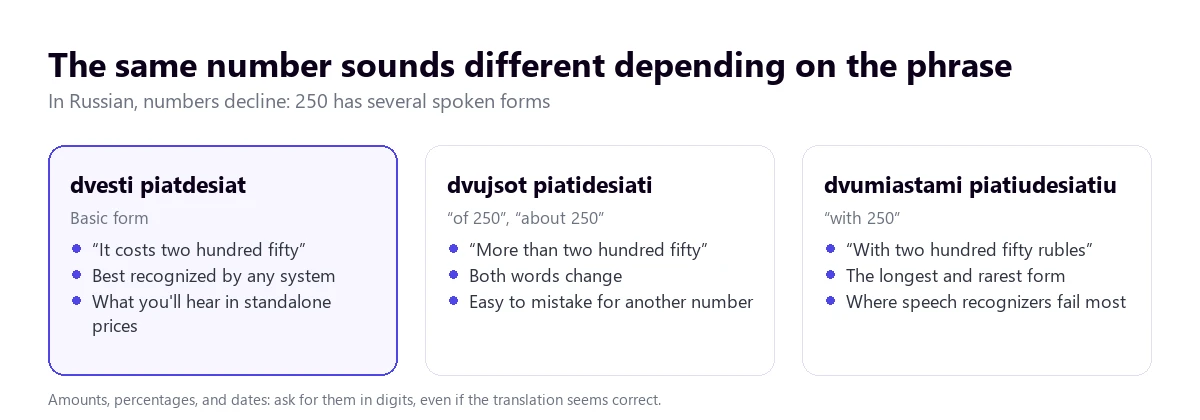
- Numbers are declined. Not only does the noun accompanying the number change: the number itself changes. “Two hundred and fifty” has one form with “more than” and another with “with”, and both are very different from the basic one. Also, the noun changes depending on the number: “one ruble”, “two rubli”, “five rublei”. A recognizer that misses a syllable can write a different number.
- Everyday fractions. “Poltora” is one and a half, and “polovina”, half. They are their own words, not “one point five”, and in a price or a number of hours, it is best to confirm them.
- Dates. The order is day, month, and year, like in the UK, and the day is said with an ordinal: “the five of May” is “pyatoe maya”, “the fifth of May”. For someone using the US format (month, day, year), this can cause confusion.
- Transcribed names. The same surname is written differently depending on the language it is transliterated into: in Spanish, Jrushchov; in English, Khrushchev. A translator might mix traditions, and in a contact list, that causes duplicates.
- False friends. “Magazin” is a store, not a magazine. “Familia” is the surname, not family. “Kabinet” is an office, not a cabinet. “Artist” is usually an actor or stage performer. “Dekada” is ten days, not a decade. The machine usually gets it right; the one who makes a mistake is the one who trusts the sound.
Paying for a more expensive tool doesn’t change any of this. What works is asking for amounts, dates, and names to be written in the chat or an email.
How to get a cleaner translation from Russian
- Set the source language. With speakers from Ukraine, Belarus, or Kazakhstan, automatic detection might hesitate between close languages or with phrases in another language.
- Choose the content well. Classes, news, conferences, and tutorials turn out well; vlogs, sports broadcasts, and movies with slang, worse.
- Lower the music and noise. In Russian, the information is in the unstressed endings, which are the first thing the background covers.
- Watch who does what. If a translation says they are going to pay you and it doesn’t add up, ask again: the subject might have been inverted.
- Prepare a list of names. People, companies, and cities, in Cyrillic and in their English form, to recognize them when they come out distorted.
- Accept the delay. Waiting for the end of the sentence gives a better result than jumping ahead, because the case of each word becomes clear with the rest.
And a limit: the machine helps you follow a conversation and understand a video, but a contract, a medical consultation, or a procedure with Russian documents deserve an interpreter or a translator who masters both languages. To understand the difference between what a machine does and what a professional does, you have our guide to real-time translation.
More questions about translating Russian by voice
How to translate a Russian audio to English?
It depends on where the audio is. If it is a WhatsApp voice note on Android, turn on transcription, which supports Russian, and translate the text. If it is a file you want to keep, use a transcription service that turns it into text and translates it. If it plays on the computer while you listen to it, a voice translator for Windows that captures that app.
How can I translate from Russian to English for free?
To speak with someone in front of you, the Google Translate app, free and with a connection. For voice notes, WhatsApp transcription and translation on Android, also free. For the audio of any PC app, a Russian to English voice translator with a free plan; ours gives 15 minutes a day with no card required.
How do I translate a Russian voice message?
If it arrives via WhatsApp on an Android, activate voice note transcription, which supports Russian, and translate the text that appears. On iPhone, or if the note arrives through another app, play it on the computer with a voice translator that listens to that app, or turn it into text with a transcription service. In both cases, manually check numbers and names.
So, which one do we use?
For Russian playing on the computer, whether it is a course, a conference, or a call that isn’t on Zoom or Teams, we use our own voice translator on Windows, with Russian set manually and subtitles activated alongside the voice. With someone in front of us, Google Translate with data. For voice notes, WhatsApp transcription. And always, numbers and names in writing. If you want to take your time comparing the options for the PC, you have our voice translators comparison, and if you also work with China, the guide to the Chinese to English voice translator.
Understand the Russian playing on your PC
English subtitles and voice from any Windows app. 15 free minutes a day, no card required.