
A Hindi to English voice translator works well with the careful Hindi of a news bulletin, a class or an interview, and loses its footing with Hinglish, songs, Indian numbers and proper names. Hindi gets more support than many other Asian languages: Zoom subtitles it with full support and Google Meet translates it by voice to and from English. Outside those meetings, a program on your computer or your phone fills the gap.
In this guide we look at what Hindi you will actually hear and why it gets confused with Urdu, which features of the language trip up a machine, what to do with politeness, figures and names, and what each option offers today: your phone, Zoom, Teams, Meet, Chrome, YouTube, WhatsApp and a translator on your PC. Platform details come from their official help pages, reviewed in September 2026, and we say so when that help is unclear.
In short
- A movie, a video, a class or a call on your computer: a Windows program that listens to that app and gives you English subtitles or voice (option 1).
- A person in front of you, travelling or running an errand: the Google Translate app, taking turns, with a data connection (option 2).
- A Zoom meeting: translated captions with Hindi in full support. In Meet, spoken translation between Hindi and English on eligible plans (option 3).
- A written WhatsApp message: its Android translator includes Hindi. Hindi voice notes are not transcribed (option 4).
In this article
- The Hindi you will hear: Delhi, Mumbai and Hinglish
- Hindi and Urdu: almost the same spoken language
- What makes Hindi hard for a machine
- Tu, tum and aap: politeness in three steps
- Lakhs, crores and rupees: numbers that mislead
- City names and personal names
- What to use depending on where the Hindi is playing
- 1. A Hindi to English voice translator for any Windows program
- 2. Google Translate on your phone, face to face
- 3. Meetings with India: Zoom, Meet and Teams
- 4. Chrome, YouTube and WhatsApp
- When you speak: from English into Hindi
- How to get a cleaner translation from Hindi
- More questions about translating Hindi by voice
- So, which one do we use?
The Hindi you will hear: Delhi, Mumbai and Hinglish
Hindi is the official language of the Government of India, alongside English, and the most widespread language in the north of the country. But India has 22 languages recognised in its Constitution, and in the 2011 census fewer than half of the population named Hindi as their mother tongue. An engineer in Chennai or a businesswoman in Kolkata may speak Tamil or Bengali at home and switch to English at work, not Hindi. Before looking for a translator, check which language is really being spoken.
The Hindi a machine recognises best is the standard Hindi of public TV news, online classes and explainer videos. Street Hindi is something else. In Mumbai you hear “Bambaiya”, with turns of phrase from Marathi and Gujarati; in Bihar or eastern Uttar Pradesh, intonation and vocabulary change quite a lot. And in almost any city, young people jump from Hindi to English in mid-sentence without a second thought.
That jump has a name: Hinglish. A sentence like “meeting ko postpone kar do, kal discuss karte hain” mixes English verbs into Hindi grammar. For listeners in India it is perfectly normal. For a speech recogniser that expects a single language it is a problem: it may treat the English words as noise or, the other way round, try to read the Hindi as badly pronounced English. TV series, ads and many YouTube channels are full of this register.
Hindi and Urdu: almost the same spoken language
This is where many people searching for a translator get stuck. Hindi and Urdu grow from the same trunk, Hindustani, and in everyday conversation speakers understand each other effortlessly. They share grammar, verbs and most of their daily vocabulary. A Pakistani and an Indian can watch the same Bollywood film without subtitles.
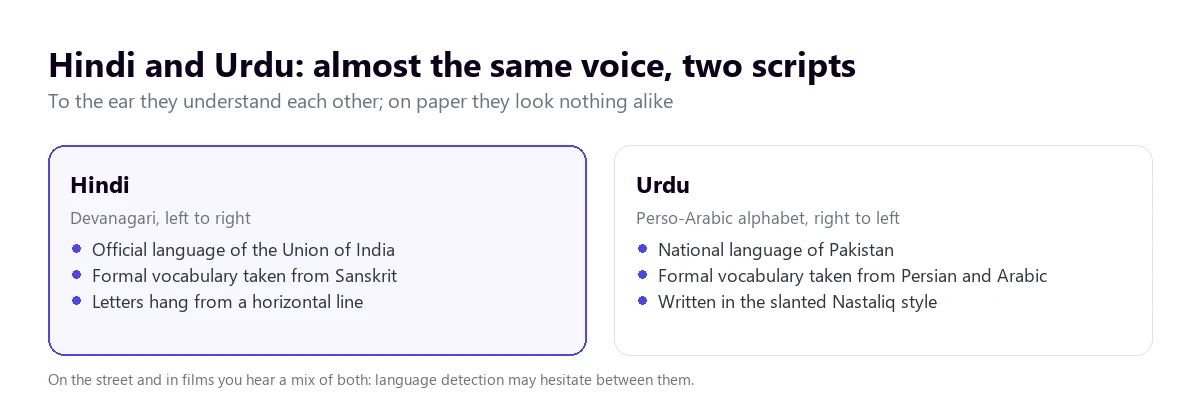
What separates them is the script and the formal register. Hindi is written in Devanagari, the alphabet whose letters hang from a horizontal line, and borrows its formal words from Sanskrit. Urdu uses a variant of the Arabic alphabet, reads right to left and takes its formal vocabulary from Persian and Arabic. A Delhi news bulletin will say “sahayata” for “help”; one from Lahore, “madad”. On the street, both.
For a machine translator this has two consequences. First, automatic language detection may hesitate between Hindi and Urdu with short or colloquial sentences; if you know which one it is, set it by hand. Second, if you ask for the original text you will see it in one script or the other, depending on what the system decided. For Urdu and the Arabic script there is more context in our guide to the Arabic voice translator.
What makes Hindi hard for a machine
Besides Hinglish and Urdu, the language has deeper features that show up in the translation. Knowing them tells you where to be more careful.
The verb comes last
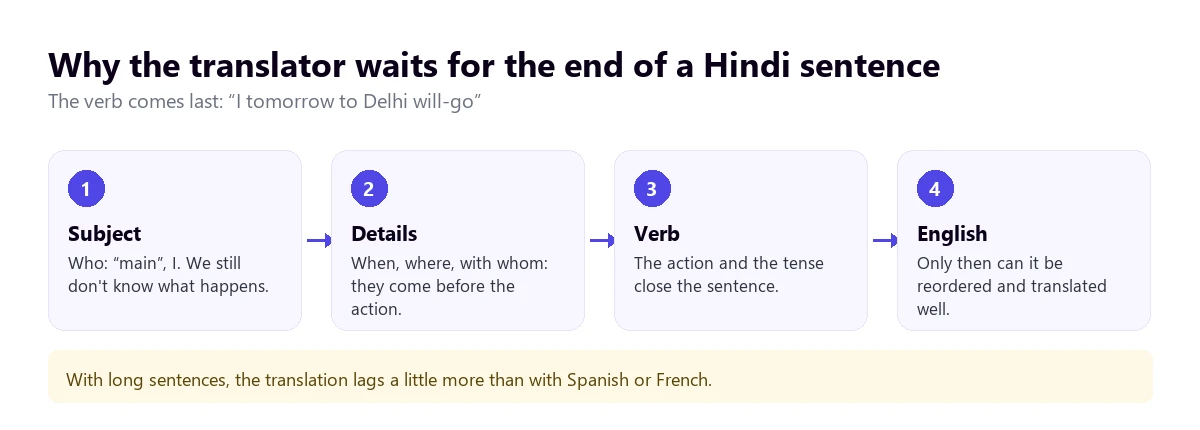
Hindi puts the verb at the end of the sentence: “main kal Dilli jaunga” is, word for word, “I tomorrow Delhi will-go”. Instead of prepositions it uses postpositions, small words that come after the noun: “ghar mein”, house in, for “at home”. Until the verb arrives the translator does not know what is happening, so it has to wait. With long sentences, the translation comes out a little later than with Spanish or French.
Sounds English does not separate
Hindi distinguishes dental “t” and “d”, made with the tongue against the teeth, from retroflex ones, made with the tip of the tongue curled back. It also contrasts aspirated and unaspirated consonants: “kal”, tomorrow or yesterday, versus “khal”, skin. With a good microphone the system catches it. With phone audio from a Delhi street those differences blur and the wrong words appear.
Gender lives in the verb
A man says “main jaata hoon”, I go; a woman says “main jaati hoon”. The verb agrees in gender with the subject, something English never marks. The information is in the sentence, but a machine translation can get the gender wrong if the ending is misheard or the sentence is ambiguous, and English pronouns such as he or she will follow that mistake. When it matters who did what, check it.
Yesterday and tomorrow are the same word
“Kal” means both yesterday and tomorrow, and only the verb tense tells them apart. The same happens with “parson”, the day before yesterday or the day after tomorrow. If the verb is lost to noise or a dropout, the translation may put the appointment on the wrong day. It is one of the least visible errors and one of the most damaging.
Tu, tum and aap: politeness in three steps
English has a single “you”. Hindi has three: “tu”, very intimate or downright rude; “tum”, for friends and people you trust; and “aap”, the respectful one, used with elders, clients, teachers and strangers. On top of that, “ji” is added after a first name or surname to show respect: “Sharma ji”, “Anita ji”.
A translation into English flattens all of this. Every form becomes “you”, and “ji” either disappears or stays as it is. If you reply, bear in mind that respectful address is the norm in India in any professional relationship; a translation that sounds too casual can come across as colder or blunter than you meant.
Lakhs, crores and rupees: numbers that mislead
This is the most concrete trap in Hindi, and in the English spoken in India too. Large numbers are not grouped in thousands but with two units of their own: one lakh is 100,000 and one crore is 10 million. They are written with different separators, 1,00,000 and 1,00,00,000, and that is how they are said in the news, in contracts and in quotes.
A machine translator may leave “lakh” untranslated, convert it correctly or, in the worst case, confuse it with another figure. “Paanch crore” is 50 million, not five. If someone mentions a price or a salary, ask for the figure in writing, in digits. The currency is the Indian rupee, which the translation may render as “rupees”, “INR” or “Rs”, and converting it into your own currency is always up to you.
City names and personal names
Many Indian cities have two names in circulation: Mumbai and Bombay, Kolkata and Calcutta, Chennai and Madras, Bengaluru and Bangalore. English-language media use one or the other depending on the period, and a translator will do the same. With personal names the problem is transliteration: the same surname may be spelt Shrivastava or Srivastava, and compound names get shortened into nicknames. Turn on the original text when you need to know who is being talked about.
What to use depending on where the Hindi is playing
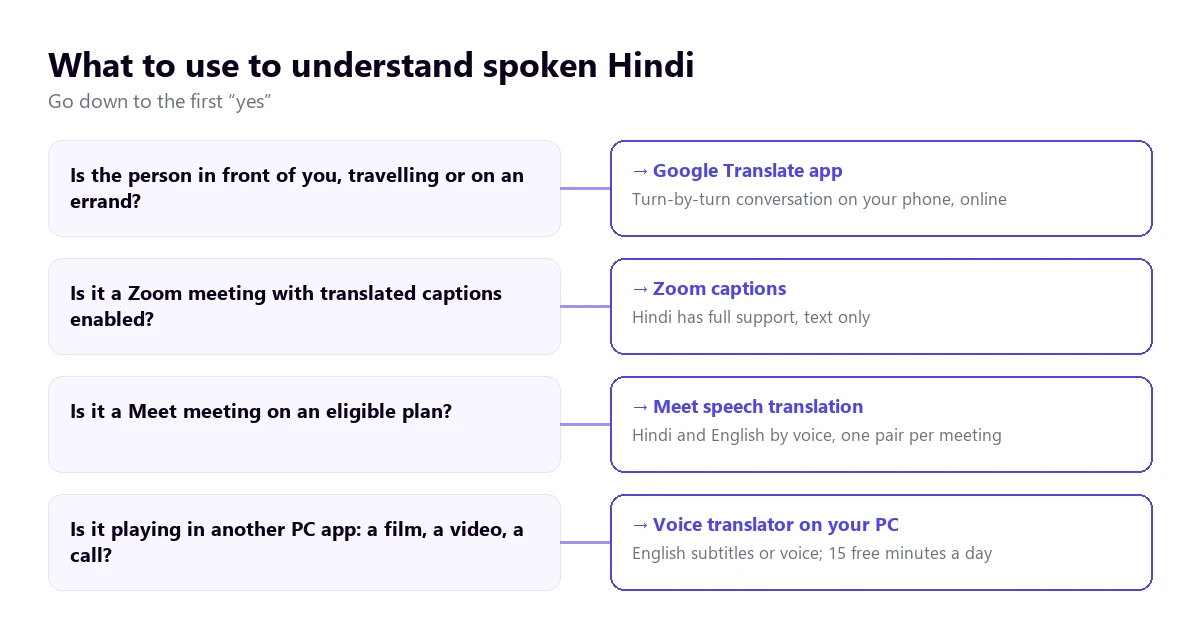
Hindi is among the fully supported languages of Zoom translated captions, among the target languages of Teams translated captions and among the languages of Meet speech translation, always with English on the other side. The tree takes you to your case and the table sums up what each option gives you.
| Option | Where the Hindi plays | What you get | Hindi to English | Cost |
|---|---|---|---|---|
| Voice translator on your PC | Any Windows app | English subtitles and voice | Yes; to reply by voice in Hindi, a paid plan | 15 free minutes a day; paid plans |
| Google Translate app | In front of you, on your phone | Turn-by-turn conversation | Yes, with a connection | Free |
| Zoom translated captions | Zoom meetings | Text only | Yes, with full support | Business Plus or higher, or an add-on with no published price |
| Meet speech translation | Meet meetings | Translated voice | Yes: Hindi and English is one of its pairs | Workspace editions or Google AI Pro |
| Teams translated captions | Teams meetings | Text only | Hindi is listed as a target; as a spoken language, not confirmed | Teams Premium or Microsoft Copilot |
| Teams Interpreter and Zoom Voice Translator | Meetings | Translated voice | No: neither includes Hindi | Paid licences or add-ons |
| Chrome Live Caption | Browser tabs | Text only | Likely: Hindi is on its list of examples | Free |
| Written messages | Text translation | Yes on Android; voice notes, no | Free |
We left out the websites that top Google for this search, which translate single phrases or a file you upload, and the store apps whose data policies we could not review.
1. A Hindi to English voice translator for any Windows program
Most of the Hindi that plays on a computer happens outside a licensed meeting: a film on a streaming platform, a cooking video, a live yoga class, a call with a supplier in Bangalore or a family video call. For that you need a program that listens to that specific app and gives you English as it plays, without depending on the video having subtitles.
Traducore, the translator we build, works like this on Windows 10 and 11, and Hindi is one of its languages. On Windows 11 you pick the app you want to hear and every other sound on the computer stays out; if you pick the browser, all its tabs come in. We have not run as many tests with Hindi as with Portuguese, and Hinglish is still a challenge, so the sensible thing is to try it first with audio similar to what you will need.
How to set it up
- Open the program where the Hindi will play and select it in “Listen from”.
- In “I hear”, choose “Hindi” if you know only Hindi will be spoken. If there may be English or Urdu, leave detection on “Automatic”.
- In “Translate to”, set English and decide whether you want to read it, hear it or both.
- Turn on “Also show the original text” to check names and figures.
- Press start and play the film, the video or the call.
What to expect
The English arrives three to six seconds behind, sometimes a little more because of the verb at the end. The translated voice plays on top and the original stays in the background at 65% unless you change it. Nothing you hear is recorded or stored. It only runs on Windows: there is no Mac or mobile version.
The free plan gives you 15 minutes a day, no card needed, for good. With Hindi, hearing a film or a call in English is covered by the free plan, because the free translated voice includes English. What it does not include is a Hindi voice: if you want the other person to hear you in Hindi, the free plan gives you subtitles and the voice needs a paid plan, which you will find on the pricing page.
Try it with a Hindi video
Hear in English whatever plays in any Windows program, with subtitles or voice. 15 free minutes a day, no card.
2. Google Translate on your phone, face to face
On a trip to India, at a hotel, a shop or an appointment with someone who speaks Hindi, the practical tool is the Google Translate app. Its conversation mode lets each person speak in turn and reads the translation aloud. Taking turns suits this language: the app waits for the sentence to end, which is exactly when the verb shows up.
It struggles with echo, with two people talking at once or when the other person mixes in a lot of English. Two tips of our own: ask the other person to speak Hindi or English, but not both in the same sentence, and show addresses and names in writing. For a medical appointment, a visa procedure or a contract, the answer is still a professional interpreter.
3. Meetings with India: Zoom, Meet and Teams
Zoom
Zoom translated captions include Hindi and English with full support, as well as Tamil and Telugu; Bengali has limited support. You need Business Plus or higher, or the translated captions add-on, whose price Zoom does not publish. Its voice feature, Voice Translator, works with English, Chinese, French, Japanese and Spanish, without Hindi. The steps are in our guide to translating a Zoom meeting.
Google Meet
Meet is the only one of the three with translated voice in Hindi, always between Hindi and English: its help says it translates between English and French, German, Hindi, Italian, Portuguese and Spanish. Only one language pair can be used per meeting and there is a 90-minute limit. For an English speaker it is a real option, provided the meeting runs on an eligible Workspace edition or Google AI Pro. More detail in our guide to video calls on Meet and WhatsApp.
Teams
The Teams Interpreter, the one that translates voice to voice, works with ten languages and Hindi is not one of them. Translated captions, in text, do offer Hindi as a target language with Teams Premium or Microsoft Copilot; we could not confirm in the help that Hindi is recognised as a spoken language. The licences for each feature are in our guide to the Teams interpreter.
4. Chrome, YouTube and WhatsApp
Chrome Live Caption
Chrome’s Live Caption transcribes and translates whatever plays in its tabs for free, and its help names Hindi in its list of example source languages. It is an indicative list and the one for Windows and Mac is not confirmed, so check it under “Settings” → “Accessibility” → “Live Caption”. It only covers the browser and only gives you text.
YouTube
YouTube’s translated subtitles need the video to have subtitles already and carry over their mistakes. Auto dubbing is switched on by the creator, and its help table shows Hindi as a target from English, with expressive voice; dubbing from Hindi into other languages is not confirmed there. If what you want is to understand Bollywood lyrics, there are ideas in our guide to translating song lyrics.
Here Hindi does better than other languages: WhatsApp message translation on Android works with English, Spanish, Hindi, Portuguese, Russian and Arabic. But only with written text, and we could not check what it does with Hindi typed in Latin letters, which is very common in chats. Voice note transcription is limited to English, Portuguese, Spanish and Russian. For a voice note, see our guide to translating a WhatsApp audio.
When you speak: from English into Hindi
If you are the one who needs to be understood, a few habits greatly improve what the other person receives:
- Short, complete sentences. Changing your mind mid-sentence confuses a language that expects the verb at the end even more.
- Polite phrasing by default, which the translation will turn into “aap”, the expected form in any working relationship.
- Figures in millions, not lakhs, and repeated in writing: it is easy for the other person to convert them the wrong way.
- In Zoom, Meet, Teams or any Windows app, a translator with a virtual microphone can send your sentence in Hindi. With speakers you take turns; with headphones the conversation flows better.
How to get a cleaner translation from Hindi
- Set the source language when you know it is Hindi: automatic detection may hesitate with Urdu or Hinglish.
- Look after the sound: aspirated and retroflex consonants are the first thing lost to noise.
- Ask for turns in meetings: two voices at once sink the result in any language.
- Prepare a list of names of people, cities and companies, with both spellings if they have two.
- Convert lakhs and crores before accepting a figure.
- Watch out for “kal”: if a date matters, confirm whether it was yesterday or tomorrow.
When a lot is at stake, such as a contract, a medical appointment or an immigration procedure, a professional interpreter has no substitute; we explain it in our guide to the simultaneous interpreter. If you work with other Asian languages, there are guides for Japanese and Chinese.
More questions about translating Hindi by voice
What is the best Hindi to English translator?
It depends on where the Hindi is playing. With the person in front of you, the Google Translate app in conversation mode. In a Zoom meeting with the feature enabled, its translated captions; in Meet on an eligible plan, its speech translation. For what plays on your computer, such as a film, a video or a call, a Windows voice translator that listens to that app. For documents or official procedures, a professional translator.
Does Google Translate translate Hindi to English by voice?
Yes, with the phone app in conversation mode: it listens to a sentence, waits for you to finish and reads it out in English. It works in turns, not continuously, and needs a connection. On a computer, the website only dictates single phrases and cannot translate what plays in another app, such as a film or a video call.
How do I translate a Hindi video into English?
If the video has subtitles on YouTube, try its automatic subtitle translation. If it is a film or a video without subtitles, or on another platform, use a translator that listens to the computer’s sound and gives you English subtitles or voice while it plays. Bear in mind that songs and Hinglish come out worst.
Is there a free Hindi to English translator?
Yes. The Google Translate app is free for face-to-face conversations, WhatsApp message translation on Android is too, and Chrome Live Caption needs no subscription. For what plays on Windows, our translator has a free plan of 15 minutes a day, with English voice included and no card.
So, which one do we use?
For Hindi playing on the computer, whether a film, a class or a call outside Zoom, we use our own Windows voice translator with the original text visible, because that is where names and lakhs show up. In Zoom meetings with the feature enabled, its translated captions; in Meet, its English voice translation when the plan allows it. In person, Google Translate with data. And figures, always in writing. If you are choosing a Hindi to English voice translator for your PC, see our comparison of voice translators.
Understand the Hindi on your PC in English
Subtitles and voice from any Windows program. 15 free minutes every day, no card.