
A Turkish to English voice translator performs well with the Istanbul Turkish heard in a newscast, an interview, or a meeting, but stumbles over suffixes chained together in a single word, letters that don’t sound like they do in English, and proper names. Turkish has less support than English or French in the tools of major platforms: Zoom subtitles it, Chrome lists it among its languages, but the translated voices of Teams, Zoom, and Meet don’t include it. On the computer and mobile, there are options that translate it into English as it is spoken.
In this guide, we look at what Turkish you will hear, why a language that builds entire sentences inside one word complicates things for a machine, what gets lost with gender, politeness, and grammatical rumors, how to properly ask for names and numbers, and what each option offers today: mobile, Zoom, Teams, Meet, Chrome, YouTube, WhatsApp, and a PC program. The data for each platform comes from their official help pages, checked in September 2026, and we state when that help doesn’t clarify something.
In short
- A Turkish series, an interview, or a call on the computer: a Windows program that listens to that application and gives you English in subtitles or voice (path 1).
- Traveling in Turkey or with someone in front of you: the Google Translate app, in conversation mode and with an internet connection (path 2).
- A Zoom meeting: its translated subtitles handle Turkish with full compatibility. There is no translated voice for Turkish in Zoom, Teams, or Meet (path 3).
- A video in Chrome: its automatic subtitles list Turkish among the source languages, for free and in text (path 4).
In this article
- The Turkish you will hear: Istanbul, Anatolia, and series
- Why Turkish fits in one word and complicates things for a machine
- Gender, politeness, and rumors: what a translation flattens
- Numbers, money, dates, and names
- Which tool to use depending on where the Turkish is playing
- 1. Turkish in any Windows program: a voice translator on the PC
- 2. Google Translate on mobile, traveling in Turkey
- 3. Meetings with Turkey: Zoom with subtitles, Teams and Meet without voice
- 4. Chrome, YouTube, and WhatsApp
- When you speak: from English to Turkish
- How to get a cleaner translation from Turkish
- More questions about translating Turkish by voice
- So, which one do we use?
The Turkish you will hear: Istanbul, Anatolia, and series
Turkish is the official language of Turkey and Northern Cyprus, and is heard daily in the large Turkish communities of Germany, the Netherlands, or Austria. Since 1928, it has been written with a 29-letter Latin alphabet, which replaced the Arabic script with Atatürk’s reform. For a voice recognition system, what matters is the variant most abundant on the internet and television: standard Turkish, based on the speech of Istanbul.
This is the Turkish of newscasts, universities, companies, and most YouTube channels with good audio. With clean sound, a machine understands it fluently. Underneath, there are regional accents that are very noticeable: the Black Sea accent, fast and with changed vowels, which is the subject of jokes in Turkey; Eastern Anatolian; or the Turkish of emigrants who have been in Germany for decades and mix in German words.
There is a detail that confuses many: in southeastern Turkey, many people speak Kurdish, which is another language, not a dialect of Turkish. If a video or call mixes the two, a translator expecting Turkish might return nonsense phrases during the Kurdish segments. Automatic language detection helps, but it doesn’t always get it right with quick changes.
And then there are the series, the “dizi”, which have been very successful in Spain and Latin America, and increasingly in English-speaking countries. Their episodes are long, with almost constant music, scenes of shouting and whispering, and dialogues with a lot of respectful address. Many arrive dubbed into English; when they don’t, a voice translator works, but it is better to prefer the official subtitles if the platform offers them.
Why Turkish fits in one word and complicates things for a machine
Every voice translator chains together three steps: turning sound into text, translating that text, and showing or reading it in English. Turkish complicates the first and second for the same reason: it is an agglutinative language. Words are formed by attaching suffixes to a root, one after another, and each suffix adds plural, possession, place, time, or negation.
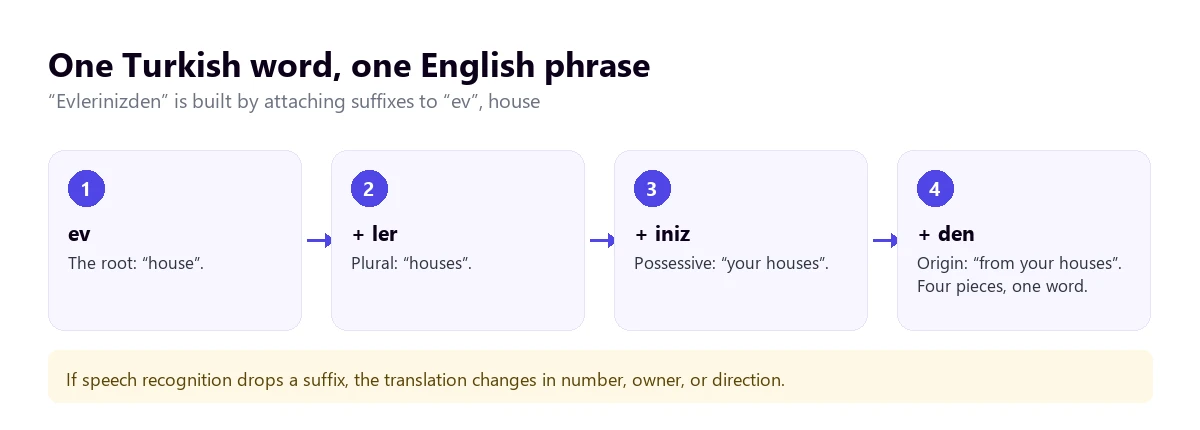
For voice recognition, this means very long words that are not in any dictionary as such, because the possible combinations are enormous. A well-trained system recognizes them by pieces; a worse one, or noisy audio, might swallow a suffix. And a lost suffix changes the number, the owner, or the direction of what is said without the English sentence sounding weird.
The verb at the end
Like Japanese or Korean, Turkish places the verb at the end: subject, object, and verb. Negation goes inside the verb itself, with a suffix: “geliyorum” is “I am coming”, and “gelmiyorum”, “I am not coming”. A translator that anticipates the sentence gets it wrong; one that waits for the pause gets it right more often, in exchange for a few seconds of delay.
Vowel harmony
Turkish suffixes change their vowel depending on the word they are attached to: the plural is “-ler” in “evler”, houses, and “-lar” in “kitaplar”, books. For a speaker, it’s automatic; for an English speaker’s ear, and for a mediocre microphone, they are short, similar syllables that are easily confused when speaking fast.
Letters that don’t sound like they do in English
The Turkish alphabet seems easy because it is Latin, but several letters are deceptive. This matters especially with proper names, which is where transcriptions fail the most.
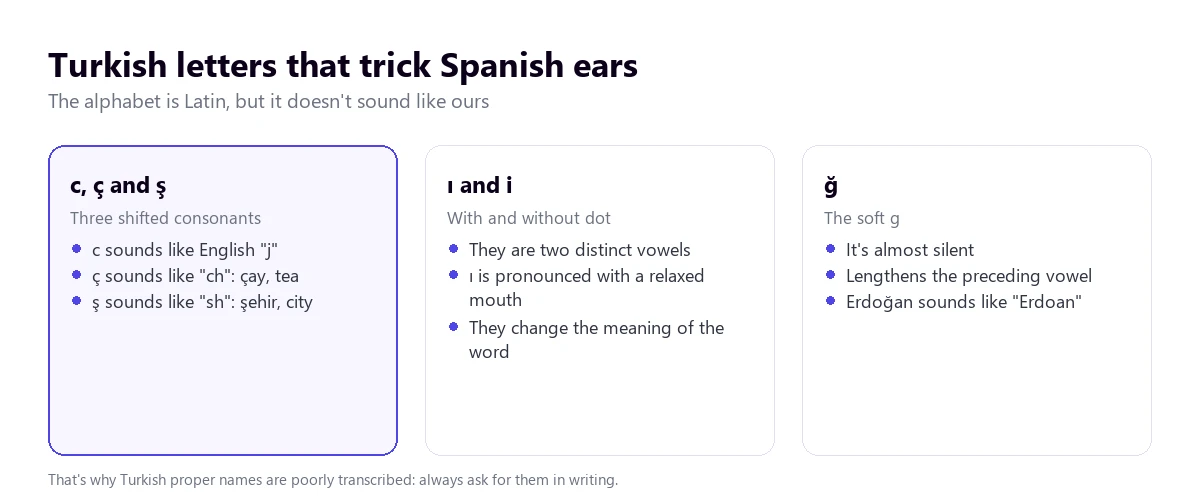
The difference between the dotless “ı” and the dotted “i” is not an ornament: “kır” is countryside and “kir”, dirt. And the “ğ” is barely pronounced, so a surname like Doğan sounds similar to “Doan”. If the original text appears on the screen, compare it with what you hear before writing down a name.
Gender, politeness, and rumors: what a translation flattens
Turkish has no grammatical gender. The same pronoun, “o”, works for “he”, “she”, and “it”, and verbs don’t change depending on who it is. When the context doesn’t make it clear, the English translation has to choose, and sometimes it chooses poorly: a female director might appear as “he” throughout an entire interview.
Politeness works with two forms: “sen” for familiar address and “siz” for respect or plural. While translations into some languages preserve this, English flattens both into ‘you’. What also doesn’t translate well are the titles that go after the first name:
- “Bey” for men and “Hanım” for women: “Ahmet Bey” or “Ayşe Hanım” are equivalent to a “Mr.” or “Mrs.” used with the first name, not the surname.
- “Hocam”, from “hoca”, teacher: it is used with professors, doctors, and experienced people, and a literal translation leaves it as an awkward “my teacher”.
- “Abi” and “abla”, older brother and older sister: they are said to anyone slightly older, even strangers, in a shop or a taxi.
There is a nuance in Turkish that almost no tool preserves: the tense for what you haven’t seen with your own eyes. “Geldi” is “came”, and the person knows it; “gelmiş” is “apparently came” or “they say he came”. In a work conversation, that difference separates a fact from a rumor, and the translation usually leaves both as “came”.
And a few words that are worth recognizing by ear, because they come up in any conversation:
- “Evet” is “yes” and “hayır”, “no”; but many people say no by raising their eyebrows and clicking their tongue, without a word.
- “Tamam” is “okay”, and it is used just as much as in English.
- “İnşallah”, “hopefully”, and “maşallah”, a formula to praise something without giving it the evil eye, appear in the mouths of both religious and non-religious people.
- Many words come from French and are recognizable when heard: “otobüs”, “kuaför” (hairdresser), “asansör” (elevator), or “pantolon” (trousers).
Numbers, money, dates, and names
Here Turkish is friendly: numbers are regular and are built from largest to smallest, just like in English. “Bin” is a thousand, “milyon”, a million, and a figure like 2,350 is said “iki bin üç yüz elli”, literally “two thousand three hundred fifty”. Turkey also writes decimals with a comma and thousands with a period, just like in Spain and much of Europe, so keep this format in mind when writing a figure down.
- The Turkish lira. Prices are given in liras (TL) and kuruş. With the inflation of recent years, figures change quickly: always ask for the written amount and the currency.
- Dates. They are said day, month, and year, unlike the US format, and are written with periods: 04.11.2026.
- Surnames. Turks have only had surnames since the 1934 law, and many are common words: Yılmaz means “the one who doesn’t give up”, and Demir, “iron”. A tool might translate a surname as if it were a word; if you see a weird sentence with a random adjective, think of that.
- Place names. Cities like İzmir or Muğla have Turkish letters that recognition software might write in various ways: check the spelling before booking anything.
The golden rule applies to any tool: amounts, deadlines, addresses, and names, in writing, in the meeting chat or in a confirmation message.
Which tool to use depending on where the Turkish is playing
Turkish is among the languages with full compatibility in Zoom’s translated subtitles, among the examples in Chrome’s subtitles, and among the target languages in Teams’ translated subtitles. None of the three translated voices of the meeting platforms include it. With the tree, you find your case; with the table, what each option provides.
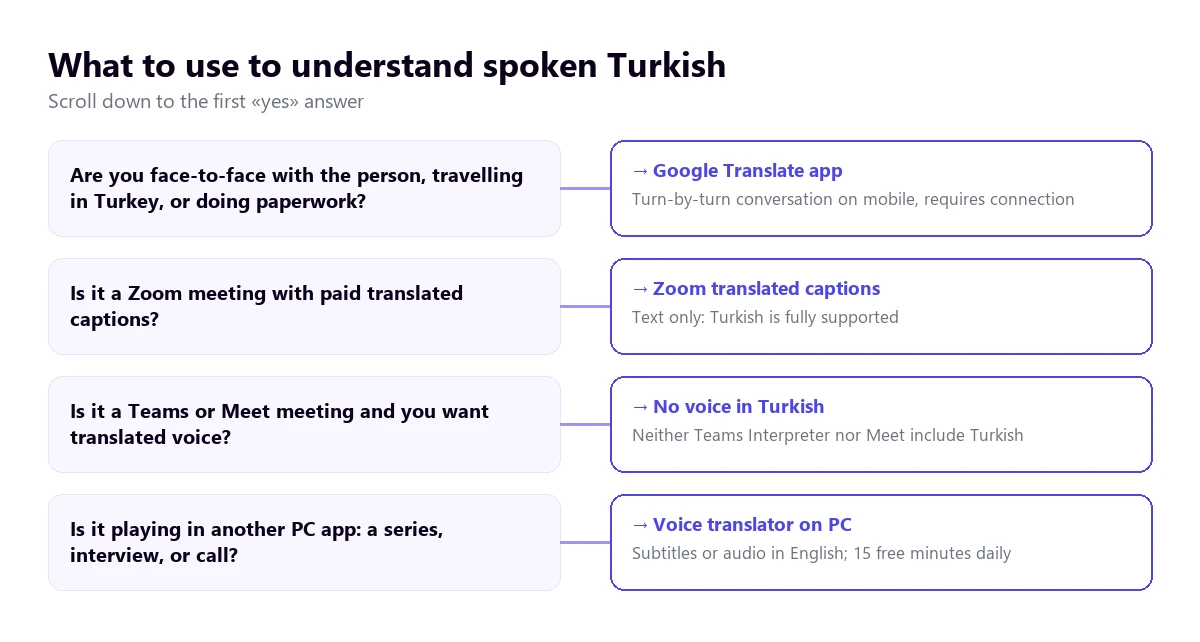
| Path | Where the Turkish plays | What you get | Turkish to English | Cost |
|---|---|---|---|---|
| Voice translator on PC | Any Windows application | Subtitles and voice in English | Yes; to reply with voice in Turkish, paid plan | 15 min free per day; paid plans |
| Google Translate app | In front of you, with mobile | Turn-based conversation | Yes, with connection | Free |
| Zoom, translated subtitles | Zoom meetings | Text only | Yes, with full compatibility | Business Plus or higher, or add-on with no published price |
| Teams, translated subtitles | Teams meetings | Text only | Turkish is listed as a target; as a spoken language, unconfirmed | Teams Premium or Microsoft Copilot |
| Teams, Interpreter | Teams meetings | Translated voice | No: Turkish is not among its ten languages | Copilot license |
| Zoom Voice Translator and Meet | Meetings | Translated voice | No: neither includes Turkish | Add-ons or paid editions |
| Chrome subtitles | Browser tabs | Text only | Yes, Turkish is listed in its help examples | Free |
| Voice notes and messages | Text transcription and translation | Not on Android: Turkish is not on its lists | Free |
We do not include the websites that top Google for this search, which translate an audio file you upload or single phrases, nor the apps from the stores whose data policy we haven’t been able to review.
1. Turkish in any Windows program: a voice translator on the PC
A large part of the Turkish that plays on a computer doesn’t come from a licensed meeting. It’s an episode of a dizi without English subtitles, an interview with a soccer player, a broadcast of a fair in Istanbul, or a video call with a supplier through any application. For all of that, a Turkish to English voice translator that listens to the specific application and translates as it plays is useful.
Traducore, the translator we make, works like this on Windows 10 and 11. On Windows 11, you choose the application you want to listen to, and sounds from others don’t come through; if you choose the browser, any tab that plays sound comes through. It waits for the pause in each sentence before translating, which fits with a verb-final language. With Turkish, we don’t have as many tests as with Portuguese, so the honest thing is to test first with an audio similar to the one you are going to use.
Step by step
- Open the application where the Turkish will play and select it in “LISTEN FROM (ORIGINAL VOICE)”.
- In “I HEAR”, choose “Turkish” if only Turkish will be spoken; if there might be Kurdish, English, or another language, leave the automatic detection.
- In “TRANSLATE TO”, set English and choose if you want to read it, hear it, or both.
- Activate “Also show the original text” to compare proper names.
- Click START TRANSLATION and begin the video or call.
Before using it
The translation runs three to six seconds behind, a bit more with long sentences, which are frequent in Turkish. The English voice plays over it and the original stays in the background, at 65% volume by default. Nothing of what is said is saved, neither audio nor text, and it only exists for Windows: no Mac or mobile.
The free plan gives 15 minutes every day, with no card and no end date. With Turkish, you need to know one thing: the free translated voice exists in English, so hearing a Turkish video in English falls under the free plan; the Turkish voice, for you to speak in the other direction, does not, and there the free plan is limited to subtitles. To reply with voice in Turkish, you need a paid plan, which you can find on the pricing page.
Try it with a Turkish interview
Hear in English what plays in any Windows program, in subtitles or with voice. 15 free minutes every day, no card required.
2. Google Translate on mobile, traveling in Turkey
In an Istanbul bazaar, an Antalya pharmacy, or an Ankara taxi, the practical choice is the Google Translate app. Its conversation mode lets each person speak in turns and reads the translation out loud, and it works with Turkish. The turn-based mode is exactly what this language requires: the app waits for the sentence to finish, with the verb and negation included.
It fails in the usual places: a street with traffic, a crowded venue, two people speaking at once, or someone who doesn’t wait for the phone to finish. A tip specific to Turkish: say street and hotel names slowly or show them written down, because Turkish letters are the first thing the app misspells.
3. Meetings with Turkey: Zoom with subtitles, Teams and Meet without voice
Zoom
Zoom’s translated subtitles include Turkish and English with full compatibility, if the host has Business Plus or higher or the translated subtitles add-on, whose price Zoom does not publish. Its translated voice, Voice Translator, works with English, Chinese, French, Japanese, and Spanish, and announces Portuguese, Arabic, German, and Italian for later in 2026: Turkish is not there. Interpretation with human interpreters brings nine languages by default, without Turkish, but allows custom languages, five per meeting. The steps are in how to translate a Zoom meeting.
Teams
Teams’ Interpreter, which translates voice to voice, works with ten languages and Turkish is not one of them. The translated subtitles, in text, do include Turkish among the languages they translate into and require Teams Premium or Microsoft Copilot; the help page lists 57 spoken language variants and we haven’t been able to confirm there that Turkish is recognized as a source language. The licenses are explained in the guide to the Teams interpreter.
Google Meet
Meet’s voice translation only works between English and six languages: French, German, Hindi, Italian, Portuguese, and Spanish. With Turkish, there is no translated voice in Meet, not even going through English.
4. Chrome, YouTube, and WhatsApp
Chrome subtitles
The automatic subtitles of Google’s browser transcribe and translate for free what plays in its tabs, and its help page names Turkish among the example languages. It is an open list and the one for Windows and Mac is not confirmed, so it is best to check it on your computer. It is activated in “Settings” → “Accessibility” → “Live Caption”, adding Turkish and choosing English for the translation. It only covers the browser and only in text.
YouTube
YouTube’s automatic subtitle translation requires the video to have them and carries over the transcription errors. Automatic dubbing is decided by the creator, and its help table shows that from most source languages it only dubs into English; an English track for a Turkish video is not confirmed. Large Turkish channels usually upload their own, more reliable subtitles.
With a Turkish voice note, WhatsApp doesn’t solve anything: its transcription supports, according to the Android help, English, Portuguese, Spanish, and Russian, and its message translation on Android works with six languages, without Turkish. On iPhone, it announces more than 19 languages without saying which ones. More alternatives in the guide to translate a WhatsApp audio.
When you speak: from English to Turkish
Replying in Turkish has fewer traps than in Korean or Japanese, because the politeness is somewhat similar to ours. Even so, there are things that help the other person receive what you mean to say:
- Short and complete sentences. Turkish reorders the entire sentence to put the verb at the end, and a mid-sentence correction throws it off.
- Use formal language with clients and suppliers: the translation will pass it to “siz”, which is expected in a first contact.
- Names with their title. “Mehmet Bey” translates better than “Mr. Yılmaz”, which in Turkey sounds colder than it seems.
- In Zoom, Meet, Teams, or another Windows application, a translator with a virtual microphone sends your sentence in Turkish. With speakers, you speak in turns; with headphones, it’s more fluid.
How to get a cleaner translation from Turkish
- Take care of the audio: suffixes are short syllables at the end of the word, the first thing lost with noise.
- Take turns: two overlapping voices are the worst case for any translator.
- Let the sentence finish: until the final verb, you don’t know if something is done or not done.
- Prepare names and acronyms of companies, cities, and people, with their Turkish spelling.
- Distrust pronouns: if the translation says “he”, check if it was “she”.
- In series, official subtitles first; the voice translator, for what doesn’t have them.
For things with consequences, a contract, a medical consultation, or an official procedure, a professional interpreter is needed; we explain this in the guide on real-time translation. If you are interested in other languages with their own traps, you have the guides for Arabic to English and Russian to English by voice.
More questions about translating Turkish by voice
What is the best Turkish to English translator?
It depends on where the Turkish is playing. With someone in front of you, the Google Translate app in conversation mode. In a Zoom meeting, its translated subtitles. For what plays on the computer, a series, an interview, or a call outside of Zoom, a Windows voice translator that listens to that application. For important texts or procedures, a professional translator.
Does Google Translate translate from Turkish to English by voice?
Yes, in the mobile app: in conversation mode, it listens to a sentence in Turkish, waits for you to finish, and reads it in English, and vice versa. It goes by turns, not continuously. On the computer, the Google Translate website only allows dictating single phrases, not translating what plays in another application.
Is there a live voice translator for Turkish?
Yes, with nuances. In person, the Google Translate app by turns. In Zoom meetings, live translated subtitles, only in text. On the PC, a voice translator that listens to any application and gives subtitles or voice in English with a few seconds of delay. The translated voices of Teams, Zoom, and Meet do not include Turkish for now.
So, which one do we use?
For the Turkish that plays on the computer, an interview, a live stream, or a call outside of Zoom, we use our voice translator on Windows, with the original text in sight so as not to miss any names. In Zoom meetings with the feature contracted, its translated subtitles. Traveling, Google Translate with data. And always, figures and names in writing. If you are comparing any Turkish to English voice translator for the PC, you have the comparison of voice translators.
Understand the Turkish that plays on your PC
Subtitles and voice in English from any Windows program. 15 free minutes a day, no card required.