An Italian to English voice translator works very well with the standard Italian of a course, a news broadcast, or a work meeting, but gets complicated with dialects, double consonants, and the “Lei”, which can mean formal “you” or “she”. Italian is one of the best-covered languages after English: Teams translates it voice-to-voice, Zoom and Chrome subtitle it, and there are programs that translate it on your computer. The most common mistake isn’t the machine’s, but the listener’s: because they think they understand a few words, they stop reading the translation.
Before choosing an Italian to English voice translator, you should know where it fails. In this guide, we review what Italian you will hear depending on the region, why its similarities to other languages can be deceiving, what gets lost with formal address and filler words, and what each option offers today: mobile, Teams, Zoom, Meet, Chrome, YouTube, WhatsApp, and a PC program. We also look at the reverse path, when you are the one who needs to make yourself understood in Italian. The data for each platform comes from their official help pages, checked in September 2026; where the help doesn’t clarify it, we say so.
In short
- A video, a course, a live stream, or a call on the computer: a Windows program that listens to that application and gives you subtitles or voice in English (path 1).
- With the person in front of you, traveling, or running an errand: the Google Translate app, taking turns and using data (path 2).
- A Teams meeting with a Copilot license: the Interpreter translates voice-to-voice between Italian and English. Zoom, for now, only provides subtitles (path 3).
- A video in Chrome: its automatic subtitles mention Italian, free and text-only (path 4).
In this article
- The Italian you will hear: standard, regional, and dialects
- Why Italian seems easy and isn’t always
- The “Lei”, titles, and filler words: what a machine flattens
- False friends: when half-understanding is worse than not understanding
- What tool to use depending on where the Italian is playing
- 1. Italian in any Windows program, with a PC voice translator
- 2. Google Translate on mobile, traveling, or with someone in front of you
- 3. Meetings in Italian: Teams with voice, Zoom with subtitles
- 4. Chrome, YouTube, and WhatsApp
- From English to Italian: when you are the one speaking
- Numbers, times, and dates in Italian: where to look twice
- How to get a cleaner translation from Italian
- More questions about translating Italian by voice
- So, which one do we use?
The Italian you will hear: standard, regional, and dialects
Italian is the official language in Italy, San Marino, Vatican City, and Switzerland, where it is mostly spoken in the canton of Ticino. The form you hear on RAI, in universities, and in companies is standard Italian, which was born from literary Tuscan and spread throughout the country with 20th-century schools and television. It is the most abundant in the data used to train voice recognizers, and the one that turns out best in any tool.
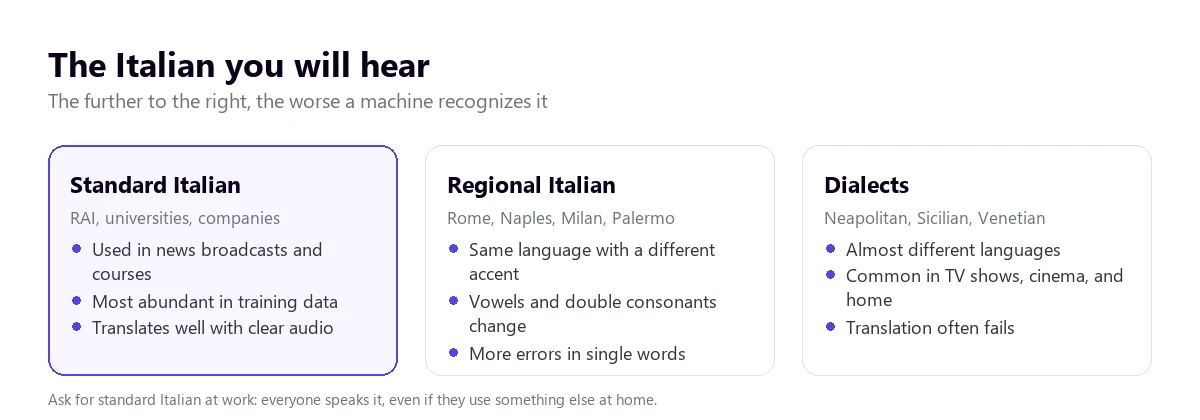
Below the standard is regional Italian: the same language with the accent of each area. A Roman lengthens some vowels, a Neapolitan opens others, a Milanese softens consonants, and a Sicilian pronounces the “r” and “d” differently. An automatic system understands almost everything but stumbles more with names, numbers, and isolated words. This is the most common situation in a meeting with an Italian company.
Dialects are another story. Neapolitan, Sicilian, Venetian, or Piedmontese have their own vocabulary, grammar, and pronunciation, and many linguists treat them as distinct languages. They are rarely used in the office but appear in series, movies, street interviews, and family conversations. There, any automatic translator loses its footing, because it learned with standard Italian. If a supplier from Bari or Catania switches to dialect with a colleague in the middle of a call, the translation of that section will be poor.
The content also matters. A technical webinar, a recorded class, or a newscast turns out well. A cooking show with four people talking at once, an enthusiastically commentated match, or a political debate with constant interruptions turns out much worse. It’s not the language that fails, it’s the rhythm and the noise.
Why Italian seems easy and isn’t always
Any voice translation system does three things in a row: it turns sound into text, translates that text, and shows or reads it in English. Italian makes the first two steps easy. It is written almost exactly as it is pronounced, the word order is similar to ours, and it shares a good part of its vocabulary with English. Therefore, with clean audio, an Italian to English voice translator gives some of the most reliable results you will find.
Double consonants change the meaning
In Italian, a double consonant is pronounced longer and changes the word. “Sete” is thirst and “sette”, seven. “Caro” is dear or expensive and “carro”, cart. “Nono” is ninth and “nonno”, grandfather. In a clean recording, the difference is heard well; with a laptop microphone, echo, or someone speaking quickly, the recognizer might pick the wrong word and the translated sentence still seems correct.
Words that stick together
Spoken Italian constantly joins words. “L’ho visto” is “I have seen it”; “c’è” is “there is”; “un po’” is “a little”; “dov’è” is “where is it”. In fast speech, these unions chain together with the rest of the sentence, and the recognition has to decide where each word begins and ends. It usually gets it right, but this is where small errors appear that change a verb tense or a pronoun.
A “sei” that isn’t a number
Some words have two readings that only context separates. “Sei” is the number six and also “you are”: “sei pronto?” is “are you ready?”. “Era” can be “was” or “used to be”. “Porta” is door or “carries”. A translator that goes sentence by sentence almost always resolves this; one that translates very short chunks, while the person is still speaking, makes more mistakes with these words. This is one of the reasons why it’s worth accepting a few seconds of delay in exchange for complete sentences.
The disappearing pronoun
Like Spanish, Italian omits the subject: “arriva domani” can be he, she, or you arrive tomorrow. In English, you have to choose a subject that the original didn’t state. This is where one of the most curious errors in translated Italian comes from, which we see in the next section.
The “Lei”, titles, and filler words: what a machine flattens
Italian addresses people formally with “Lei”, the same pronoun that means “she”. “Lei è stanca?” can be “are you tired?” or “is she tired?”, and only context clarifies it. In a direct translation from Italian to English, you have to choose between “you” and “she”, and sometimes the machine chooses poorly.
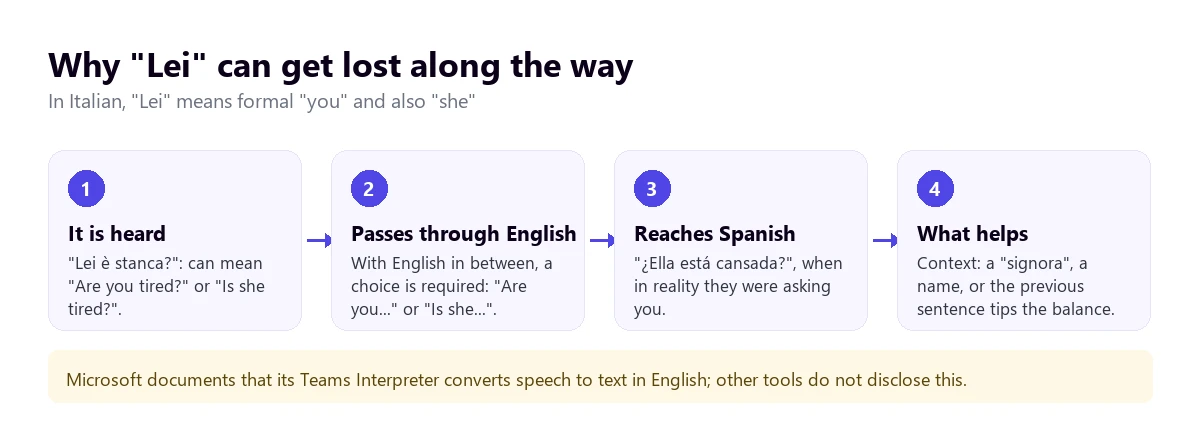
Microsoft documents that its Teams Interpreter turns speech into English text before translating it to the final language. Other tools don’t publish how they work inside. It’s not a reason to rule any out, but it is a reason to look twice when a translated sentence suddenly talks about a third person no one has mentioned.
Titles are another source of confusion. In Italy, anyone with a university degree is “dottore” or “dottoressa”, and “ingegnere”, “avvocato”, or “architetto” are also used as forms of address. A literal translation turns the purchasing manager into a “doctor”, and the listener might think they are talking to a physician. When replying, however, you should use the title: at work, in Italy, dropping it sounds too familiar.
What gets lost the most are filler words, which set the tone and have no exact translation. “Allora” opens almost any sentence and equals “well” or “so”. “Cioè” is “I mean”. “Insomma” summarizes with a certain resignation, something like “in short”. “Magari” can be “maybe” or “I wish”, depending on the sentence. “Boh” is an “no idea” with a shrug, and “figurati”, depending on the case, “don’t mention it” or “no way!”. An automatic translator usually omits them or translates them literally, and the sentence loses the nuance of doubt or politeness it carried.
And a custom that might clash: in an Italian conversation, it’s normal to talk at the same time, interrupt to show interest, and pick up the other person’s sentence. It’s not bad manners, but it is the worst scenario for any voice translator, because two mixed voices are recognized poorly. If the meeting is important, asking to take turns at the beginning saves many misunderstandings.
False friends: when half-understanding is worse than not understanding
The similarity between Italian and other languages has a curious effect. Someone who knows no Italian reads the whole translation; someone who understands it “more or less” stops reading it and trusts their ear. And the ear, with these words, deceives.
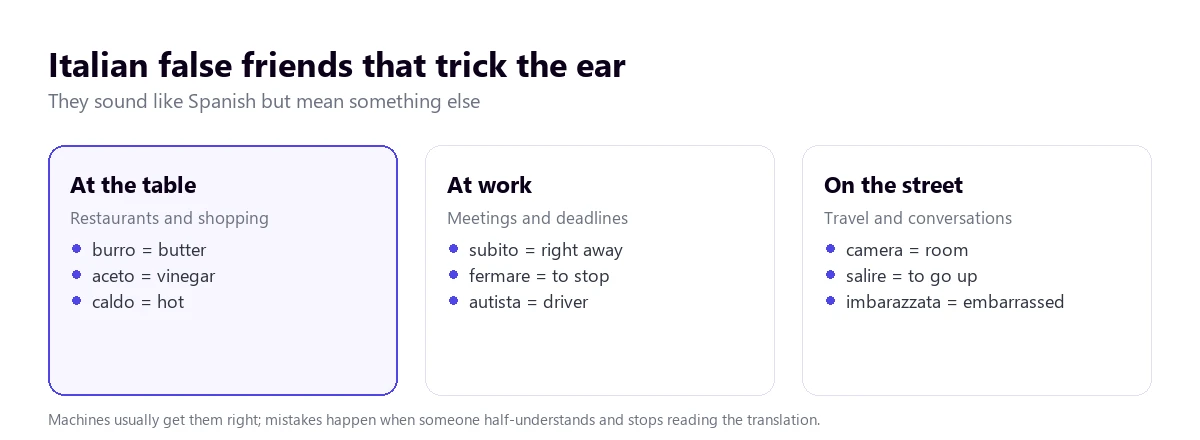
- “Subito” is “right away”, not “sudden”. “Lo mando subito” is good news, not a warning of something unexpected.
- “Caldo” is “hot” or “heat”, not cold. In a restaurant or hotel, “fa caldo” means “it’s hot”.
- “Burro” is butter, “aceto” is vinegar, and “gamba” is leg.
- “Salire” is to go up and “uscire”, to go out. “Camera” is room; a camera is “macchina fotografica”.
- “Imbarazzata” is embarrassed. Pregnant is said “incinta”.
- “Fermare” is to stop, and “autista”, the driver. “Morbido” is soft.
An automatic translator gets almost all of them right, because it has seen them millions of times in context. The risk lies with the person who mixes what they hear with what they read. The practical rule is simple: if the translation and your ear don’t match, believe the translation and ask.
What tool to use depending on where the Italian is playing
With Italian, there are more options than with most languages. It is among the ten languages of the Teams Interpreter, among those with full support for Zoom’s translated captions, and among the examples for Chrome’s captions. Meet translates it voice-to-voice, but only with English. The tree takes you to your case and the table summarizes what each path offers.
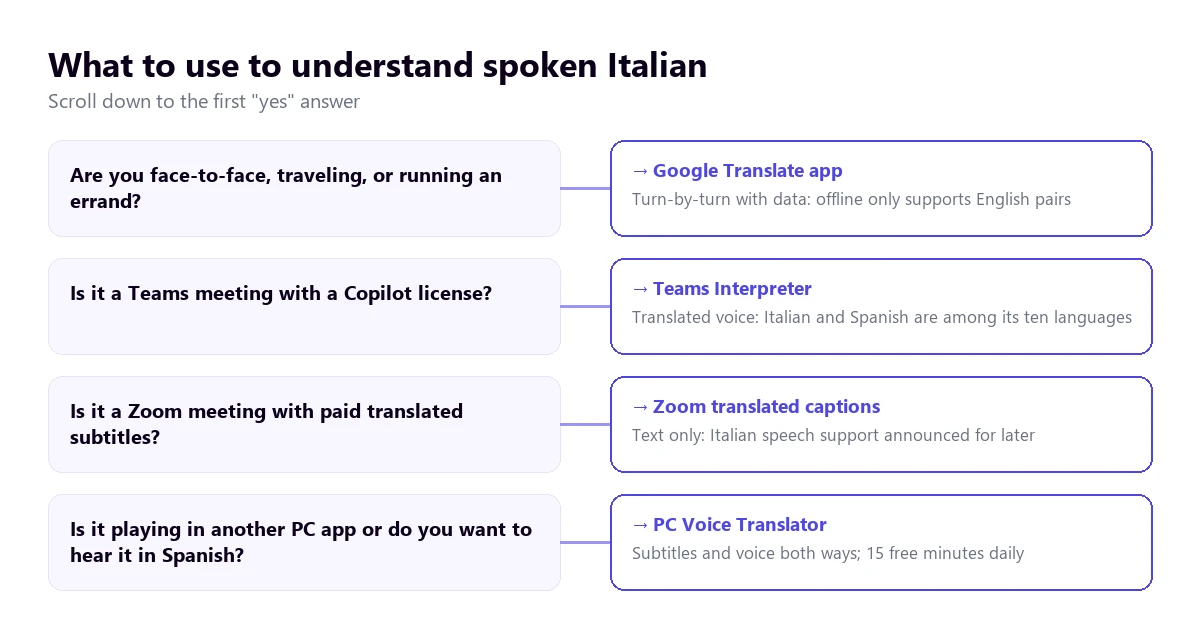
| Path | Where the Italian plays | What you get | Italian to English | Cost |
|---|---|---|---|---|
| PC voice translator | Any Windows application | Subtitles and voice in English | Yes, with voice in both directions | 15 min free per day; paid plans |
| Google Translate app | In front of you, on mobile | Turn-based conversation | Yes, with connection | Free |
| Teams, Interpreter | Teams meetings | Translated voice | Yes: both are among its ten languages | Copilot license (20 h per month per person) |
| Zoom, translated captions | Zoom meetings | Text only | Yes, with full support | Business Plus or higher, or add-on with no published price |
| Zoom Voice Translator | Zoom meetings | Translated voice | Not yet: announced “later in 2026” | Add-on |
| Google Meet, voice translation | Meet meetings | Translated voice | Yes: Italian works with English | Paid Workspace editions or Google AI Pro |
| Chrome captions | Browser tabs | Text only | Yes, Italian is listed in its help | Free |
| Voice notes and messages | Text transcription and translation | Not on Android: Italian isn’t on its lists | Free |
Not in the table are the websites that top Google with this search, like Lara Translate, Clideo, or ScreenApp. They work with text or a file you upload and give you back the translation, subtitles, or a new audio: they are for your own video or a document, not for following something while it plays. Store apps whose help we couldn’t read are also excluded.
1. Italian in any Windows program, with a PC voice translator
A good part of the Italian that reaches a computer doesn’t come from a licensed meeting. It’s a presentation from a Milan trade fair being streamed, a course from an Italian university, a cooking or design channel, a series on a platform without English subtitles, or a video call with a client from Turin on any app. For all that, an Italian to English voice translator that listens to that specific application and translates while it plays is what you need.
Traducore is a program of this type, for Windows 10 and 11. On Windows 11, it captures only the application you choose, so notifications from other programs don’t slip in; if you choose the browser, everything that plays in it comes through, with all its tabs. With standard Italian and clean audio, the translation is good; with a dialect or several people talking at once, you should test it first with a similar video.
The program works by sentences: it waits for a pause to translate, and that’s why it resolves “sei” and “Lei” better than a system that goes word by word. The English voice plays over it and the original stays in the background, at 65% by default, so you keep hearing the speaker’s tone, something that helps quite a bit with Italian, which is so expressive.
Step by step
- Open the application where the Italian will play and choose it in “LISTEN FROM (ORIGINAL VOICE)”.
- In “I HEAR”, tick “Italian”. Fixing it prevents it from confusing similar-sounding words with English.
- In “TRANSLATE TO”, choose English and decide if you want subtitles, voice, or both.
- If you understand some Italian, activate “Also show the original text” and compare.
- Click start and play the video or begin the call.
What you should know
The translation arrives with a three to six-second delay, a bit more with long sentences. For a video or a presentation, it doesn’t matter; in a conversation, leave pauses. The program doesn’t save the audio or the text, and it only exists for Windows.
The Free plan gives you 15 minutes a day, without a card and without expiring, with two-way conversation included. With Italian, there’s an advantage: the translated voice on the Free plan includes Italian and English, so you have voice in both directions without paying. Paid plans are on the pricing page.
Try it with a presentation in Italian
Hear in English what plays in any Windows program, with subtitles or voice. 15 free minutes every day, no card required.
2. Google Translate on mobile, traveling, or with someone in front of you
On a trip to Rome, in a Florence pharmacy, or with a Bologna landlord, the practical choice is the Google Translate app. Its help describes several modes: Listen, with headphones, to follow someone speaking; Conversation, where you take turns speaking and the phone reads the translation out loud; and Face-to-face, which splits the screen so each person reads in their language.
The turn-based mode suits Italian well: the app hears the whole sentence before translating and resolves the context with more information. Where it fails is the usual: a terrace with traffic, a market, two people talking at once, or someone who doesn’t wait for the phone to finish.
An important limitation for traveling: according to its help, live translation offline only exists on Pixel 9, 10, and 11, and only in pairs with English. So Italian to English without data works there, but not on older phones. On the computer, the Google Translate website doesn’t allow conversing: you can only dictate a sentence and click to translate it.
3. Meetings in Italian: Teams with voice, Zoom with subtitles
Teams
The Teams Interpreter agent translates voice-to-voice, and its help includes Italian and English among its ten languages. Each participant chooses which language to hear the meeting in and can adjust how much original audio they want in the background. It requires a Microsoft Copilot license, which includes 20 hours of interpretation per month per person, and it doesn’t work in impromptu meetings, town halls, or webinars. Remember the “Lei”: this agent goes through English, so an unexpected third-person sentence deserves a second look.
Teams’ translated captions, text only, include Italian and English among their target languages and require Teams Premium or Copilot. You have the full requirements in the guide to the Teams interpreter.
Zoom
Zoom’s translated captions treat Italian and English with full support, provided the host has Business Plus or higher, or the Translated Captions add-on, whose price Zoom doesn’t publish. Its translated voice, Voice Translator, currently works with English, Chinese, French, Japanese, and Spanish, and Zoom’s July 2026 blog announces Italian “later in 2026”, with no date. More details in the guide to translate a Zoom meeting.
Google Meet
Meet’s voice translation mentions Italian, but it only translates between English and another language, with a single pair per meeting. Italian and English works perfectly here. It requires paid editions of Google Workspace or Google AI Pro.
4. Chrome, YouTube, and WhatsApp
Chrome captions
Chrome generates captions for what plays in the browser and translates them, at no cost. Italian appears in the list of examples in its help, although it’s an open list that changes between the Spanish and English versions. It is activated in “Settings” → “Accessibility” → “Live Caption”, adding Italian in “Manage languages” and choosing English as the translation language. It only covers what plays inside Chrome, and only in text.
YouTube and Windows
YouTube’s automatic caption translation depends on the video having them, and it drags along the recognition errors. Automatic dubbing is activated by the creator: its help table dubs from English to Italian, with expressive voice, and from Italian almost everything goes only to English, so an English track for an Italian video is highly likely. Windows 11 Live Captions translate the computer’s audio, but they require a Copilot+ PC and only give the result in English or Simplified Chinese.
With voice notes in Italian, WhatsApp doesn’t help. Its voice note transcription supports, according to the Android help, English, Portuguese, Spanish, and Russian, and message translation on Android works with six languages, without Italian. On iPhone, its blog talks about more than 19 languages, without giving the list. For an audio in Italian, the most direct way is to play it on the computer with a translator that listens to that application. You have other options in the guide to translate a WhatsApp audio.
From English to Italian: when you are the one speaking
Many English speakers trust that, by speaking slowly, an Italian will understand them. Sometimes it works to order a coffee; in a negotiation or a complaint, mixing languages creates more doubts than it resolves. Translated voice produces correct and neutral Italian, usually with “Lei”, which is the safe option with clients and suppliers.
For the translation to come out clean, speak in short, complete sentences, without leaving them half-finished to correct yourself. Avoid jokes and double meanings, which translate poorly in any pair, and spell out or write down uncommon proper names.
- With the person in front of you: the Google Translate app in Conversation mode, each waiting their turn.
- In a Teams meeting: the Interpreter agent, provided all participants have a Copilot license.
- In Zoom, Meet, or another Windows calling app: a voice translator with a virtual microphone that sends your sentence in Italian. With speakers, you take turns; with headphones, it’s more fluid.
Numbers, times, and dates in Italian: where to look twice
Italian numbers are regular and look like ours: “ventuno”, “trentatré”, “duemila”. Even so, there are details worth watching when money or deadlines are involved.
- Numbers that sound alike. “Sei” (six) and “sette” (seven) are rarely confused, but “sette” and “sete” or “tre” and “trenta” in noisy audio are. A misheard amount still sounds perfect translated.
- Billions. “Un miliardo” is one billion, just like in English. The risk appears if the translation goes through another language and someone converts it again: the Italian “bilione”, rarely used, equals a trillion.
- Decimals and thousands. Italian uses the decimal comma and the thousands period, unlike the US and UK. So a figure written on an Italian slide might be read wrong if you’re used to the opposite.
- Times. At work, the 24-hour clock is heavily used: “alle quindici” is three in the afternoon. “Le tre e mezza” is 3:30, no tricks.
- Dates. Day, month, and year, unlike the US format. The first day of the month is said with an ordinal, “il primo marzo”, and the rest with a cardinal: “il due marzo”.
The solution doesn’t depend on the tool: ask for amounts, times, and deadlines to be written in the chat or in a confirmation email after the meeting.
How to get a cleaner translation from Italian
- Fix the source language. With so many similar words, automatic detection can confuse a stretch of Italian with English or Spanish.
- Ask for standard Italian. No one is offended: everyone speaks it, even if they use dialect at home.
- Ask to take turns. Overlapping voices are the biggest enemy of any voice translator.
- Improve the audio. Double consonants and numbers are lost first with a bad microphone.
- Read the translation even if you understand some. False friends are there for a reason.
- Prepare a list of terms with product names and acronyms that will come up.
And a clear limit: the machine is good for following a meeting or understanding a video, but a contract, a medical consultation, or a trial call for a professional interpreter. We explain the difference between the two in the guide on real-time translation, and if you’re interested in how a very different language behaves, the one on German to English by voice.
More questions about translating Italian by voice
Does Google have an Italian to English voice translator?
Yes, in the Google Translate app for Android and iOS, with the turn-based conversation mode and the listening mode with headphones. It requires a connection: without data, it only works in pairs with English and only on some Pixels. From the PC, the web version is limited to dictating single sentences; if what you want is to follow a video inside Chrome, use the automatic captions that come with the browser itself.
Does DeepL translate from English to Italian?
Its text translator works with both languages and usually gives good results with this pair, pasting complete sentences. DeepL Voice, its voice product for meetings, has its own list of spoken languages, shorter than the text translator’s; we analyze it in the comparison with DeepL Voice.
How do you say translator in Italian?
“Traduttore”, and in the feminine “traduttrice”. The interpreter is “interprete”, the same in masculine and feminine. If you are looking for a tool in Italian, “traduttore vocale” is the voice translator and “traduzione simultanea”, simultaneous translation.
So, which one do we use?
For the Italian that plays on the computer, a presentation, a course, or a call that doesn’t go through Teams, we use our own voice translator on Windows, with Italian manually fixed and the original text visible to compare. If the meeting is on Teams and the company has Copilot, the Interpreter delivers. Traveling, Google Translate with data. And always, amounts and dates in writing. If you are looking for another Italian to English voice translator for the PC, you have the voice translators comparison, and for videos in another Latin language, the guide to translate a Portuguese video into English.
Understand the Italian playing on your PC
English voice and subtitles from any Windows program, and Italian voice to reply. 15 free minutes a day, no card required.