
Wordly and Traducore translate voice in real time, but different people buy them: Wordly is bought by the person organizing a meeting or event so their audience can follow it in their language, and Traducore is installed by the listener on their own PC. Wordly is a cloud platform for conferences, training sessions, and meetings: the speaker talks, and each attendee opens a link or QR code and chooses a language, in text or audio. Traducore is a Windows program that listens to the application you choose and translates for you, without anyone else in the meeting having to do anything.
In short: if you are organizing a conference, a shareholder meeting, or a webinar with an audience from several countries, Wordly is made for you. If you are an attendee and the event doesn’t offer translation, the only option that depends entirely on you is a translator on your computer. Below is the full comparison: how the audio reaches Wordly, what each attendee receives, how many languages there really are, how much the starter package costs, and what each tool stores. The data for Wordly comes from its official website: pricing and frequently asked questions consulted in November 2026, and its data sheet in September 2026.
Traducore is our product
We are stating this upfront. We compare it with what Wordly publishes and we also point out where it beats us, which is in quite a few areas when it comes to events.
In short
- You are organizing an event, a conference, or a training session and want the audience to follow it in their language: Wordly.
- You need transcripts, summaries, and security certifications for your purchasing department: Wordly.
- You are an attendee and the meeting or video doesn’t come with translation: Traducore, which runs on your PC without asking anything of the organizer.
- You translate a few hours a month and want to start without paying: Traducore gives you 15 minutes a day; Wordly’s starter package is around $1,500.
- You work on a Mac or mobile phone: Wordly, because its attendees join from any browser and Traducore only works on Windows.
In this article
- What exactly is Wordly
- Traducore and Wordly, head to head
- Organizer vs listener: the difference that decides everything
- How audio reaches Wordly, in the room and online
- What each attendee sees and hears
- Replying in another language: they don’t compete here
- Languages: many pairs and a list you have to read
- Pricing: annual packages vs hours per month
- Security, transcripts, and what gets saved
- How to test them properly
- Where each one wins
- Which one you need depending on the case
- More questions about Wordly
- So, which one do we use?
What exactly is Wordly
Wordly describes itself in its data sheet as an AI translation and captioning platform for in-person, virtual, and hybrid meetings and events. It replaces the human interpreter with an automatic system that listens to the speaker and delivers translated audio with synthetic voices, subtitles, or both to each attendee. After the session, it offers transcripts and, in the larger packages, summaries and MP3 audio files per language.
If you searched for “wordly” on Google, you might see that the first result has nothing to do with it: it’s a word-guessing game similar to Wordle. The translation platform lives at wordly.ai, and customer access, the “portal”, is on its own subdomain. It’s best not to confuse them, because many apps in the stores with a similar name are also games.
Wordly’s customer is the organization hosting the event: a university with international students, a company holding its annual meeting in several languages, a church with a congregation from different countries, or a conference organizer. Wordly boasts about supporting tens of thousands of users in a single session, and its selling point against a human interpreter is the price: its pricing page mentions saving “up to 90%”.
Traducore plays in a different league and we don’t hide it. It’s a desktop program for Windows 10 and 11 with two modes, Video / talk for listening and Video call for conversing. There is no room, no audience, and no organizer portal: it translates for the person using it.
Traducore and Wordly, head to head
| Tool | Who uses it | How audio arrives | What the listener receives | Where it works | Languages | Free | Starting price |
|---|---|---|---|---|---|---|---|
| Traducore | The listener, on their PC | The application you choose (Windows 11) or a device (Windows 10) | Voice and subtitles, with the original voice in the background | Windows 10 and 11 | Translates to 78 | 15 min a day | €7.95 / 2 h a month |
| Wordly | The organizer, for the whole audience | Presenter app, soundboard, or apps for Zoom and Teams | Translated audio, subtitles, or both, in the browser | Any browser (attendees) | About 60 for speaker and 67 for attendee | Online demo; trial via sales | About $1,500 for 10 h, valid for 12 months |
Organizer vs listener: the difference that decides everything
Before looking at languages or prices, you have to answer one question: who provides the translator? With Wordly, the organizer buys the hours, creates the session, and shares the link. Attendees don’t pay, don’t install anything, and don’t need an account. If the organizer hasn’t purchased Wordly, there is nothing the attendee can do with it.
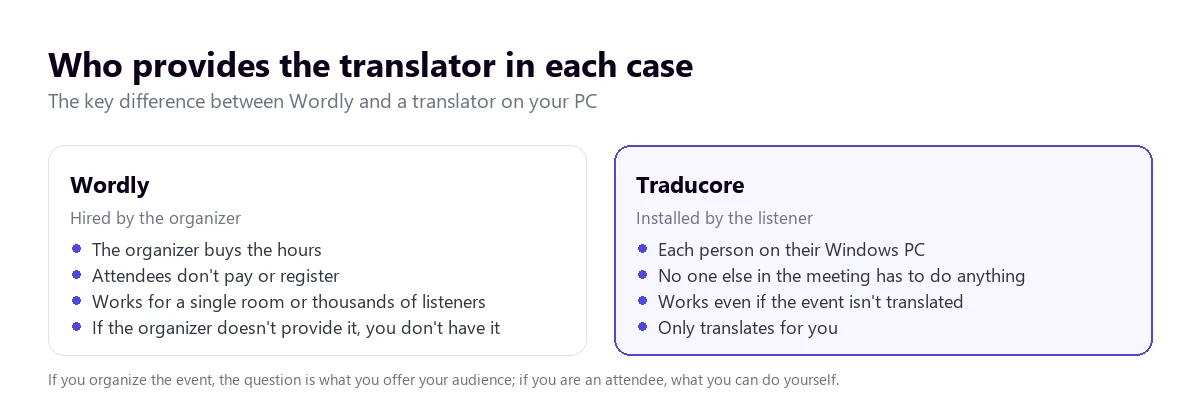
With a translator on your computer, the opposite happens. It is installed by the person listening, and it works even if the webinar, class, or call doesn’t come with any translation. No one else has to know: no bot joins the meeting and you don’t have to ask the host for permission. In return, it only translates for you: if there are five of you in the room and all five need translation, each one needs their own program.
That’s why comparing them directly is tricky. For an organizer with 300 attendees, asking each one to install something is unfeasible, and Wordly solves the problem all at once. For a freelancer attending a German supplier’s virtual fair, Wordly isn’t an option unless the supplier has purchased it. The useful comparison is what you need in your role.
How audio reaches Wordly, in the room and online
To translate, Wordly has to hear the speaker with good quality. Its help section distinguishes two situations.
In an in-person event, Wordly connects to the room’s sound system: a cable from the mixing board to a tablet or computer running its Presenter app. You need an analog-to-digital converter, “similar to an iRig device”, according to its frequently asked questions. The minimum requirement is a device with an internet connection and an audio input. For several people talking nearby, the Presenter app has a push-to-talk mode.
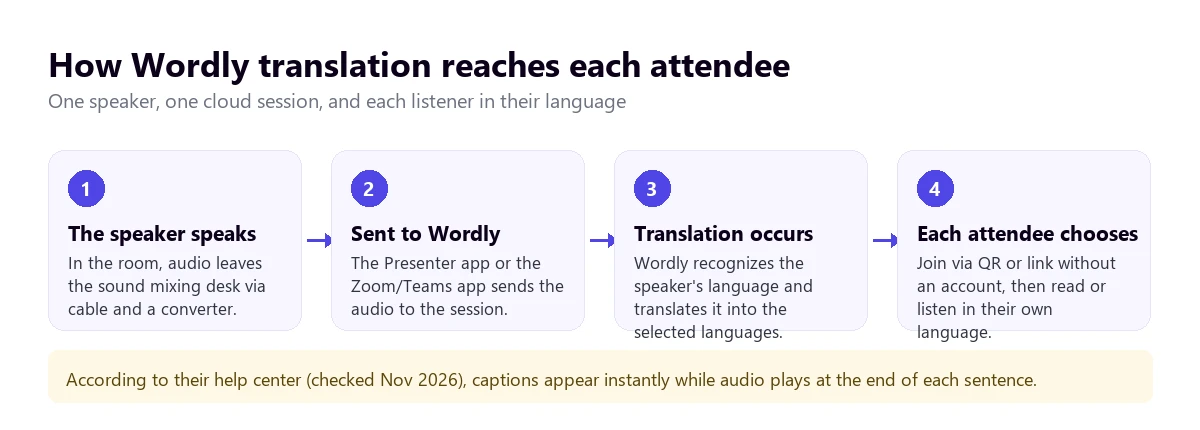
In an online meeting, Wordly integrates with the platforms. In Zoom, you install the “Wordly App for Zoom” from the Zoom Marketplace, and it is the host who starts the session of translation and provides the minutes; attendees spend nothing. They can follow it from the Wordly app itself within Zoom or from a broadcast link. In Teams, there is a dedicated app with the option of a “Wordly meeting bot”. It also integrates with Google Meet, Webex, and Cvent, and can be embedded on a website using an iframe.
A PC translator doesn’t need any of that. On Windows 11, Traducore captures only the application you choose: Zoom, Teams, the browser, or the video player. If you choose the browser, all its tabs are included, because Windows separates by application and not by tab. On Windows 10, an entire audio device is captured. The practical difference: it doesn’t depend on the platform having an integration or the host doing anything.
What each attendee sees and hears
In Wordly, the attendee joins via QR code or link from their mobile phone, tablet, or computer, without downloading anything, and chooses a language. They can read subtitles, listen to translated audio with headphones, or both, and they can rejoin with the same link if they get disconnected. The help section describes accessibility options like white text on a black background and showing subtitles word by word or by sentences.
Regarding delay, Wordly talks about translations with “close to zero lag”. The fine print in its frequently asked questions is more interesting: subtitles appear instantly, but the translated audio plays when each sentence ends, because that makes the recognition more accurate. This is the same thing any system of this type does; it doesn’t give a figure in seconds.
There is a detail worth knowing if you attend an event with Wordly: according to its help section, subtitles are only available during the live session, unless the organizer shares the transcript afterward. If you want to review something, ask for it.
With Traducore, the translation appears in floating subtitles on your screen and in voice, with the original voice in the background at 65% so you don’t lose the speaker’s tone. Between the end of a sentence and its translation, 3 to 6 seconds pass. There is no transcript when it finishes: the program doesn’t save anything.
Replying in another language: they don’t compete here
Wordly is designed primarily for one speaker to talk and many to listen. It allows the speaker’s language to change automatically or manually in seconds, so in a panel with speakers from several countries, each can speak in their own. But for the attendee who wants to chime in, the consulted website doesn’t describe a way for their reply to sound translated in the Zoom or Teams meeting. Its frequently asked questions don’t explain it, so we can’t confirm it.
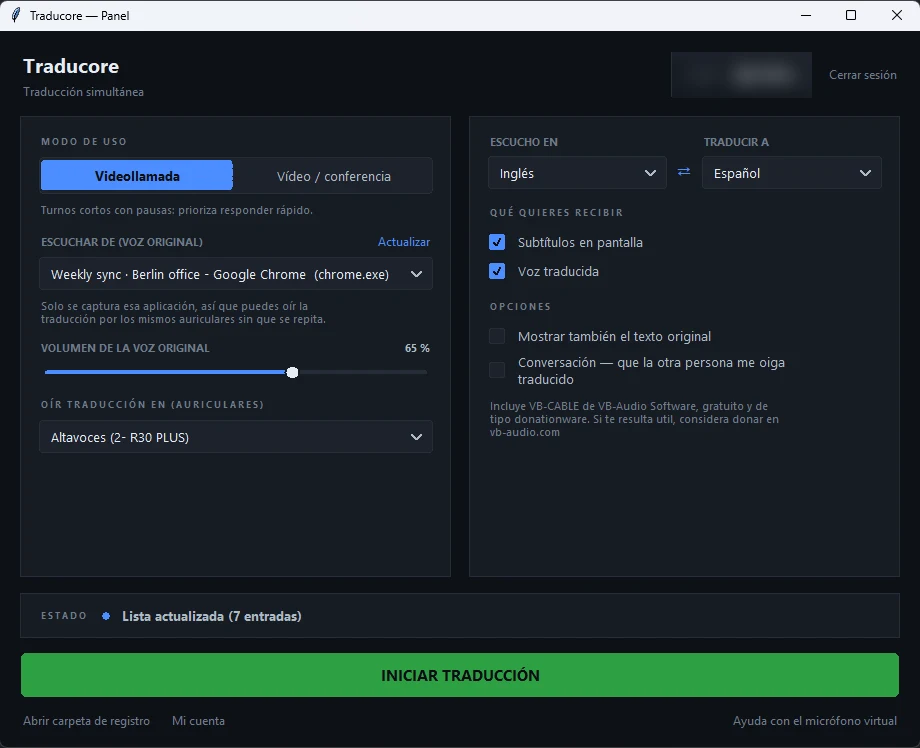
Traducore does have that path, because it was designed for conversations. In Video call mode, your voice is translated and goes out through a virtual microphone that the program installs the first time (Windows asks for administrator permission). In Teams, Zoom, or Meet, you choose “CABLE Output” as your microphone and the other person hears you in their language. With speakers, you take turns talking, because the program doesn’t send your microphone while something is playing; with headphones, it’s more fluid. This two-way conversation is included in the free plan every day.
Languages: many pairs and a list you have to read
Wordly advertises “Dozens of Languages / 3,000+ Language Pairs”. The number of pairs is impressive, but it comes from multiplying: with a few dozen input languages and as many output ones, the pairs run into the thousands. What matters is its official list, which separates the languages the speaker can talk in from those the attendee can listen in.
According to our count of that list, there are about 60 speaker languages and 67 attendee languages: six languages, like Swahili or Zulu, only exist as output. Spanish appears in two variants, from Spain and from Mexico, and Korean, Japanese, or Chinese are on both lists. Wordly doesn’t limit how many languages are used in a single session, and all are included in the same price. What its page doesn’t clarify is which languages have translated audio and which have subtitles only.
Traducore detects the source language and translates into 78. The quality isn’t the same across all of them: from Spanish, Portuguese, or French into English it works very well, and for less common pairs it’s best to test it first. On the free plan, translated voice is available in English, Spanish, French, German, Italian, and Portuguese; for the rest of the languages, the free plan provides subtitles.
In both cases, the real test is your language pair with your audio. A speaker with a heavy accent, an echoing room, or two people talking at the same time change the result more than a ten-language difference on a list.
Pricing: annual packages vs hours per month
Wordly doesn’t charge per user but per session hours. According to its pricing page, consulted in November 2026:
- Starting price: “Pricing starts at about $1,500 for a 10-hour package”. About $1,500 for 10 hours, which can be used in any fraction over 12 months.
- Packages: Starter (10 hours), Pro (25), Pro+ (50), Corporate (100), Corporate+ (250), and Enterprise (500 or more). The page doesn’t publish the price of the larger packages.
- How it’s billed: only the time used, “We don’t round up”, and with all languages included. Leftover hours can roll over to the next year by talking to sales.
- Discounts: from 10% to 30% or more for large packages, for two- or three-year contracts, and an extra 10% for non-profits and education starting from the Pro package.
- What depends on the package: transcript translation, audio files per language, and summaries are only checked in the higher packages; configurable storage and single sign-on, in the highest one.
There is a small contradiction on its website: the frequently asked questions mention purchases of “10, 50, and 200 hours”, while the pricing table lists 10, 25, 50, 100, 250, and 500. If you are going to buy, ask for a written quote.
Doing the math, Wordly’s starter package comes out to about $150 per hour. Compared to a human interpreter per language, it’s cheap, and for an event with 500 people and five languages, even more so: one session hour serves the entire audience. For a single person who wants to understand one webinar a month, it’s an impossible entry point.
Traducore is paid by hours per month and per person: Video plan at €7.95 (2 h), €36.95 (10 h), or €108.95 (30 h), and Conversation plan, with the other person hearing you translated, at €10.45, €49.95, or €146.95. The details are on the pricing page. And there is a free plan of 15 minutes a day, with no card required and no expiration.
Wordly doesn’t have a free plan: it offers an online demo, a live demo with sales, or a trial agreed upon with a sales rep. For an organizer this is reasonable; for someone who just wants to test it at home, it’s not.
Security, transcripts, and what gets saved
Here Wordly has the upper hand for a large company. Its data sheet cites SOC 2 Type II and ISO/IEC 27001:2022 certifications, data encryption in transit and at rest, and a commitment not to use data to train models. Its frequently asked questions add that no personal data is needed to use it as an attendee. For a purchasing department that asks for certificates before signing, this carries weight.
What Wordly does keep are the transcripts: after each session they can be downloaded, with or without timestamps and in formats like WebVTT, and in the higher packages also translated, in audio per language, and summarized. Configurable storage is only for Enterprise, and the retention period doesn’t appear on the consulted pages.
Traducore works the other way around: it saves neither the audio nor the text. The translation exists for as long as the sentence lasts and then disappears. This is a limitation if you need the minutes of a conference, and an advantage if the meeting is about health, a layoff, or a negotiation. It also doesn’t have certifications like Wordly’s, so if your company requires them, it’s a different conversation.
How to test them properly
If you are evaluating Wordly for an event, it’s worth preparing the demo as if it were the real day:
- Use the real audio: the same microphone, the same room, and, if you can, the same speaker. Anyone can translate a clean voiceover well.
- Test your specific languages and check which ones come out with audio and which ones as subtitles only.
- Ask for a glossary: Wordly has glossaries with its “boost, block, and replace” technology for product names, acronyms, and words that shouldn’t appear.
- Measure the audio delay with your phone’s clock, from when the speaker finishes the sentence until it plays in your headphones.
- Ask about the retention of transcripts and where they are stored, because the website doesn’t say.
If you are an attendee and want to test a translator on your PC, the test is simpler: open a recording of the type of event you are going to attend, with audience questions and some noise, and see how it keeps up. The 15 daily minutes of the free plan are enough to do this several days in a row with different content.
Where each one wins
- Wordly wins on scale (thousands of listeners in one session), on attendees not installing anything or needing an account, on in-person events connected to the soundboard, on transcripts and summaries, on SOC 2 and ISO 27001 certifications, on devices (any browser), and on price per listener when the audience is large.
- Traducore wins on not depending on the organizer, on the free plan of 15 minutes a day, on a starting price of €7.95 compared to about $1,500, on replying with translated voice through a virtual microphone, on the original voice in the background, and on not saving anything.
Your next webinar, in English
Translate what plays in the application on your PC, even if the event doesn’t come with translation. 15 free minutes every day, no card required.
Which one you need depending on the case
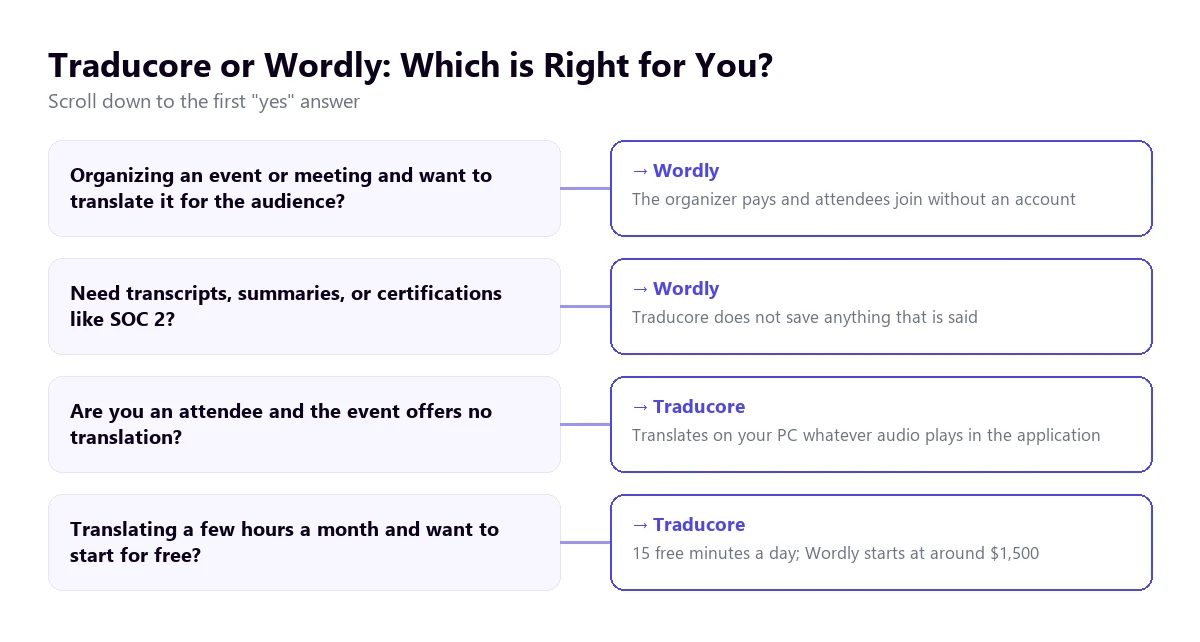
- Organizer of a conference or meeting with an audience from several countries: Wordly. It’s exactly what it’s made for.
- University or training center with international students and classes every week: Wordly, with an annual package and the education discount.
- Attendee at a webinar or virtual fair without translation: a translator on your PC. If the event is on Zoom, you have the steps in how to translate a Zoom meeting into English.
- Freelancer with clients in another language who needs to understand and reply: Traducore, with the Video call mode. If the meetings are on Teams, also check out the options for Teams.
- Small team with a few international meetings a month: probably neither of the two to start with; the translation features of the meeting platform itself or a PC translator are more cost-effective than an annual package.
If neither fits, you have more tools in the comparison of voice translators for PC, and direct comparisons with DeepL Voice and JotMe. If you are comparing the machine with a person, we cover it in the guide on the human interpreter.
More questions about Wordly
How much does Wordly cost?
According to its website, in November 2026, from about $1,500 for a 10-hour package used over 12 months. There are packages of 25, 50, 100, 250, and 500 hours or more, with volume discounts, for non-profits, and for education. You pay only for the time used, without rounding up, and all languages are included in the price.
Does Wordly have an app?
Attendees don’t need one: they join from the browser with a link or a QR code. The speaker uses the Presenter app, and there are apps for Zoom and Teams that are installed from their app stores. Its website also links to Google Play and the App Store, but doesn’t detail what those apps do.
Does Wordly support Spanish?
Yes. Spanish is on its language list in two variants, from Spain and from Mexico, for both the speaker and the listener. Its website also has pages in Spanish, like the pricing page.
So, which one do we use?
We don’t organize conferences: we attend meetings with clients and suppliers, webinars, and training sessions on our PCs. For that we use Traducore, because we don’t depend on the host having purchased anything and because we can reply with translated voice. If tomorrow we were to set up an event with an audience from ten countries, Wordly would be the first tool we’d request a demo for. They are two answers to two different questions, and most likely only one of them is yours.
Translate from your side of the screen
Voice and subtitles from any Windows application, without asking anything of the organizer. 15 free minutes a day.