
Talkao and Traducore solve different problems: Talkao is a family of mobile apps that translates what you say or read in front of another person, and Traducore is a Windows-only program that translates whatever plays on your computer. Search for “Talkao” on Google and almost everything that comes up belongs to the brand itself: its apps, its text translation site and its language courses. Traducore doesn’t compete with all of that, only with one small part of it: understanding a conversation or a video while it plays.
Put plainly: for traveling, ordering a coffee in another language or chatting with someone standing in front of you, a mobile app like Talkao is the natural choice, and we don’t do that. For following a course, a series or a video call on your computer, a program that listens to that application fits better. The Talkao data comes from its official website, checked in November 2026. We haven’t tested its apps for this article, so we don’t measure its translation quality or delay: we tell you what it publishes and what it doesn’t.
Traducore is our product
Worth knowing before you read on. We compare against what Talkao publishes, point out the figures on its site that don’t add up, and say where it beats us, which in several areas is by a wide margin.
In short
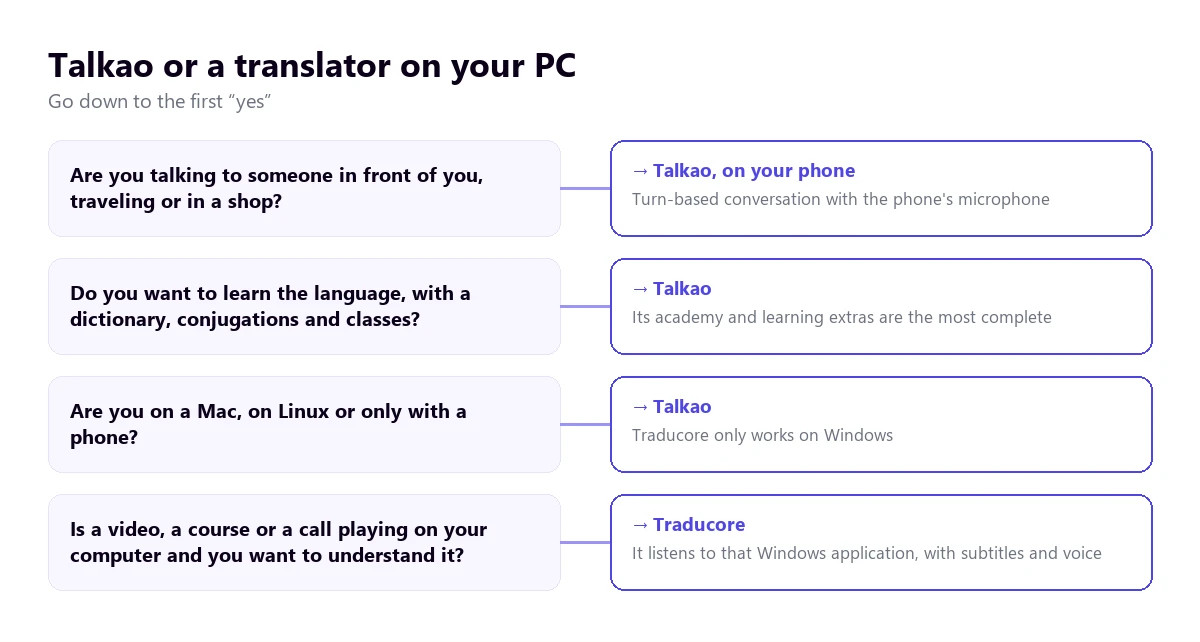
- You’re talking to someone in front of you, while traveling or in a shop: Talkao, on your phone and in turns.
- You also want to learn the language, with a dictionary, conjugations and classes: Talkao.
- You’re on a Mac, on Linux or only have a phone: Talkao. Traducore only works on Windows.
- You want to understand a video, a course or a call playing on your computer: Traducore.
- You want to start with a clear free plan: Traducore gives you 15 minutes a day; the free plans on Talkao’s site are those of its academy and its text translator.
In this article
- What Talkao is and what it isn’t
- Talkao and Traducore, side by side
- The phone’s microphone versus your computer’s audio
- What happens if you try to translate your PC’s audio with Talkao
- Where Talkao wins: conversation in person
- Languages: four figures on the same website
- Price: weeks on one site, hours on the other
- Learning languages: what Talkao has and we don’t
- Data and privacy
- How to run a fair test
- Where each one wins
- What to choose depending on what you want to do
- More questions about Talkao
- So, which one do we use?
What Talkao is and what it isn’t
Talkao is a brand of mobile translation apps: Talkao Translate, AR Translate, Camera Translator and others, for Android, iOS and Huawei. Behind it is a company from Málaga, TALKAO, S.L., according to its App Store listing, and a website with two separate worlds: the online AI translator for text and documents, and an academy with language classes.
That mix explains why Google’s results can mislead. Many are English, Italian or Japanese lessons and vocabulary lists, which have nothing to do with translating speech. And its own site boasts a huge user base but gives three different download figures: over 30 million on the home page, over 20 on the app page and over 25 on another. None of this is serious. It does suggest the site was written piece by piece, and that you should trust what it says about a feature more than its marketing numbers.
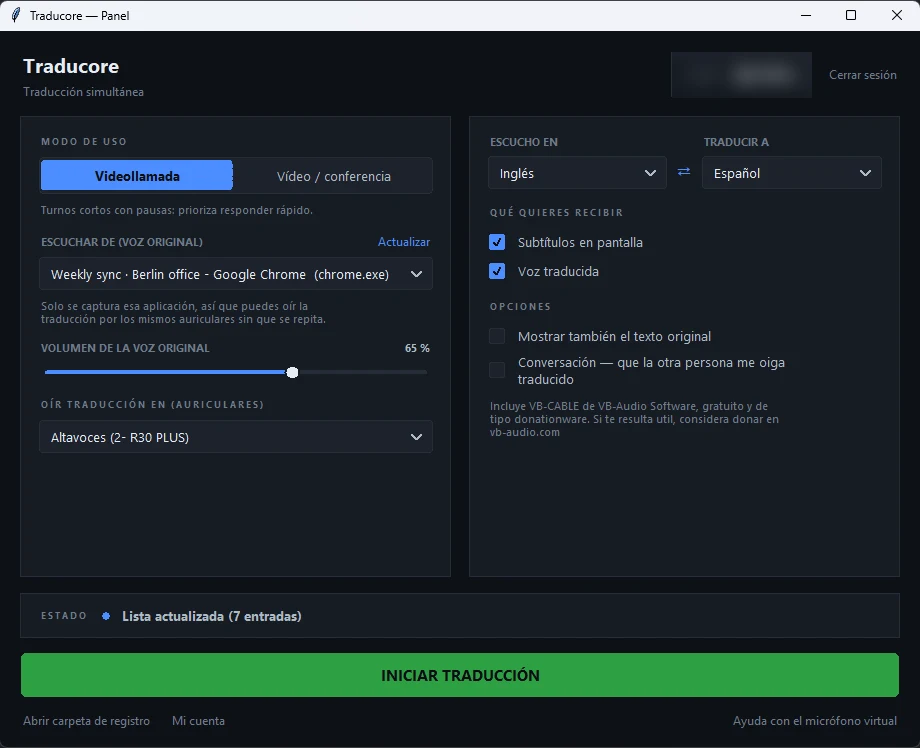
Traducore is much narrower: a program for Windows 10 and 11, with a Video / conference mode for listening and a Video call mode for conversing. It doesn’t teach languages and has no mobile version. It does one thing, translating your computer’s audio, and it does it on Windows.
Talkao and Traducore, side by side
| Tool | Where it lives | Where it listens | What you get | Languages | Free | Price |
|---|---|---|---|---|---|---|
| Traducore | Program on your PC with Windows 10 or 11 | The application you choose, without going through a microphone | Voice and subtitles, with the original voice in the background | Translates into 78 | 15 min a day | From €7.95 / 2 h a month |
| Talkao | Android, iOS and Huawei apps; text website and courses | The phone’s microphone | On-screen translation, audio of the translation, history and favorites | Between 45 and 125, depending on the page | Free plan on the website (academy and text); the app’s, not confirmed | App: not confirmed; website: from €2.65 a week |
The phone’s microphone versus your computer’s audio
The important difference isn’t the language or the price, but how each tool finds out what is being said. Talkao puts it in the same words across its pages: turn on the microphone, press the record button and speak into the device. Its “Automic” option detects the language without you pressing anything and lets the conversation flow, but it is still the microphone doing the listening.
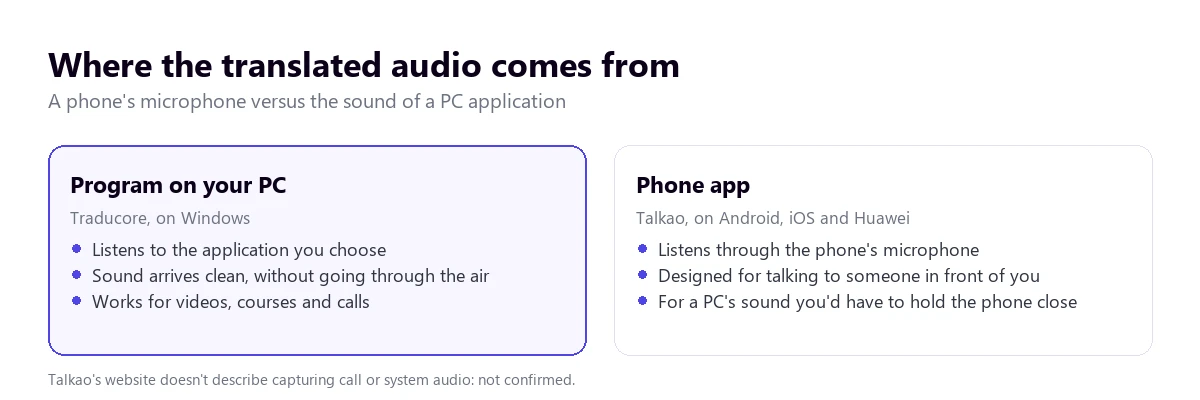
It’s a perfect design for a face-to-face chat and a so-so one for other uses. A microphone picks up the voice and also the echo of the room, the street noise and the person talking next to you. Traducore avoids all that, because on Windows 11 it captures the sound of the application you choose: it doesn’t hear your room or mix in other applications. If you choose the browser, all its tabs come in, because Windows separates audio by application, not by tab. On Windows 10 it captures a whole audio device.
What happens if you try to translate your PC’s audio with Talkao
It’s the question of someone arriving from Google with “how can I translate a voice audio?”. Talkao’s website doesn’t describe capturing call audio or system audio, and we haven’t found any desktop app for Windows or Mac: what it confirms is the phone. The honest answer is that it isn’t confirmed and you’d have to test it.
With a route that does exist, the microphone, you can improvise: hold the phone near the speakers and let it listen. It works in a quick test and fails as soon as the audio has music, several voices or low volume. There is also no way for the phone to translate and for you to speak at the same time in a video call without them hearing each other. For audio you already have as a file, other tools transcribe it without going through the air; we cover that in the guide to translating audio from English to Spanish.
Where Talkao wins: conversation in person
There is no doubt here: in a conversation with the person in front of you, a phone beats a desktop program, among other reasons because a PC doesn’t fit in your pocket. Talkao offers real-time conversation, automatic language detection and audio of the translation, with a setting to play it automatically. It adds “Connect”, a feature for talking remotely with other users of the app, and a video translator that works with the camera, not with sound.
Traducore doesn’t play in that field. Its Video call mode is for conversing inside a call you already have on your computer: your voice is translated and goes out through a virtual microphone that the program installs the first time, with Windows administrator permission. In Teams, Zoom or Meet you choose “CABLE Output” as the microphone. With speakers it works in turns, because your microphone isn’t sent while something is playing; with headphones it flows better.
Languages: four figures on the same website
Talkao’s website doesn’t give one language count but four. The voice translation page says over 125. The real-time translator page says over 45. The real-time conversation page, over 50, and the advanced online translator and plans pages, over 100. Each figure may count something different: text languages, voice, conversation. But the site doesn’t clarify, so you need to check your language pair in the app before relying on it.
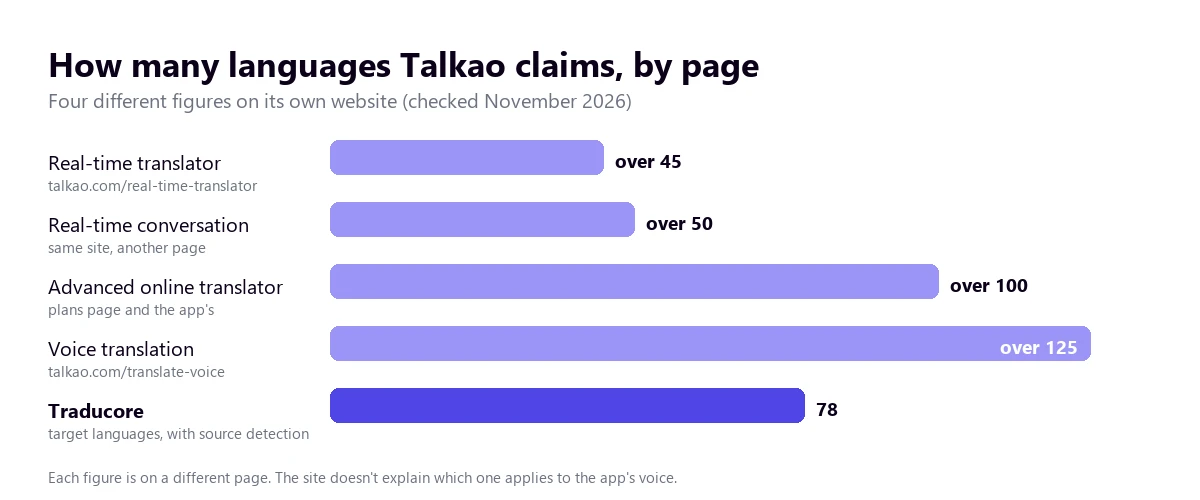
Traducore detects the source language and translates into 78, without promising the same quality in all of them: between widely used languages, such as English, Portuguese or Spanish, it does very well, and in uncommon pairs you need to test first. Also, the free translated voice exists only in Spanish, English, French, German, Italian and Portuguese; in other languages, the free plan gives subtitles. It’s a clear limitation, and we prefer to say it up front rather than let you find it out.
Price: weeks on one site, hours on the other
On its website Talkao publishes three weekly plans: Free at €0 a week, Pro at €2.65 and Ultra at €4.50, billed weekly, monthly or yearly. But those plans are for the academy and the online text translator; none mentions voice translation. The app’s price doesn’t appear on the official site. The Spanish App Store listing, which is not the manufacturer’s, lists in-app purchases between €2.99 and €99.99, but that isn’t enough to know what each one gives.
Traducore is sold by hours of translation per month, VAT included. The Video plan costs €7.95 (2 h), €36.95 (10 h) or €108.95 (30 h). The Conversation plan, with the other person hearing you translated, €10.45, €49.95 or €146.95. You’ll find everything on the pricing page, along with the free plan of 15 minutes a day, no card and permanent, which also includes two-way conversation.
Comparing the two prices makes little sense, because you aren’t buying the same thing. If your use is translating on a phone while traveling, a weekly subscription of a few euros can work out well. If your use is several hours a month of courses, meetings or videos on a PC, paying by the hour is easier to predict. Either way, check what each plan includes first, because the name “Pro” says nothing by itself.
Learning languages: what Talkao has and we don’t
Talkao isn’t only a translator. Its website includes a dictionary, conjugations and expressions alongside voice translation, and an academy with English, Italian and Japanese classes, vocabulary by topic and levels. If your goal is to learn, rather than to get by, that is exactly what you want: the translation goes with you while you study.
Traducore has nothing similar. It shows the original text next to the translation, which helps you notice how something is said, but it doesn’t teach. If you want to study with what you already see on your computer, a speech translator and a class app complement each other instead of competing.
Data and privacy
Talkao’s website doesn’t explain what happens to your recordings in the app: not confirmed. All you can see on its pages is that the app lets you delete translations, favorites and the sound cache, and that it keeps a history. That is usual for an app of this kind, and it’s worth reading its privacy policy in the store before using it with sensitive conversations.
Traducore doesn’t store audio or text: the translation exists while it plays and disappears, with no record afterwards. That is an advantage if you’re translating a private meeting and a drawback if you wanted the text afterwards, because there is no transcript to download. There is no history to go back to either.
How to run a fair test
Both have a free version, so the sensible thing is to try them with your real case before paying. A test that resembles your use is worth more than any table:
- Pick a real audio of the kind you’ll use, with noise and someone interrupting, not a clean voice-over.
- Time the delay from the end of the sentence until you hear the translation, with your language pair.
- Test proper names, figures and dates, which is where a mistake costs the most.
- Repeat it where you’ll use it: in the street with the phone, or in the room with the PC and headphones.
- Check what the free plan includes: how many minutes, in which languages the voice speaks and whether it asks for a card.
Where each one wins
- Talkao wins in face-to-face conversation, in fitting in your pocket, in working on Android, iOS and Huawei, in automatic detection without pressing, in the dictionary and conjugations, in the language academy and in having gathered millions of users.
- Traducore wins in capturing the audio of any Windows application, in not depending on the microphone, in the original voice in the background with floating subtitles, in the virtual microphone for speaking in Teams, Zoom or Meet, in a daily free plan that never expires and in not storing anything.
Understand what plays on your computer
Voice and subtitles from any Windows application, without holding your phone up to the speakers. 15 free minutes every day, no card.
What to choose depending on what you want to do
- Traveling abroad, with taxis, shops and restaurants: Talkao or another phone app with turn-based conversation.
- Studying a language and wanting a translator that teaches you: Talkao, with its academy.
- Following a course or a webinar in another language from your computer: a program that listens to the browser. You’ll find more options in the guide to free audio translators.
- Working with calls on your PC and wanting to understand and reply: a program with a virtual microphone, as the guide to translating a call explains.
- Mac or Linux: Talkao, with its website or the phone. Traducore only works on Windows.
If you’re torn between more options, go through the comparison of speech translators for PC or the head-to-head comparisons with DeepL Voice and with JotMe.
More questions about Talkao
How can I translate a voice audio?
It depends on where the audio is. If it’s a conversation in front of you, with the phone app: you turn on the microphone and speak. If it’s a file, with a tool that transcribes and translates it. If it plays on your computer, with a Windows program that listens to that application.
Which AI translates best?
There isn’t a best one for everything. With fast voices and accents, noise matters more than the brand. The useful thing is to try two or three tools with the same audio, in your language pair, and compare names, figures and dates, which is where they all fail.
How do I turn on automatic translation?
In Talkao, the “Automic” option detects the language without you pressing the record button, and the “Play audio translations automatically” setting plays the translation by itself. In a desktop program, the source language is left on automatic detection or set by hand if only one is spoken.
So, which one do we use?
We use Traducore for what plays on the computer, and when we travel, a phone app: you don’t have to commit to a single tool. If you depended on in-person conversation, or wanted to learn the language while you translate, we’d ask for Talkao’s trial without hesitating and check your language pair first, given how variable the figure on its site is. The useful question isn’t which translates better on paper, but where what you want to understand is playing.
Understand and reply from your PC
Voice and subtitles from any Windows application, without holding your phone up to anything. 15 free minutes a day, no card.