A Korean to English voice translator works well with standard Korean from a newscast, a class, or a work meeting, but gets complicated with the verb at the end of the sentence, the three levels of politeness, and numbers, which are counted in tens of thousands. Korean is better covered than it seems: Teams translates it voice-to-voice, Zoom and Chrome subtitle it, and on the computer, there are programs that turn it into English voice or text while it plays. What not all tools have is the opposite direction, and you should know this before a meeting.
In this guide, we look at what Korean you will hear, why a machine needs to wait longer with this language than with others, what gets lost with politeness and English loanwords, how to read numbers and names properly, and what each option offers today: mobile, Teams, Zoom, Meet, Chrome, YouTube, WhatsApp, and a PC program. What we say about each platform comes from its official help documentation, checked in September 2026, and we warn you when that help doesn’t make it clear.
In short
- A series, a live stream, a class, or a call on the computer: a Windows program that listens to that app and gives you English subtitles or voice (path 1).
- Face-to-face, traveling in Korea, or in a store: the Google Translate app, speaking in turns and with a connection (path 2).
- A Teams meeting with a Copilot license: the Interpreter translates voice-to-voice between Korean and English. In Zoom, for now, subtitles only (path 3).
- A video inside Chrome: its live captions support Korean, for free and in text only (path 4).
In this article
- The Korean you will hear: Seoul, the regions, and TV series
- Why Korean forces a machine to wait
- Politeness, job titles, and loanwords: what a machine flattens
- Numbers, money, and dates: where to look twice
- Which tool to use depending on where the Korean is playing
- 1. Korean in any Windows program, with a voice translator on the PC
- 2. Google Translate on mobile, traveling in Korea
- 3. Meetings with Korea: Teams with voice, Zoom with subtitles
- 4. Chrome, YouTube, and WhatsApp
- From English to Korean: when you are the one speaking
- How to get a cleaner translation from Korean
- More questions about translating Korean by voice
- So, which one do we use?
The Korean you will hear: Seoul, the regions, and TV series
Korean is the official language of South Korea and North Korea, and is also spoken in communities in China, Japan, the United States, and Central Asia. It is written with Hangul, an alphabet created in the 15th century during the reign of Sejong, with letters grouped into syllable blocks. For a machine, the important thing is that the Korean most abundant on the internet, on television, and in training data is the southern standard, based on the speech of Seoul.
That is the Korean of newscasts, universities, companies, and most YouTube videos with good sound. With clean audio, an automatic system understands it well. Below that are regional accents and dialects: the Gyeongsang dialect, in Busan and Daegu, with an intonation that goes up and down a lot and its own words; the Jeolla dialect, in the southwest; and the Jeju Island dialect, so different that UNESCO treats it as a severely endangered language. North Korea also has its own standard, with different vocabulary and fewer English loanwords.
TV series and variety shows deserve a separate chapter. A Korean drama mixes the standard with dialects to characterize characters, informal speech between friends, whispers, background music, and cut-off sentences. A variety show is even worse: five people talking at once, canned laughter, and on-screen captions saying things no one pronounces. There, any voice translator drops in quality, and the best option is usually the official subtitles if they exist.
Why Korean forces a machine to wait
Any voice translation system does three things in a row: it turns sound into text, translates that text, and shows or reads it in English. With Korean, the second step has a structural problem: the verb goes at the end. The normal order is subject, object, and verb, so the word that says what happens, whether it is done or not, and with what degree of politeness, arrives last.
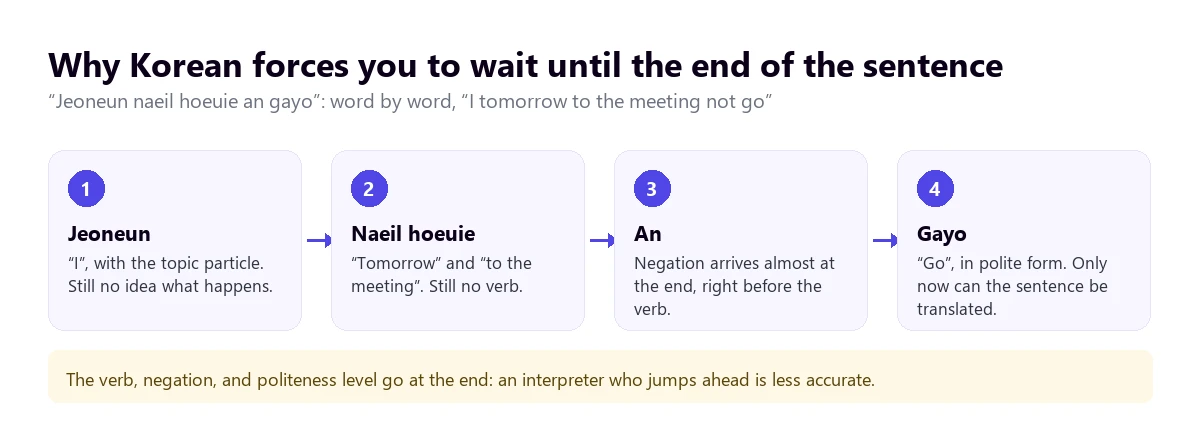
In practice, this means that a translator trying to go word by word, while the person is still speaking, makes many more mistakes than with French or Spanish. Systems that work by full sentences are more accurate, in exchange for a few seconds of delay. With Korean, it pays to accept them: a negation that arrives late changes the entire meaning of what you are told.
Particles attached to each word
Korean marks the function of each word with particles attached to the end: one for the topic, another for the subject, another for the object, another for the place. They are short syllables that blend with the previous word in fast speech. If speech recognition confuses them, the translation can change who does what without the sentence sounding strange in English.
Three consonants where an English speaker hears one
Korean distinguishes three versions of several consonants: a soft one, an aspirated one, and a tense one. “Dal” is moon, “tal” is mask, and “ttal” is daughter. An English speaker barely hears the difference, and a bad microphone doesn’t either. In a clean recording, the recognizer gets it right; with echo, noise, or a choppy connection, it is one of the first things to get lost.
The subject no one says
In Korean, the subject is almost always omitted, and pronouns like “you” are avoided because they sound blunt. A person is called by their name with a respect suffix, by their job title, or by their relationship: “seonsaengnim” for a teacher or doctor, “bujangnim” for a department head. English requires a subject, so when a tool translates, it has to invent a “he”, a “she”, or a “you”, and sometimes it chooses poorly.
Politeness, job titles, and loanwords: what a machine flattens
Korean changes the verb ending depending on who is being spoken to. There are many levels in the grammar, but in today’s speech, three are heard most: formal, everyday polite, and informal, which Koreans call “banmal”.
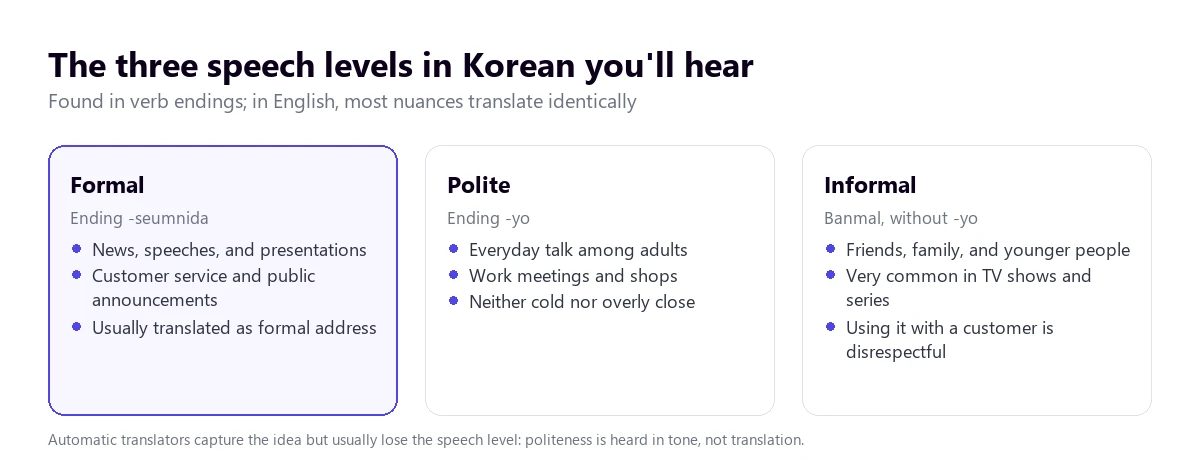
Machine translation keeps what is said and almost always loses how it is said. The formal and polite usually come across as neutral sentences; the informal, just the same. But the nuance of a person switching from polite to informal mid-conversation, which in Korean is a clear sign of trust or anger, disappears. If it matters, pay attention to the tone of voice, not the translation.
Job titles are another source of confusion. In a Korean company, people address others by their position plus the suffix “-nim”: “sajangnim” is the president or owner, “timjangnim” is the team leader. Translated, they appear as “Mr. President” or disappear. For you, the useful thing is knowing that calling someone just by their name sounds too familiar; if you reply in Korean, let the tool use the polite register.
English loanwords, called “Konglish”, deserve attention because they trick those who know English:
- “Haendeupon” (from “hand phone”) is a mobile phone, and “noteubuk” (from “notebook”) is a laptop, not a paper notebook.
- “Apateu” is an apartment in a block, and “wonrum” (“one room”) is a studio.
- “Seobiseu” (“service”) is what the place gives you for free: “this is seobiseu” means they won’t charge you for it.
- “Konsenteu” is a power outlet, and “hwaiting” (“fighting”) is a “cheer up!” or “let’s go!” heard everywhere.
And a trick of the ear, not the machine: in Korean, “ne” means “yes”, and “aniyo” means “no”. An English speaker who understands a few words might mistake that “ne” for a negation (like “nay” or “never”). Also, “ne” is used a lot as “uh-huh, I’m following you”, without meaning the person agrees.
Numbers, money, and dates: where to look twice
Numbers are the trickiest part of spoken Korean, because there are two systems and they are used at the same time. Native numbers (hana, dul, set…) are used to count things, state your age, and tell the hour; Sino-Korean numbers (il, i, sam…), for minutes, dates, money, phone numbers, and floors. “Se si samsip bun” is half past three: the hour with a native number and the minutes with a Sino-Korean one.
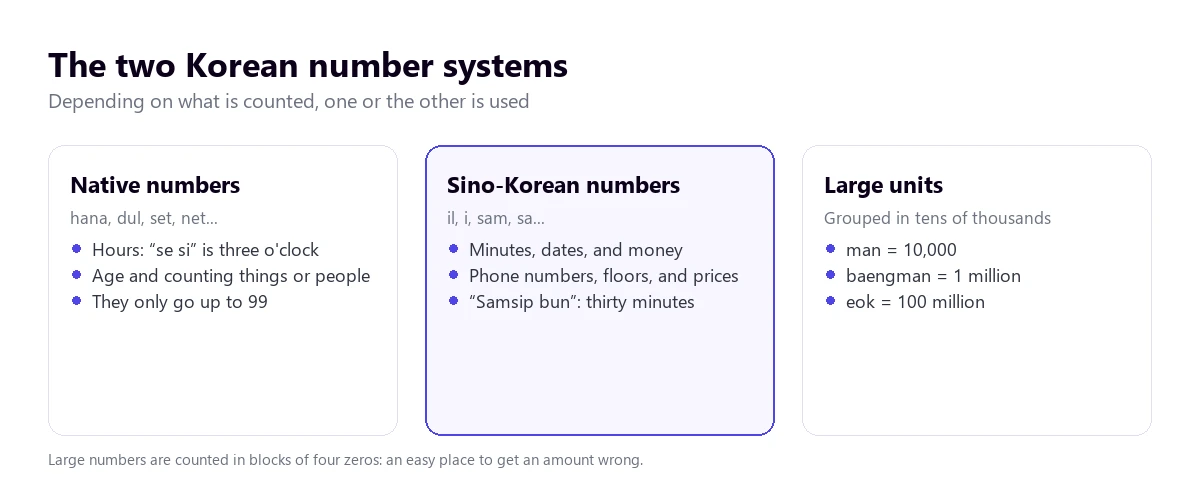
- Ten thousand by ten thousand. Korean groups large numbers by four zeros: “man” is 10,000, “baengman” is one million, and “eok” is one hundred million. A price of “osip man won” is 500,000 won. If the translation gets the unit wrong, the amount comes out ten times larger or smaller and still sounds perfectly fine.
- The won. Prices in won have many zeros: a coffee can cost 5,000 won. Always ask for the written figure and the currency.
- Age. For decades, in Korea, you were one year old at birth and gained a year every New Year. Since June 2023, the law uses international age, but in conversations and older series, you will still hear the other one.
- Dates. They are said from largest to smallest: year, month, and day. An “11 wol 3 il” is November 3.
- Names. The surname goes first and is almost always one syllable. Kim, Lee, and Park make up nearly half the population, so in a meeting there might be three “Mr. Kims”: the job title is what tells them apart.
The rule that applies to any tool: amounts, deadlines, and dates, in writing, in the meeting chat or in a confirmation email.
Which tool to use depending on where the Korean is playing
Korean is among the ten languages of the Teams Interpreter, among those with full support for Zoom’s translated captions, and on the example list for Chrome’s live captions. Meet and Zoom’s translated voice, however, do not include it. Use the tree to find your case; use the table to see what each option offers.
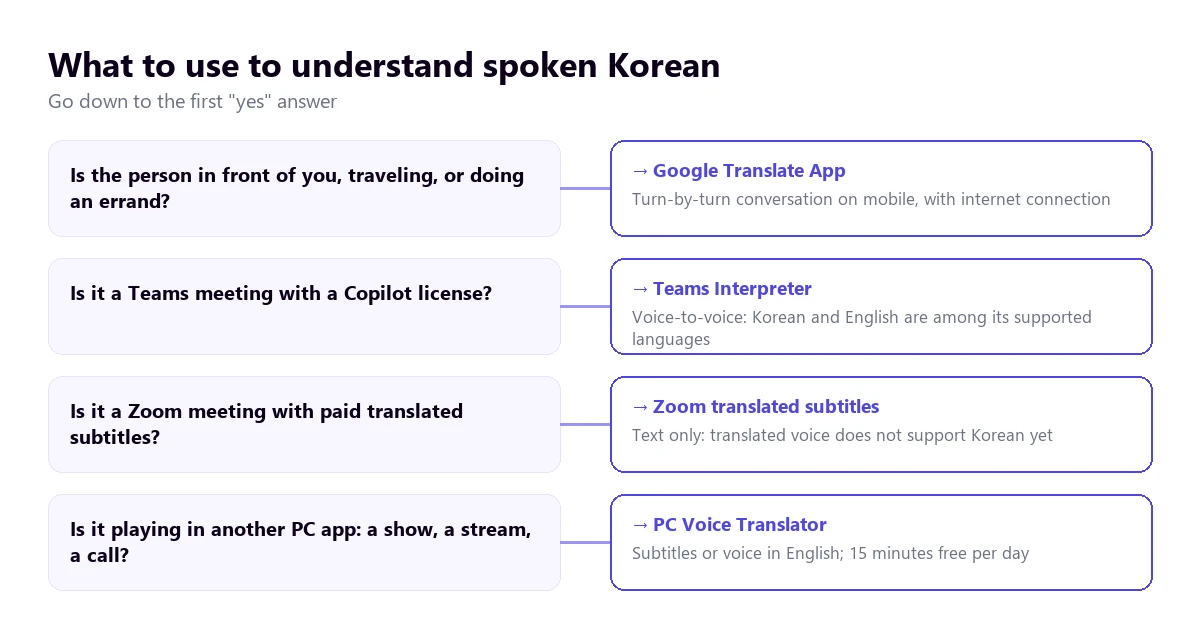
| Path | Where the Korean plays | What you get | Korean to English | Cost |
|---|---|---|---|---|
| Voice translator on PC | Any Windows application | English subtitles and voice | Yes; to reply in Korean with voice, paid plan | 15 min free per day; paid plans |
| Google Translate app | In front of you, on mobile | Turn-based conversation | Yes, with connection | Free |
| Teams, Interpreter | Teams meetings | Translated voice | Yes: both are among its ten languages | Copilot license (20 h per month per person) |
| Zoom, translated captions | Zoom meetings | Text only | Yes, with full support | Business Plus or higher, or add-on with no published price |
| Zoom Voice Translator | Zoom meetings | Translated voice | No: Korean is not even among the announced ones | Add-on |
| Google Meet, translated voice | Meet meetings | Translated voice | No: Korean is not on its list | Paid Workspace editions or Google AI Pro |
| Chrome live captions | Browser tabs | Text only | Yes, Korean is listed in its help section | Free |
| Voice notes and messages | Text transcription and translation | Not on Android: Korean is not on its lists | Free |
Not included in the table are the websites that top Google for this search, which work with a file you upload or with single sentences, nor the apps whose help documentation we couldn’t read. In Korea, Papago, Naver’s translator, is widely used; we don’t analyze it here because we haven’t reviewed it with its official sources.
1. Korean in any Windows program, with a voice translator on the PC
Much of the Korean that reaches a computer doesn’t come from a licensed meeting. It’s a live stream from a Korean creator, a class from a Seoul university, a broadcasted electronics fair, a drama on a platform without English subtitles, or a video call with a supplier through any app. For all that, a Korean to English voice translator that listens to that specific application and translates while it plays does the job.
Traducore works like this on Windows 10 and 11. On Windows 11, it captures only the application you choose, so notifications from other programs don’t slip in; if you choose the browser, everything playing in it comes through, across all its tabs. It works by sentences, waiting for the pause, which is exactly what a language with the verb at the end requires. With standard Korean and good sound, the translation is easy to follow; with a dialect, music, or several voices at once, you should test it first with something similar.
Step by step
- Open the application where the Korean will play and choose it in “LISTEN FROM (ORIGINAL VOICE)”.
- In “I HEAR”, check “Korean” if you know only Korean will be spoken; if not, leave the automatic detection.
- In “TRANSLATE TO”, set English and check if you want to read it, hear it, or both.
- If you are learning Korean, turn on “Also show the original text” and compare.
- Click start and play the video or start the call.
What you should know
The translation arrives with a delay of three to six seconds, sometimes a bit more in Korean, because long sentences don’t close until the verb. The English voice plays over the top and the original stays in the background, at 65% by default. Nothing of what is said is saved, neither audio nor text, and there is no version for Mac or mobile.
The Free plan gives you 15 minutes a day, with no card and no expiration. A specific note for Korean: on that plan, translated voice exists in English, so hearing a Korean video in English is included; the Korean voice, for the opposite direction, is not, and on the free plan it comes out as subtitles only. To reply with voice in Korean, you need a paid plan; you can find them on the pricing page.
Try it with a live stream in Korean
Hear what plays in any Windows program in English, with subtitles or voice. 15 free minutes every day, no card required.
2. Google Translate on mobile, traveling in Korea
On a trip to Seoul, in a Busan pharmacy, or at a market, the practical choice is the Google Translate app. It has a conversation mode where each person speaks in turns and the phone reads the translation out loud, and a listening mode to follow someone with headphones. The turn-based mode suits Korean well: the app hears the whole sentence, verb included, before translating.
Where it fails is the usual: a street with traffic, a crowded restaurant, two people talking at once, or someone who doesn’t wait for the phone to finish. With Korean, there is an extra tip: speak in short, complete sentences yourself, because the translation into Korean has to choose a politeness level and, with short, neutral sentences, it usually picks the polite one.
3. Meetings with Korea: Teams with voice, Zoom with subtitles
Teams
The Teams Interpreter agent translates voice-to-voice, and its help section includes Korean and English among its ten languages. Each participant chooses which language to hear the meeting in, with the original audio in the background. It requires a Microsoft Copilot license per person, with 20 hours of interpretation per month included; impromptu meetings, town halls, and webinars are left out. Microsoft documents that it turns speech into English text before translating it, so the omitted subject problem applies.
Teams’ translated captions, text only, include Korean and English among the target languages and require Teams Premium or Copilot. The licenses and steps are in the Teams interpreter guide.
Zoom
Zoom’s translated captions handle Korean and English with full support, if the host has Business Plus or higher or the Translated Captions add-on, whose price Zoom does not publish. Its translated voice, Voice Translator, works with English, Chinese, French, Japanese, and Spanish, and Korean is not even among the languages announced for later. If the meeting is an event with human interpreters, Zoom’s language interpretation includes Korean among its nine default languages. We explain it step by step in how to translate a Zoom meeting.
Google Meet
Meet’s translated voice only translates between English and six languages: French, German, Hindi, Italian, Portuguese, and Spanish. Korean is not there, not even with English. If the meeting with a Korean company is on Meet, translated voice is not an option today.
4. Chrome, YouTube, and WhatsApp
Chrome live captions
Google browser’s live captions transcribe and translate what plays in its tabs for free. Korean appears among the examples in its English help section, although the list is open and the exact list for Windows and Mac is not confirmed. It is turned on in “Settings” → “Accessibility” → “Live Caption”, adding Korean and choosing English for the translation. It only covers what plays in Chrome, and only in text.
YouTube
YouTube’s automatic caption translation depends on the video having them, and it carries over recognition errors. Automatic dubbing is turned on by the creator: its help table says it dubs from English to Korean, but from other source languages almost everything goes only to English, so an English track for a Korean video is usually available. Many large Korean channels upload hand-made subtitles, which are always better than the automatic ones.
With a voice note in Korean, WhatsApp doesn’t help. Its voice note transcription supports, according to the Android help section, English, Portuguese, Spanish, and Russian, and message translation on Android works with six languages, without Korean. For iPhone, the WhatsApp blog announces more than 19 languages but doesn’t publish which ones, so Korean is not confirmed. There are more ways in the guide to translate a WhatsApp audio.
From English to Korean: when you are the one speaking
Replying in Korean is trickier than understanding it, because the translation has to choose a register. Tools usually produce a polite and neutral Korean, which is the safe choice with clients and suppliers. What they won’t do is adjust the address to the age or job title of the other person, something that carries weight in Korea.
- Speak in short, complete sentences, without correcting yourself halfway: in Korean, the whole sentence is reordered and a correction breaks it.
- Avoid jokes, irony, and double meanings, which translate poorly in any pair and worse between such distant languages.
- Use job titles if you know them: “Director Kim” translates better than just “Kim”.
- In Teams, the Interpreter also translates your voice, provided everyone has a Copilot license.
- In Zoom, Meet, or another Windows calling app, a voice translator with a virtual microphone sends your sentence in Korean. With speakers, you speak in turns; with headphones, it’s more fluid.
How to get a cleaner translation from Korean
- Improve the audio: tense and aspirated consonants are the first things lost with a bad microphone.
- Take turns: two voices at once are the worst-case scenario for any translator, even more so with sentences that close at the end.
- Let sentences finish: if you interrupt before the verb, the translation comes out halfway.
- Prepare a list of names and terms: surnames, job titles, brands, and acronyms are where it fails the most.
- Distrust numbers and ask for them in writing.
- For series, prioritize official subtitles: a voice translator is for what doesn’t have them.
There remains a limit that no tool overcomes: to sign a contract, go to the doctor, or testify before a judge in Korea, you need a professional interpreter. We explain the difference in the guide on real-time translation. If you are interested in another Asian language with its own pitfalls, you have the one for Japanese to English and Chinese to English by voice.
More questions about translating Korean by voice
How can I translate a Korean audio into English?
If the audio plays on the computer, in a player, the browser, or a call, a voice translator for Windows that listens to that application gives it to you in English while it plays. If it’s a WhatsApp voice note, WhatsApp doesn’t translate it: play it on the PC with that translator, or on your mobile next to the Google Translate app in conversation mode.
Does Google Translate translate Korean in real time?
On the mobile app, yes, in turns: you speak, the app waits for you to finish the sentence, and reads the translation. It is not a continuous translation while someone speaks non-stop. On the computer, the Google Translate website only allows dictating single sentences.
Can a Korean conversation be translated in real time?
Yes, with nuances. In person, with the Google Translate app in turns. In a Teams meeting with a Copilot license, with the Interpreter, which translates voice-to-voice. In other PC applications, with a voice translator that translates what you hear and sends your reply through a virtual microphone. In all cases, there is a delay of a few seconds.
So, which one do we use?
For Korean playing on the computer, a presentation, a live stream, or a call that isn’t on Teams, we use our own voice translator on Windows, with the original text visible to compare names and numbers. In Teams meetings with Copilot licenses, we rely on the Interpreter. When traveling, Google Translate with mobile data. And always, amounts and dates in writing. If you are looking for another Korean to English voice translator for the PC, you have the voice translators comparison.
Understand the Korean playing on your PC
English voice and subtitles from any Windows program. 15 free minutes a day, no card required.