
A Ukrainian to English speech translator works well with the standard Ukrainian of a newscast, an interview or a meeting, and struggles with mixing in Russian, with the names of cities and people and with sentences that run together at full speed. Ukrainian gets less support than English or French on the big platforms: Zoom subtitles it with full compatibility, but neither Teams, nor Zoom nor Meet offers translated voice in this language. For hearing Ukrainian in English from a phone or a computer, there are options.
In this guide we look at which Ukrainian you’ll hear and how it differs from Russian, what gets lost in the move into English, how to look after proper names and figures, and what each route offers today: the phone, Zoom, Teams, Meet, Chrome, YouTube, WhatsApp and a program on your PC. The data for each platform comes from its official help pages, checked in November 2026, and we say when that help doesn’t make something clear.
In short
- A livestream, an interview or a call on your computer: a Windows program that listens to that application and gives you the translation in subtitles or voice (route 1).
- A person in front of you, at an appointment or a visit: the Google Translate app, in turns and with a connection (route 2).
- A Zoom meeting: its translated captions include Ukrainian with full compatibility. There is no translated voice in Ukrainian in Zoom, Teams or Meet (route 3).
- A video, a voice note or a chat: neither Chrome’s captions nor WhatsApp name Ukrainian in their help (route 4).
In this article
- The Ukrainian you’ll hear: from Kyiv to Lviv and calls with family
- Ukrainian and Russian: relatives, not the same language
- Why Ukrainian fools a machine
- Informal and formal “you”, and names: what a translation flattens
- Numbers, money and dates
- What to use depending on where the Ukrainian is playing
- 1. A Ukrainian to English speech translator for any Windows program
- 2. Google Translate on the phone, with the person in front of you
- 3. Meetings with Ukraine: Zoom with captions, Teams and Meet without voice
- 4. Chrome, YouTube and WhatsApp
- When you are the one speaking: from English to Ukrainian
- How to get a cleaner translation of Ukrainian
- More questions about translating Ukrainian by voice
- So, which one do we use?
The Ukrainian you’ll hear: from Kyiv to Lviv and calls with family
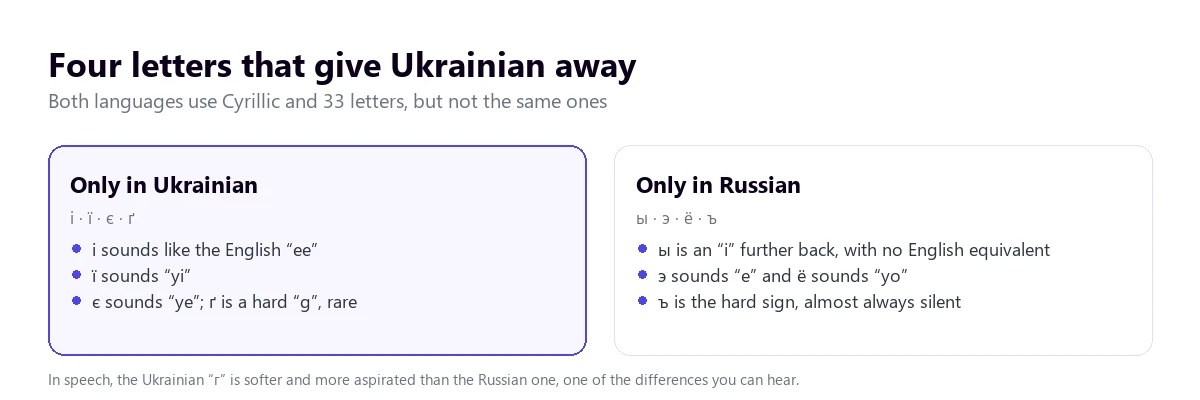
Ukrainian is the official language of Ukraine and is also heard across the diaspora, including a large community in Spain since 2022. It is written in a 33-letter Cyrillic alphabet, the same number as Russian, but with different letters. For a speech recognition system, what matters is standard Ukrainian, the Ukrainian of newscasts, universities and YouTube channels with good audio.
With clean sound, a machine understands it fluently. Underneath there are regional differences you can hear: the speech of the west, of Lviv and the Galicia region, with its own vocabulary and a distinctive rhythm; that of Kyiv, which serves as the model; and that of the east and south, where contact with Russian is stronger. And in calls with relatives the speech is normally fast, colloquial, full of nicknames and diminutives, exactly what appears least in the texts these systems are trained on.
Another frequent context is war news: reports with sirens, distant explosions, phone microphones and overlapping voices. It’s the worst possible audio for an automatic translator, and anyone using one should know it: quality drops a lot and every place name should be checked against a written source.
Ukrainian and Russian: relatives, not the same language
This is the point that confuses people most when they arrive looking for a translator. Ukrainian and Russian are East Slavic languages, close relatives, with many similar words. But they are different languages, with their own grammar, everyday vocabulary and pronunciation. A Ukrainian speaking fast doesn’t sound like Russian, and many speakers feel it’s disrespectful to be told otherwise.
There is also “surzhyk”, a mixed speech that combines words and structures from both languages, especially in the center and east of the country and among people who have switched language over their lives. A translator expecting Ukrainian can stumble over a sentence that starts in one language and ends in the other. And since 2022 many people who spoke Russian at home have moved to Ukrainian, so the same speaker can alternate depending on who they are talking to.
If you know Russian or need to compare, there is the guide to the Russian to Spanish speech translator, where we cover the other side of this confusion.
Why Ukrainian fools a machine
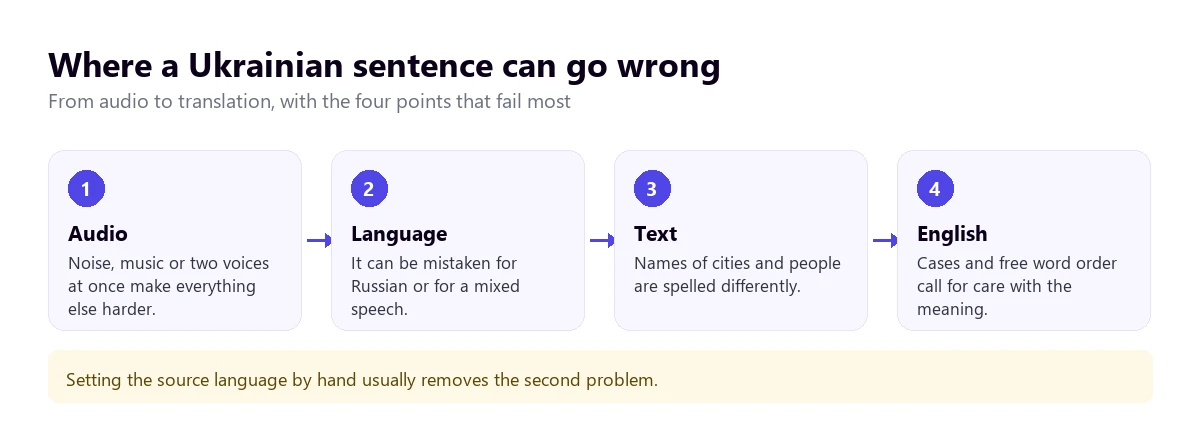
Apart from its Russian neighbor, the language has features of its own that complicate automatic translation, and knowing them tells you where to trust it less.
Seven cases and free word order
Ukrainian declines nouns in seven cases, including the vocative, used to address someone: “Іване” to call out to Ivan, or “пане Іване”. The ending of each word says what role it plays in the sentence, which is why the order can change freely. For the translator, it means the subject and the object don’t always sit where an English speaker would expect them.
An aspirated “г” and vowels that shift
The Ukrainian “г” sounds softer and more aspirated than the Russian one, almost like a weak “h”, and the letter “ґ” exists only for the hard “g”, which appears in few words. Unstressed vowels, besides, are pronounced with timbres that vary by region. With phone microphones or tired voices, the short syllables at the end of the word get lost, which is exactly where the ending that carries the meaning is.
Fast speech and filler words
In a real conversation there are cut-offs, repetitions, “ну” and “значить” everywhere. A system that understands a newscast may hesitate with an informal chat, and the translation comes out more literal and with broken sentences. It isn’t a flaw specific to Ukrainian, but it is what shows most.
Informal and formal “you”, and names: what a translation flattens
Ukrainian distinguishes between “ти”, for close address, and “ви”, used for respectful address and for several people, much like the Spanish “tú” and “usted”. An automatic translation usually picks a register without telling you, and in a conversation with a client or an official it can sound drier or more familiar than it was.
Place and personal names are the other problem. Each city has a Ukrainian spelling and a Spanish one, and they don’t always match: Kyiv or Kiev, Kharkiv or Járkov, Lviv or Leópolis, Odesa or Odesa. First names have diminutive forms that change completely: Oleksandr, Sasha and Sashko are the same person. The prudent thing is to ask for the original text alongside the translation so you can check what the system heard.
Numbers, money and dates
The currency is the hryvnia, which a translation may leave as “grn”, “UAH” or “hryvnias”, and nobody converts it to euros for you. Large numbers, dates with the month in the genitive and amounts said quickly are a classic source of errors. For any figure that matters, ask for it in writing or repeat it aloud at the end: “so, twelve thousand hryvnias, correct?”.
What to use depending on where the Ukrainian is playing
Ukrainian is among the languages with full compatibility in Zoom’s translated captions and among the target languages of Teams’. None of the platforms’ meeting voice translators include it. The tree takes you to your case; the table summarizes what each option offers.
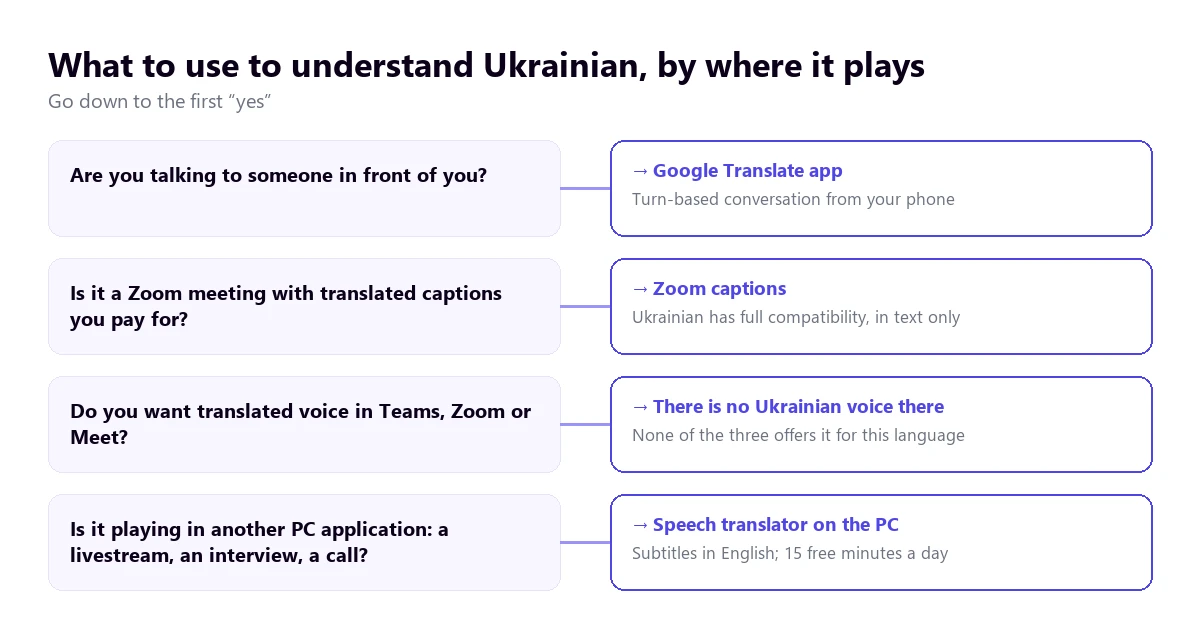
| Route | Where the Ukrainian plays | What you get | Ukrainian to English | Cost |
|---|---|---|---|---|
| Speech translator on the PC | Any Windows application | Subtitles and voice in English | Yes; to reply with voice in Ukrainian, paid plan | 15 free min a day; paid plans |
| Google Translate app | In front of you, with the phone | Turn-based conversation | Yes, with a connection; check your phone’s list | Free |
| Zoom, translated captions | Zoom meetings | Text only | Yes, with full compatibility | Business Plus or higher, or an add-on with no published price |
| Teams, translated captions | Teams meetings | Text only | Ukrainian appears as a target; as a spoken language, not confirmed | Teams Premium or Microsoft Copilot |
| Teams, Interpreter | Teams meetings | Translated voice | No: Ukrainian isn’t among its ten languages | Copilot license |
| Zoom Voice Translator and Meet | Meetings | Translated voice | No: neither includes Ukrainian | Add-ons or paid editions |
| Chrome captions | Browser tabs | Text only | Not confirmed: it isn’t in the examples in its help | Free |
| Voice notes and messages | Transcription and text translation | Not on Android: Ukrainian isn’t in its lists | Free |
We leave out the websites that top Google for this search, which translate an audio file you upload or single phrases, and the store apps whose data policy we haven’t been able to review.
1. A Ukrainian to English speech translator for any Windows program
A good part of the Ukrainian that plays on a computer doesn’t come from a licensed meeting. It’s a YouTube livestream with no subtitles, an interview with an athlete, a newscast, a video call with family through some application or a talk by a supplier. For all of that you need a Ukrainian to English speech translator that listens to the specific application and translates as it plays.
Traducore, the translator we make, works that way on Windows 10 and 11, and Ukrainian is among its languages. On Windows 11 you point at the application you want to hear and the rest of the computer’s sounds stay out; if you point at the browser, all its tabs come in. We have fewer tests with Ukrainian than with Portuguese, so the honest thing is to test first with audio similar to what you’ll use.
Step by step
- Open the application where the Ukrainian will play and select it in “Listen from”.
- In “I listen in”, choose “Ukrainian”. If there may be Russian, English or another language, leave automatic detection on.
- In “Translate to” type English and decide whether you prefer to read it, hear it or both.
- Turn on “Also show the original text” to check proper names.
- Press start and begin the video or the call.
Before you use it
The translation runs three to six seconds behind, a little more with long sentences. The English voice plays on top and the original stays in the background, at 65% volume unless you change it. Nothing that is said stays recorded or written anywhere. The program is Windows-only, with no Mac or mobile version.
The free plan offers 15 minutes every day, with no card required and no end date. With Ukrainian there is one thing to know: the free translated voice exists in Spanish, English, French, German, Italian and Portuguese, so hearing a Ukrainian video in English falls within the free plan; voice in Ukrainian, for you to speak in the other direction, does not, and there the free plan stays at subtitles. To reply with voice in Ukrainian you need a paid plan, which you’ll find on the pricing page.
Try it with a Ukrainian livestream
Hear in English what plays in any Windows program, in subtitles or with voice. 15 free minutes every day, no card.
2. Google Translate on the phone, with the person in front of you
At an appointment, a consultation or a visit with someone who speaks Ukrainian, the practical choice is the Google Translate app. Its conversation mode lets each person speak in turns and reads the translation aloud. Turn-based mode suits this language: the app waits for the sentence to finish, ending of each word included. Google often adjusts the language lists by feature, so check Ukrainian voice on your phone before counting on it.
It fails where they all fail: a room with echo, two people talking at once or someone who doesn’t wait for the phone to finish. A tip specific to Ukrainian: say street, city and personal names slowly or show them written down, because spelling is the first thing that comes out wrong. For a medical consultation, a legal procedure or an immigration matter, a professional interpreter is still the answer.
3. Meetings with Ukraine: Zoom with captions, Teams and Meet without voice
Zoom
Zoom’s translated captions include Ukrainian and Spanish with full compatibility, if the host has Business Plus or higher or the translated captions add-on, whose price Zoom doesn’t publish. Its translated voice, Voice Translator, works with English, Chinese, French, Japanese and Spanish, and announces Portuguese, Arabic, German and Italian for later in 2026: Ukrainian isn’t there. Interpretation with human interpreters comes with nine languages by default, without Ukrainian, but it accepts custom languages, five per meeting. The steps are in how to translate a Zoom meeting.
Teams
The Teams Interpreter, which translates voice to voice, works with ten languages and Ukrainian is not one of them. The translated captions, in text, do include Ukrainian among the target languages and require Teams Premium or Microsoft Copilot; the help lists 57 spoken-language variants and we haven’t been able to confirm there that Ukrainian is recognized as a source language. Licenses are explained in the guide to the Teams interpreter.
Google Meet
In Meet, translated voice exists only between English and six other languages (French, German, Hindi, Italian, Portuguese and Spanish). With Ukrainian, there is no translated voice in Meet, not even going through English.
4. Chrome, YouTube and WhatsApp
Chrome captions
The Google browser’s automatic captions transcribe and translate for free whatever plays in its tabs, and its Spanish help gives a list of example languages where Ukrainian doesn’t appear. It’s an open list and the one for Windows and Mac isn’t confirmed, so it’s worth checking on your machine, under “Settings” → “Accessibility” → “Live Caption”. It covers only the browser and only in text.
YouTube
YouTube’s translated subtitles depend on the video already having subtitles, and they inherit the errors of their transcription. Automatic dubbing is up to the creator, and its help table shows that Ukrainian appears as a target language from English, not as a source language into Spanish. Big Ukrainian channels usually upload subtitles of their own, which are more reliable.
With a voice note in Ukrainian, WhatsApp solves nothing: according to the Android help its transcription supports English, Portuguese, Spanish and Russian, and its message translation on Android works with six languages, without Ukrainian. On iPhone it announces more than 19 languages without saying which. Other ways out are in the guide to translating a WhatsApp audio.
When you are the one speaking: from English to Ukrainian
Replying in Ukrainian has its pitfalls, mainly around register and names. Some habits help the other person receive what you mean:
- Short, complete sentences. A correction in mid-sentence throws off any automatic translator.
- Formal address with people you don’t know: the translation will turn it into “ви”, which is what’s expected on first contact.
- Proper names spelled out or written down, especially surnames or towns.
- In Zoom, Meet, Teams or another Windows application, a translator with a virtual microphone sends your sentence in Ukrainian. With speakers you speak in turns; with headphones, it flows better.
How to get a cleaner translation of Ukrainian
- Set the source language when you know it’s Ukrainian: automatic detection can hesitate with Russian or with mixed speech.
- Look after the audio: endings are short syllables, the first thing lost to noise.
- Ask people to speak in turns: when two voices overlap, the result gets much worse.
- Prepare names and acronyms of cities, companies and people, with their Ukrainian spelling.
- Repeat figures aloud at the end of the conversation.
- Check anything important against a written source, especially in noisy news.
When a lot is at stake, such as a contract, a medical appointment or a dealing with the authorities, a professional interpreter can’t be replaced; we explain it in the guide to real-time translation. If you’re interested in other languages with their own pitfalls, there are the guides to Arabic to Spanish and to Italian to Spanish.
More questions about translating Ukrainian by voice
What is the best Ukrainian to English translator?
It depends on where the Ukrainian is playing. With someone in front of you, the Google Translate app in conversation mode. In a Zoom meeting, its translated captions. For what plays on the computer, a livestream, an interview or a call outside Zoom, a Windows speech translator that listens to that application. For important texts or paperwork, a professional translator.
Does Google Translate translate Ukrainian by voice?
With the phone app, in conversation mode, which listens to a sentence, waits for you to finish and reads it out. It works in turns, not continuously, and it’s worth checking on your phone that Ukrainian is on the voice list. On the computer, the website only dictates single phrases and doesn’t translate what plays in another application.
Is there a live speech translator for Ukrainian?
Yes, with caveats. In person, the Google Translate app in turns. In Zoom meetings, live translated captions, text only. On the PC, a program that listens to any application and delivers subtitles or voice in English, with a few seconds’ delay. The translated voices of Teams, Zoom and Meet don’t include Ukrainian for now.
So, which one do we use?
As a Ukrainian to English speech translator, for the Ukrainian that plays on the computer, a livestream, an interview or a call outside Zoom, we use our Windows speech translator, with the original text in view so we don’t miss any name. In Zoom meetings with the feature paid for, its translated captions. In person, Google Translate with data. And always, figures and names in writing. If you’re comparing any speech translator for the PC, there is the comparison of speech translators.
Understand the Ukrainian playing on your PC
Subtitles and voice in English from any Windows program. 15 free minutes a day, no card.