
A Japanese to English audio translator understands the slow Japanese of a news broadcast or a class well, but stumbles with the pace of anime, Osaka speech, and, above all, long sentences, because in Japanese the important part comes at the end. Furthermore, Japanese is one of the languages with the most tools available: Zoom and Teams already translate it from voice to voice. The problem isn’t finding one, but knowing what gets lost along the way.
In this guide we explain why spoken Japanese is so different from English for a machine, what happens with politeness, names, and numbers, and what each method offers today: mobile, Zoom, Teams, Meet, Chrome, YouTube, and a computer program. We also cover the opposite direction, when you are the one who needs to sound in Japanese. Everything we mention about each platform is taken from their official help in September 2026, and when that help doesn’t clarify a point, we point it out.
In short
- Anime, a stream, a course, or a call on the computer: a Windows program that captures the audio of that application and translates it while it plays solves it (method 1).
- Traveling in Japan or with someone in front of you: Google Translate on your mobile, taking turns and with data, because offline live translation only works on specific devices (method 2).
- A work meeting: Zoom and Teams already have translated voice with Japanese and English, if the company pays for the feature; Meet doesn’t (method 3).
- A video you watch in Chrome, when reading is enough: its translated subtitles, at no cost (method 4).
In this article
- The Japanese you’ll hear: standard, Kansai, and fiction
- Why spoken Japanese confuses a machine
- Keigo: the politeness that a translation flattens
- Which tool to use depending on where the Japanese is playing
- 1. Japanese in any Windows program, with a voice translator on the PC
- 2. Google Translate on mobile, for traveling to Japan
- 3. Meetings with Japan: Zoom and Teams yes, Meet no
- 4. Anime, streams, and videos on Chrome and YouTube
- From English to Japanese: when you are the one speaking
- Numbers, dates, names, and anglicisms: where to look twice
- How to get a cleaner translation from Japanese
- More questions about translating Japanese by voice
- So, which one do we use?
The Japanese you’ll hear: standard, Kansai, and fiction
Unlike Chinese or Arabic, Japanese doesn’t hide several languages under the same name. There is a standard Japanese, “hyōjungo”, based on Tokyo speech, which is the one used in news, classes, companies, and most videos intended to reach the whole country. It is also the most abundant in the data used to train voice recognizers, and with it, the results are good.
Dialects exist and are noticeable. Kansai dialect, from the Osaka and Kyoto region, is the most famous: it changes verb endings (“akan” instead of “dame” to say something is no good), negation (“wakarahen” for “wakaranai”, I don’t know), and intonation. You will hear it from comedians, variety shows, and anime characters playing the funny guy or the merchant. Those from Tōhoku, in the north, or Okinawa are even further away, although they rarely appear as is in content intended for the general public.
There is a third Japanese that should be separated: fiction. In anime and video games, each character speaks in a purposely marked way. The samurai uses old forms, the shy girl ends sentences one way, the tough guy another, and there are catchphrases invented for a single character. In addition, they speak fast, shout, and voices overlap with music and effects. For an automatic system, it is a difficult case, even if the pronunciation is clear.
The practical consequence is simple: with a video from a Japanese company, a class, or an interview, expect a useful translation. With an anime episode or a stream from a creator who speaks fast and uses slang, expect to understand the plot and miss nuances.
Why spoken Japanese confuses a machine
Every voice translator chains three steps: it turns sound into text, translates that text, and shows or reads it in English. With French, almost all problems appear in the first step. With Japanese, the second step weighs as much as the first, because the Japanese sentence is built backwards compared to English.
The verb comes at the end
Japanese puts the subject and objects first and the verb at the end. Negation, verb tense, politeness, and whether the sentence is a question are attached to that verb, in the last syllables. In English we say “I am not going to the meeting tomorrow”, and the “not” appears right away. In Japanese you hear “to tomorrow’s meeting… attend… I will not do”, and until the last second you don’t know if it’s a yes or a no.
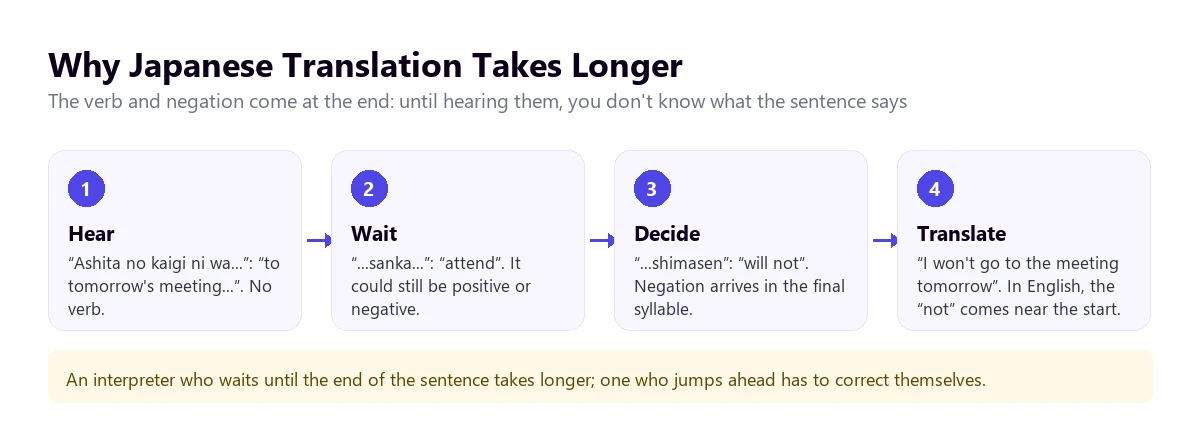
This has a direct effect on what you see. A translator that waits for the end of each sentence gives a correct translation, but with more delay than with Spanish, especially when the speaker chains long sentences. One that anticipates to save time ends up correcting itself on screen. Human interpreters know the problem well: with Japanese they have to wait longer, or anticipate and take risks. We explain this in more detail in our real-time translation guide.
What goes unsaid
In Japanese it is normal to omit the subject when it is understood from context. “Ikimasu” can be “I go”, “we go”, “he goes”, or “they go”. There are no articles or mandatory plurals either: “hon” is “book” or “books”. The translator has to choose a person and a number for the English sentence to make sense, and sometimes it chooses wrong without the sentence sounding weird. In a two-person conversation it usually gets it right; in a meeting with several, that’s where it makes the most mistakes.
Many words with the same sound
In writing, Japanese distinguishes words with kanji. When speaking, many sound the same or almost the same. “Hashi” can be chopsticks or bridge, and only the intonation changes. “Kami” can be paper, hair, or god. “Kikan” can be period, organization, or return. The recognizer chooses the word that fits with what comes around it, and almost always gets it right, but with short sentences or taken out of context the risk of it choosing the wrong one is real. If a translation sounds absurd to you, try thinking of another word with the same sound.
Keigo: the politeness that a translation flattens
Japanese has a politeness system, “keigo”, which is unlike the informal and formal pronouns found in some languages. It is not a matter of pronouns, but of different verb forms depending on who you are talking to and who you are talking about. There are three layers you should know even if you are not going to learn Japanese.
- Teineigo: the basic polite form, that of verbs ending in “-masu” and the copula “desu”. It is the one used with strangers and at work.
- Sonkeigo: forms that elevate the other person. To say that a client “comes”, a different verb is used than the one you would use for a friend.
- Kenjōgo: forms that lower what one does oneself, out of respect for the other. An employee does not say they “go” to the client’s office: they use a humble verb.
A machine translates all this into correct and neutral English. The information about the hierarchy is lost: you won’t know if the speaker is being formal, very formal, or addressing a superior. In most cases it doesn’t matter. In a negotiation, or to understand how your Japanese interlocutor sees you, it is a part of the message that the translation will not give you.
With keigo comes another custom that confuses anyone reading a literal translation: indirect noes. A Japanese person in a work context rarely says a flat “no”. They say “that is a bit…” (“chotto…”) and leave the sentence hanging, or “we will study it” (“kentō shimasu”). The translation will be faithful to the words, and you might understand a “maybe” where there was a “no”.
The same care applies to “hai”. It translates as “yes”, but in a conversation it is also used to say “I’m listening” or “I understand what you’re saying”, without it meaning agreement. These continuous nods, the “aizuchi”, are normal in Japanese. If the translation shows you “yes, yes, yes” while you explain a proposal, don’t take it as an acceptance.
Which tool to use depending on where the Japanese is playing
Japanese is better covered than most non-European languages: the two meeting platforms that already translate voice include it alongside English. What doesn’t exist is a tool that works for everything. The tree orders the questions and the table summarizes what each method offers.
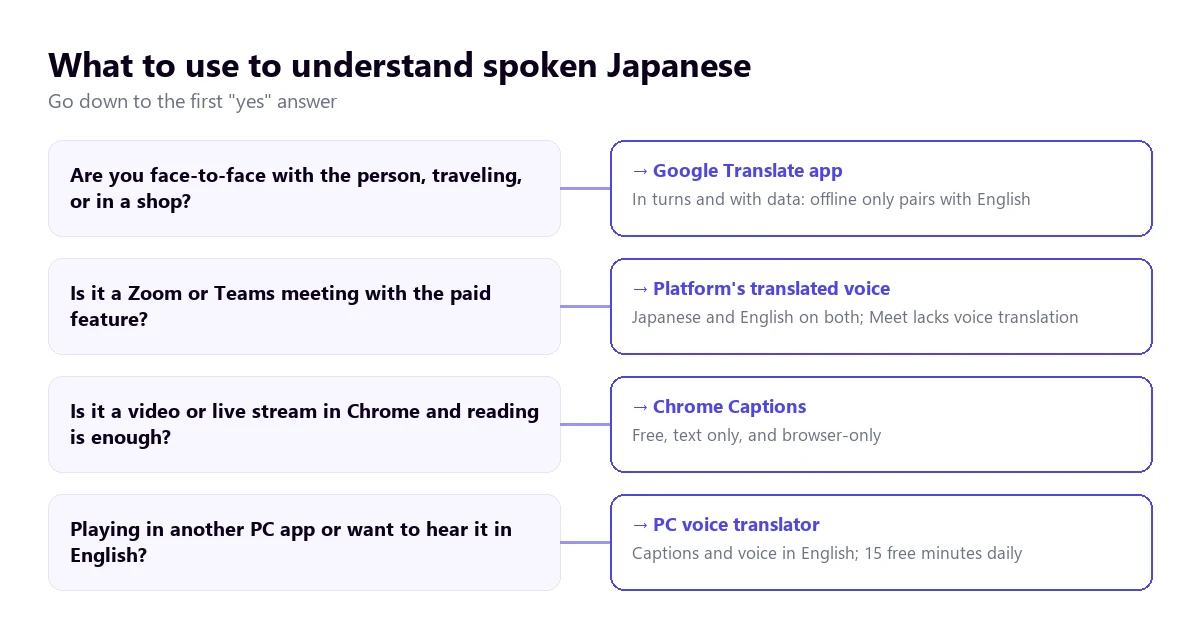
| Method | Where the Japanese plays | What you get | Japanese to English | Cost |
|---|---|---|---|---|
| Voice translator on PC | Any Windows application | Subtitles and voice in English | Yes | 15 free mins a day; paid plans |
| Google Translate app | In front of you, on mobile | Turn-based conversation | Yes, with connection | Free |
| Zoom Voice Translator | Zoom meetings | Translated voice | Yes, both are among its five languages | Add-on; price not published |
| Teams, Interpreter | Teams meetings | Translated voice | Yes, both are on its list | Microsoft Copilot license |
| Google Meet, voice translation | Meet meetings | Translated voice | No: Japanese isn’t there | Paid Workspace editions |
| Chrome Live Caption | Browser tabs | Text only | Yes, according to its help | Free |
| YouTube, auto-dubbing | YouTube videos | Translated audio track | Unconfirmed; from Japanese, almost always only to English | Free, if the creator enables it |
Outside the table are the websites that appear at the top of Google when searching for this topic, like Happy Scribe or VEED. They work on a file you upload and return the transcript or translated subtitles: they are useful for your own video or to keep the text, not to follow a live stream. We also haven’t included VoiceTra, a mobile app that appears on Google Play, because we couldn’t consult its help section.
1. Japanese in any Windows program, with a voice translator on the PC
Most of the Japanese that reaches a computer in the US or the UK doesn’t come from a company meeting. It’s anime on a platform without English subtitles, a Japanese creator’s stream, a video game tutorial, a cooking or pottery course, or a call with a supplier through a messaging app. For all that, a program that listens to the sound of the application you choose and gives you the translation while it plays is what you need.
Traducore is a Japanese to English audio translator of this type, for Windows 10 and 11. On Windows 11 it captures only the chosen application, so notifications from another program don’t mix with the Japanese; if you choose the browser, everything that plays in it comes through. Japanese is on its language list, but we haven’t tested it as thoroughly as Portuguese: with standard Japanese and good audio the translation is useful, and with anime or Kansai speech it’s best to test first with one of your videos.
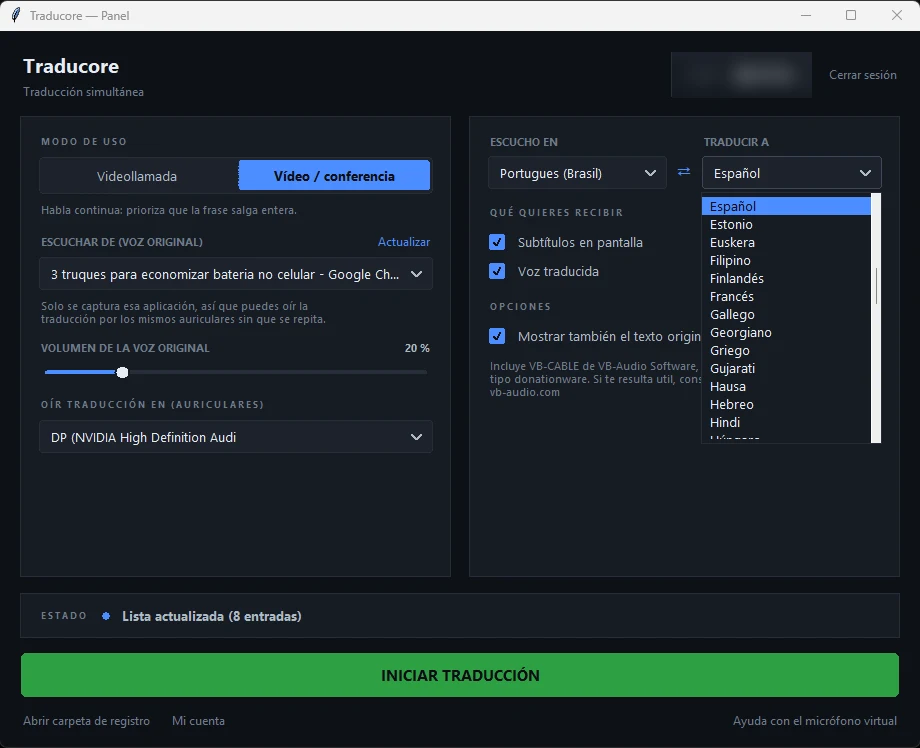
Step by step
- Open the program where the Japanese will play and choose it in “LISTEN FROM (ORIGINAL VOICE)”.
- In “I HEAR”, select “Japanese”. Automatic detection works, but fixing it prevents jumps when the speaker throws in English words.
- In “TRANSLATE TO”, leave English and choose subtitles, translated voice, or both.
- If you read some Japanese in romaji or kana, tick “Also show the original text” to compare.
- Click start and play the video or start the call.
What you should know
The translation arrives with a delay of three to six seconds, and with Japanese it is more noticeable in long sentences, because of what we mentioned about the verb at the end. In a series it doesn’t bother; in a conversation you have to leave pauses. The program doesn’t save the audio or the text: if you want to keep it, you should turn the audio into text with a transcription service. It only exists for Windows, not for mobile or Mac.
The Free plan gives 15 minutes a day, with no card and no expiration date. A specific note for Japanese: in that plan, translated voice exists for English, so hearing a Japanese video in English is included; what isn’t included is the Japanese voice, for the opposite direction, which remains as subtitles. Paid plans are on the pricing page.
Test it with a Japanese video
English subtitles or voice from the audio of any Windows application. 15 free minutes every day, no card required.
2. Google Translate on mobile, for traveling to Japan
In a Tokyo station, at a ryokan, or in an Osaka pharmacy, the Google Translate app is the practical choice. Its help describes a live mode with several ways to use it: Listen, to follow what they say with headphones; Conversation, taking turns and with the translation through the speaker; and Face-to-face, which splits the screen so each one reads in their language. The microphone detects when the language changes.
With Japanese it works better than you might expect if each person speaks in complete, short sentences. The order of the Japanese sentence plays in favor here: since the app waits for the turn to end, it doesn’t have to guess the end. What fails is the usual: background noise, rushing, and someone answering with a “hai” that the app translates as a resounding yes.
There is a limit that matters a lot in Japan, where you won’t always have data: according to the help consulted in September 2026, offline live translation exists only on Pixel 9, 10, and 11 and only in pairs with English. So Japanese to English offline is supported, unlike other combinations. If you are going to travel, a data SIM or a portable router saves you trouble. And on the computer, the Google Translate website doesn’t allow conversations: only dictating a sentence and stopping it.
3. Meetings with Japan: Zoom and Teams yes, Meet no
For working with a Japanese company, Japanese is in a good position. The two platforms that already translate voice include it with English, although both require a license or an add-on that doesn’t come with basic accounts.
Zoom
Voice Translator, announced by Zoom in July 2026, translates voice-to-voice with five languages: English, Chinese, French, Japanese, and Spanish. Each participant chooses which language they speak and which they want to hear, and adjusts the volume of the original voice against the translated one. It requires the desktop app 7.0.0 or higher and the Live Translation or ZoomMate add-on, with no published price. Its translated subtitles also list Japanese with full compatibility. The requirements are in our guide to translate a Zoom meeting.
If the meeting is important, Zoom also allows human interpreters in their own audio channels, and Japanese is among its nine default languages. You need a Pro, Business, Education, or Enterprise account, and to hire the interpreter on your own.
Teams
The Teams Interpreter agent translates voice-to-voice, and its help lists Japanese and English among its languages. It requires a Microsoft Copilot license, with 20 hours of interpretation per person per month, and doesn’t work with anonymous guests or in free Teams. Since the Japanese company will join with their own account, their participants also need a license to use it. We detail this in the Teams interpreter guide.
Google Meet
Meet’s voice translation works between English and six languages: French, German, Hindi, Italian, Portuguese, and Spanish. Japanese isn’t there. That leaves its translated subtitles, in paid Workspace editions and, according to the help, only “in certain language pairs” which it doesn’t detail, so we can’t confirm that Japanese to English is one of them.
4. Anime, streams, and videos on Chrome and YouTube
Chrome Live Caption
If the video plays in the browser, Chrome can caption it and translate the subtitles into English. It is activated in “Settings” → “Accessibility”, with Live Caption and Live Translate, after adding Japanese in “Manage languages”. Japanese appears in the list of examples in its help. The recognition is done on your computer and the text is sent to Google, not the audio. It’s free, but it only covers what plays in Chrome and only gives text.
YouTube
On YouTube there are two paths and both depend on the video. Automatic subtitle translation requires the video to have them, and with Japanese, when translating, recognition errors are amplified, because the sentence changes order completely. Automatic dubbing is activated by the creator, and from almost all languages other than English it dubs only into English: an English track for a Japanese video is usually the default. We explain it in the guide to translate YouTube subtitles.
What doesn’t work
WhatsApp translates written messages, but on Android only with six languages and Japanese isn’t there; its voice note transcription doesn’t support it either. Windows 11 Live Captions do translate any PC audio, but only on Copilot+ PCs and only into English or Simplified Chinese, which works perfectly for this case.
From English to Japanese: when you are the one speaking
The other half of the problem is being understood. Your English is recognized well by any system, so here the challenge is how the result sounds. Translated voice almost always produces Japanese in the “-masu” form, the standard polite one. It is correct for almost everything and no one will be offended, but it is not the form a Japanese employee would use with an important client.
Names are another point. In Japanese the surname goes first and a suffix is added: “Tanaka-san”, or “Tanaka-sama” for a client. An automatic translator doesn’t usually add those suffixes on its own, and if you just say “Kenji”, the translation might sound more familiar than you intend. Calling people by their surname with “-san” is the safe bet.
- With the person in front of you: Google Translate in conversation mode, each in their language and taking turns.
- On Zoom or Teams: the platform’s translated voice, each choosing which language they speak and which they hear.
- In other Windows calling applications: a voice translator with a virtual microphone that sends your translated sentence to the other side. There, the Japanese voice is paid.
A piece of advice that applies to any of the three: speak in short sentences and without double negatives. “It’s not that I’m not interested” translates poorly into any language, and into Japanese even worse.
Numbers, dates, names, and anglicisms: where to look twice
There are features of Japanese that no tool fully resolves. Knowing what they are tells you which sentences to always check, especially when money or deadlines are involved.
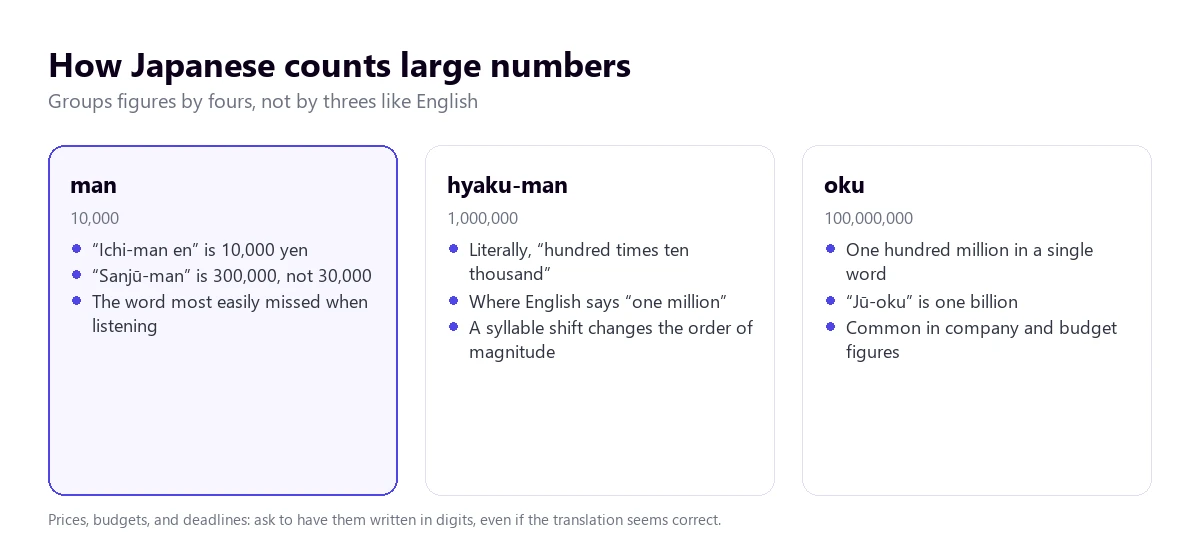
- Large numbers. Japanese groups by ten thousands. “Man” is 10,000, so 300,000 yen is said “sanjū-man en”, thirty times ten thousand. One million is “hyaku-man” and one hundred million, “oku”. If the recognizer misses a syllable, the amount changes order of magnitude.
- Counters. Things are counted with suffixes according to their shape: “-mai” for flat objects, “-hon” for long ones, “-hiki” for small animals. The translation usually comes out fine, but a misheard counter turns “three sheets” into “three bottles”.
- Dates. The order is year, month, and day. In addition, Japan uses its own era calendar alongside the Western one: 2026 is year 8 of the Reiwa era. If you hear “Reiwa hachi-nen”, it’s this year.
- Proper names. Surname first, given name second. A translator might leave them in that order or flip them, and in an attendee list that causes confusion.
- Anglicisms that aren’t. Japanese adopts words from English and changes their meaning. “Manshon” is an apartment, not a mansion; “konsento”, an electrical outlet; “baiku”, a motorcycle. If you rely on the English sound, you will be the one making the mistake, not the machine.
Paying for a more expensive tool doesn’t change any of this. What works is asking for amounts, dates, and names to be written in the meeting chat or in an email.
How to get a cleaner translation from Japanese
- Fix the source language. Japanese throws in many adapted English words, and automatic detection might hesitate on short sentences.
- Choose the content well. News, interviews, and classes come out well; action anime, variety shows, and streams with chat read aloud, worse.
- Lower the music. In videos and games, background music covers verb endings, which is exactly where the negation is.
- Accept the delay. With the verb at the end, waiting for the end of the sentence gives a better result than anticipating. In a conversation, leave clear pauses.
- Don’t trust the “hai”. Confirm agreements with a closed question and, better yet, in writing.
- Prepare a list of names. People, companies, and places with their reading in romaji, to recognize them when they come out distorted.
And a limit that shouldn’t be skipped: the machine helps you follow the conversation and understand a video, but a contract with a Japanese company, a medical consultation in Japan, or an official procedure deserve an interpreter or a text reviewed by someone fluent in both languages.
More questions about translating Japanese by voice
Where can I translate from Japanese to English for free?
For a conversation, the Google Translate app on mobile, free and with a connection. For a video playing in Chrome, its Live Caption with Live Translate, also free. For the audio of any other PC application, a Japanese to English audio translator for Windows with a free plan; ours gives 15 minutes a day with no card.
How to translate a Japanese text to English?
If you have it written, paste it into Google Translate or DeepL. If it’s in an image, a sign, or a menu, the camera in the Google Translate app translates it over the photo. If it’s audio, you first have to turn it into text, or directly use a voice translator that does both steps at once.
What is the best Japanese to English translator?
It depends on where the Japanese is playing. Traveling, Google Translate. In a meeting with a paid license, the translated voice of Zoom or the Teams Interpreter, which support both languages. For videos, courses, and calls on the computer, a voice translator that captures that application. None of them resolve keigo or indirect noes.
Is there a Japanese translator to watch anime in English?
No tool is designed just for anime, but two work. If you watch it in the browser, Chrome’s translated subtitles. If you watch it in a desktop app or want to hear it dubbed, a voice translator on the PC. In both cases, the fast speech, shouting, and ways of speaking of each character will make you miss nuances.
So, which one do we use?
For the Japanese that plays on the computer, whether it’s a video, a course, or a call that doesn’t go through Zoom or Teams, we use our own voice translator on Windows, with Japanese fixed manually and subtitles as well as voice. Traveling, the Google Translate app with data. In meetings with Japanese companies that already pay for Zoom or Teams, the platform’s own translated voice. And always, numbers and names in writing. If you want to compare the options for the PC calmly, you have our voice translators comparison, and if you also work with China, the Chinese to English voice translator guide.
Understand the Japanese playing on your PC
English subtitles and voice from any Windows application. 15 free minutes a day, no card required.