
A Chinese to English voice translator works well with clear Mandarin and complete sentences, and almost always fails at the same things: large numbers, proper nouns, and Cantonese. The right tool depends on where the Chinese is playing: in front of you, in a meeting, or inside a computer program.
In this guide, we review what exactly “Chinese” means when you choose it from a menu, why spoken Mandarin is harder for a machine than English, and the four methods that make sense, along with their requirements. We also cover the opposite direction, when you are the one speaking in English and the other person needs to hear you in Mandarin. The data for Google, Zoom, Microsoft, and Chrome comes from their official help pages, checked in September 2026; where the source doesn’t confirm something, we say so.
In short
- Is the Chinese playing on your computer (a video, WeChat, a call)? → a voice translator for PC that listens to that app (method 1).
- Is the person right in front of you? → the Google Translate app in conversation mode (method 2).
- Is it a Zoom or Teams meeting and the company pays for the feature? → their built-in translation, which includes Chinese (method 3).
- Is it a video in Chrome and reading is enough for you? → the browser’s translated subtitles (method 4).
In this article
- Mandarin, Cantonese, Simplified, Traditional: what you are actually choosing
- Why spoken Chinese is hard for a machine
- Which tool to use depending on the situation
- 1. Chinese in any Windows program, with a voice translator on your PC
- 2. The Google Translate app, to speak face-to-face
- 3. Zoom and Teams meetings with their built-in translation
- 4. Translated Chrome subtitles for videos in Chinese
- From English to Chinese: when you are the one speaking
- Numbers, names, and politeness: what always goes wrong
- How to get a cleaner translation from Chinese
- More questions about translating Chinese by voice
- So, which one do we use?
Mandarin, Cantonese, Simplified, Traditional: what you are actually choosing
The first trap is in the menu itself. Many translators offer “Simplified Chinese” and “Traditional Chinese”, and anyone would think they are two languages. They aren’t: they are two ways of writing. Simplified is used in mainland China and Singapore; traditional in Taiwan, Hong Kong, and Macau. To read a text, the difference matters. To translate voice, something else matters: what language is being spoken.
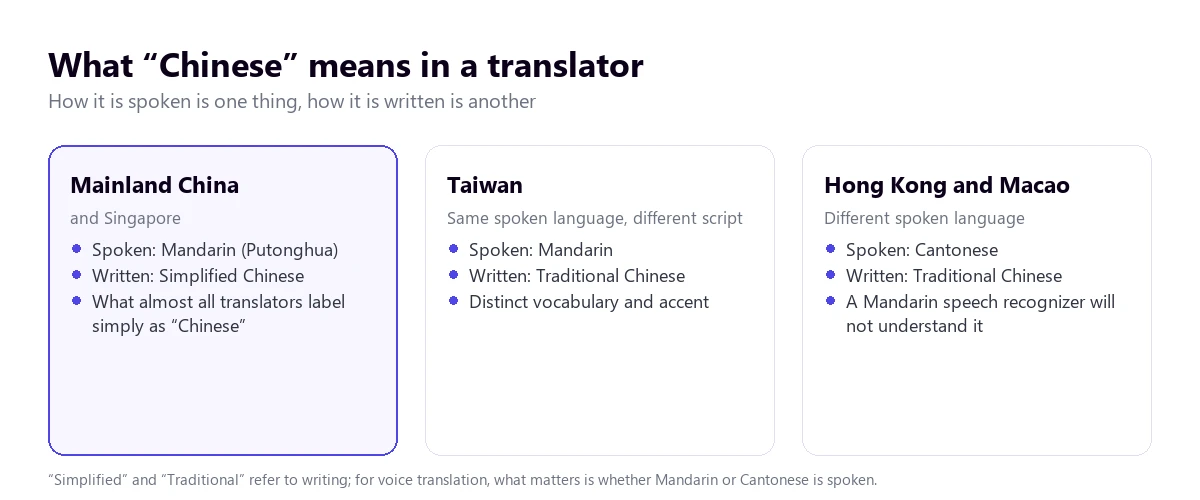
The majority spoken language is Mandarin, the standard that in mainland China is called Putonghua and is taught in schools. When a tool just says “Chinese”, it almost always refers to it. Cantonese is another language, not an accent: it has more tones, different words, and different grammar in everyday speech. A system trained for Mandarin doesn’t understand it, just like an English system doesn’t understand Dutch no matter how similar they might look on paper.
That is why, before choosing a tool, you should ask a simple question: where is the speaker from? If they are from Guangdong, Hong Kong, or Macau, and they speak in their native tongue, you need a tool that lists Cantonese by name. Of the ones we review here, only Zoom’s translated subtitles do so in their help pages. In the rest, “Chinese” means Mandarin.
Then there are nuances within Mandarin itself. Taiwanese Mandarin has its own vocabulary and accent, and the Mandarin from many southern provinces sounds different from Beijing’s, with consonants that get mixed up. Recognition systems are trained mostly on the standard, so a speaker with a strong regional accent yields more errors than a television presenter.
Why spoken Chinese is hard for a machine
A voice translator works in three steps: it recognizes what is said, translates it, and writes it or reads it out loud. In the Chinese-English pair, the first step is the tricky one, and the reason lies in how the language works.
Mandarin has tones: the same syllable changes meaning depending on the melody used to pronounce it. The textbook example is “ma”, which depending on the tone can mean mother, hemp, horse, or scold. Furthermore, the language is built with very few distinct syllables, barely a few hundred, so there are plenty of words that sound exactly the same and are written with different characters. The system has to deduce which one it is from the context.
In fast speech, tones soften and chain together, and that is where errors appear. A proper noun, which has no context to help, can be transcribed with characters that sound the same but mean something else, and the translation into English turns into a weird sentence. If a line makes no sense, it is almost always a name that the system has interpreted as common words.
Chinese text also doesn’t separate words with spaces. The system must decide where each one begins and ends before translating, and a wrong cut changes the meaning. Add to that something very common in business meetings: mixing English words into Mandarin sentences, especially product names, job titles, and acronyms. A recognizer set only to Chinese might write those words as if they were Chinese syllables.
Which tool to use depending on the situation
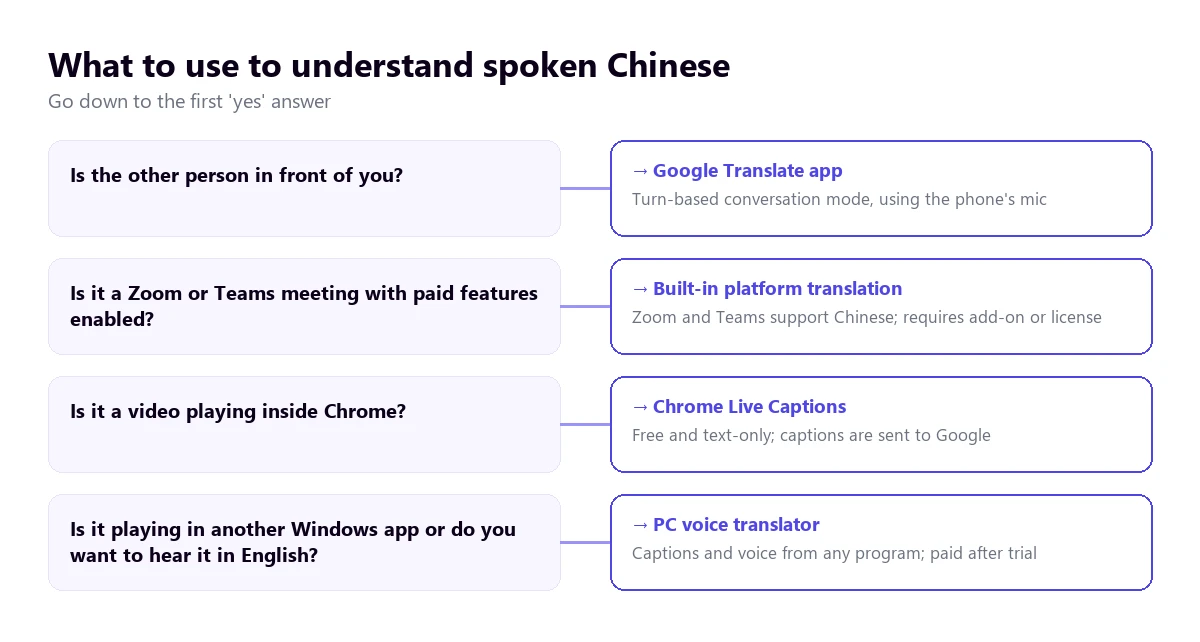
| Method | Where the Chinese plays | What you get | Cantonese | Cost |
|---|---|---|---|---|
| Voice translator on PC | Any Windows application | Subtitles and voice in English | Not as a separate option | 15 free min a day; more time, paid |
| Google Translate app | In front of you, on your phone | Turn-based conversation, text and voice | — | Free |
| Zoom (translated subtitles) | Zoom meetings | Text only | Yes, in its list | Business Plus plan or higher, or add-on |
| Zoom Voice Translator | Zoom meetings | Translated voice | No | Add-on; price not published |
| Teams (Interpreter) | Teams meetings | Translated voice | No | Microsoft Copilot license |
| Chrome subtitles | Videos in the browser | Translated text on screen | — | Free |
“—” means the official help doesn’t mention it. The Cantonese column is the one that gives the most surprises: almost no tool names it, and when it doesn’t name it, you have to assume it doesn’t recognize it.
1. Chinese in any Windows program, with a voice translator on your PC
A large part of the Chinese that reaches a computer doesn’t play in a meeting room, but in another application: a WeChat call, a downloaded video, a recorded class, or a video call with a supplier. That is what a program is for that listens to the audio of the app you choose and turns it into English subtitles or voice while it plays.
Traducore works like this on Windows 10 and 11. On Windows 11, it captures only the chosen application, so notifications or another program playing music don’t sneak into the translation. In its language list, Chinese appears as “Simplified Chinese” and “Traditional Chinese”, just like in most translators. Cantonese doesn’t appear as a separate option, and we haven’t tested it, so we don’t promise it.
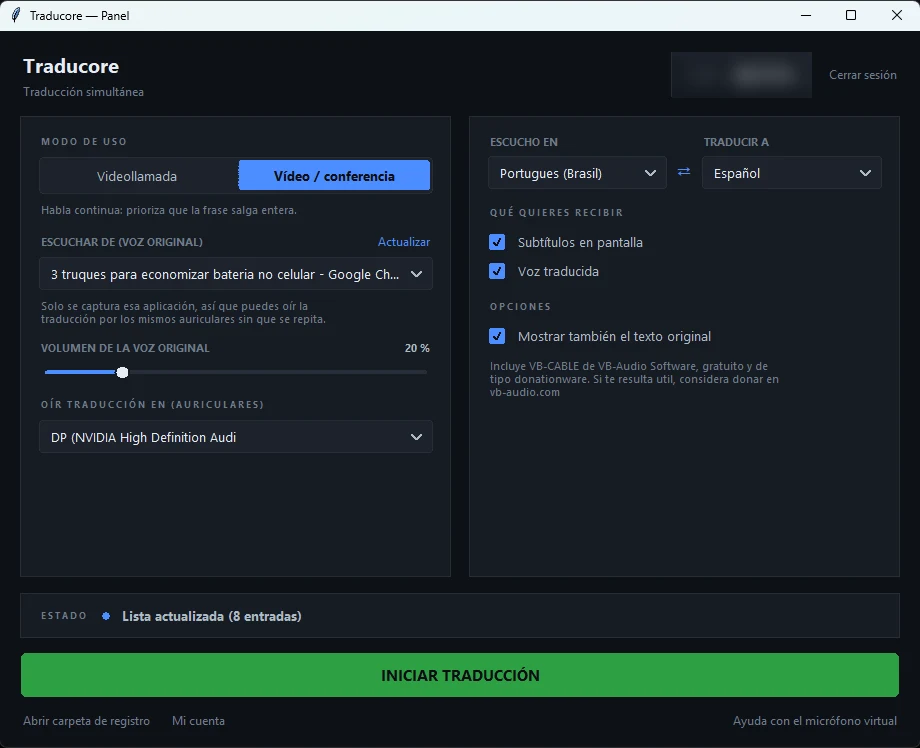
Step by step
- Open the app where the Chinese will play and, on the panel, choose it under “LISTEN FROM (ORIGINAL VOICE)”.
- Under “I HEAR”, set Chinese manually instead of leaving the automatic detection: with short audios or mixed English, detection fails more often.
- Under “TRANSLATE TO”, choose English and tick subtitles, translated voice, or both.
- Enable “Also show the original text” if you read some Chinese: seeing the characters next to the translation helps spot poorly recognized names.
- Click start and play the audio.
What you should know
The translation arrives with a three to six-second delay, which doesn’t bother you in a video but forces you to leave pauses in a conversation. The program doesn’t save the audio or the text, so it’s not useful for taking meeting minutes: for that, check our guide to convert audio to text. It is only for Windows and has no phone version. The engine provider declares Chinese among its languages, but the quality isn’t the same across all pairs: we have tested it thoroughly with Portuguese but not with Chinese, so the sensible thing is to test it with your own audio before paying.
For the opposite direction, when the other person needs to hear you in Mandarin on Teams or Zoom, the Conversation mode sends your translated voice through a virtual microphone: in the meeting app, you choose “CABLE Output” as your microphone. It is available in the Conversation plans and also in the Free plan, every day. Note: on the Free plan, the translated voice only exists in Spanish, English, French, German, Italian, and Portuguese, so for them to hear you in Mandarin you need a paid plan. The prices for each plan are on the pricing page.
Test it with a Chinese audio you have on hand
English subtitles or voice from any Windows application. 15 free minutes a day, no credit card required.
2. The Google Translate app, to speak face-to-face
If the person is right in front of you—at a trade show, in a store, or on a trip—the practical route is the Google Translate app. According to its help page, the live mode has several options: Listening, designed to hear the translation with headphones; Conversation, where you speak in turns and the translation plays through the speaker; and Face-to-face, which splits the screen so each person reads in their language. The microphone detects when the language changes, so you don’t have to press a button every turn.
It is free and is, by far, the most convenient for a short conversation. It has two clear limits. On the computer, it doesn’t work the same way: the web help literally says that you cannot speak and translate at the same time in the browser version, only press the microphone, dictate a sentence, and stop it. And offline translation, according to the same help page, is limited to certain Pixel models and pairs with English, so unless you have one of those devices, you will need data or Wi-Fi.
One tip that makes a difference: short and complete sentences. Conversation mode translates in turns, and a long turn with several chained ideas multiplies recognition errors. If you are speaking, finish each sentence before letting the app speak.
3. Zoom and Teams meetings with their built-in translation
If the Chinese comes up in a work meeting and the company already pays for certain features, the platform itself can translate. The big three treat Chinese very differently, and you should know this before inviting anyone.
Zoom
Zoom has two features. Translated subtitles convert automatic captions to the language each participant chooses, and its help page lists Cantonese, Traditional Chinese, and Simplified Chinese with full support; it is the only tool in this guide that names Cantonese. It requires the host to have a Business Plus or Enterprise account, or the translated subtitles add-on, for which the help page refers you to Sales for pricing.
The second is Voice Translator, announced in July 2026, which translates voice to voice. Today it covers five languages: English, Chinese, French, Japanese, and Spanish, so the Chinese-English pair is included. It requires the desktop app 7.0.0 or later and an add-on, and the administrator activates it. The details are in our guide to translate a Zoom meeting.
Teams
The Teams Interpreter agent translates voice to voice, and its help page includes “Simplified Chinese (Mandarin)” among its languages. It requires a Microsoft Copilot license, with 20 hours of interpretation per person per month, and does not allow anonymous guests. Live translated subtitles, which are text only, require Teams Premium for the organizer and have Simplified and Traditional Chinese as target languages. Everything each feature costs is in the Teams interpreter guide.
Google Meet doesn’t work for this pair
Meet’s voice translation always works with English as one of the two languages, and in its help page the others are French, German, Hindi, Italian, Portuguese, and Spanish. Chinese is not there, so a meeting in Chinese and English cannot be voice-translated with Meet.
4. Translated Chrome subtitles for videos in Chinese
For a video playing inside the browser—a stream, a class on a web platform, a video without subtitles—Chrome can generate subtitles and translate them. They are enabled in “Settings” → “Accessibility”, with Live Caption and Live Translate. For it to recognize Chinese, you first have to add it under “Manage languages”.
Chrome’s Spanish help page mentions Simplified and Traditional Chinese among the source languages, but it does so in a list of examples in the Chromebook Plus section, and the English version doesn’t match. For Windows and Mac, the exact list is not confirmed: test it with a video before trusting it. It is free, only provides text, and only hears what plays inside Chrome. The recognition is done on your device, but the subtitles are sent to Google to translate them.
From English to Chinese: when you are the one speaking
Many people look for the opposite direction: an English to Mandarin Chinese translator with audio, so the other person hears you in their language. The options change, because now the challenge is for your voice to come out translated on the other end.
- Face-to-face: the same conversation mode in Google Translate works both ways and reads the translation out loud.
- On Zoom: with Voice Translator, each participant chooses which language they speak and which they listen to, so you speak in English and your counterpart hears Mandarin.
- On Teams: the Interpreter translates both ways if each person has their license.
- In any other calling app on Windows: a translator with a virtual microphone, which sends your translated voice as if it were your microphone.
A curious detail: Windows 11 Live Captions translate into Simplified Chinese, from 27 languages, any audio on the PC. They aren’t useful for someone who wants to understand in English, but they can help a Chinese colleague following a presentation on your computer. They require a Copilot+ PC with Windows 11 24H2 or later, and the help page doesn’t detail if English is among those 27 languages, so you have to check it.
Numbers, names, and politeness: what always goes wrong
The tools change, but the weak points with Mandarin are the same across all of them. It is not bad luck: they are features of the language that any automatic system has to resolve without help, and knowing them beforehand tells you where to look twice.
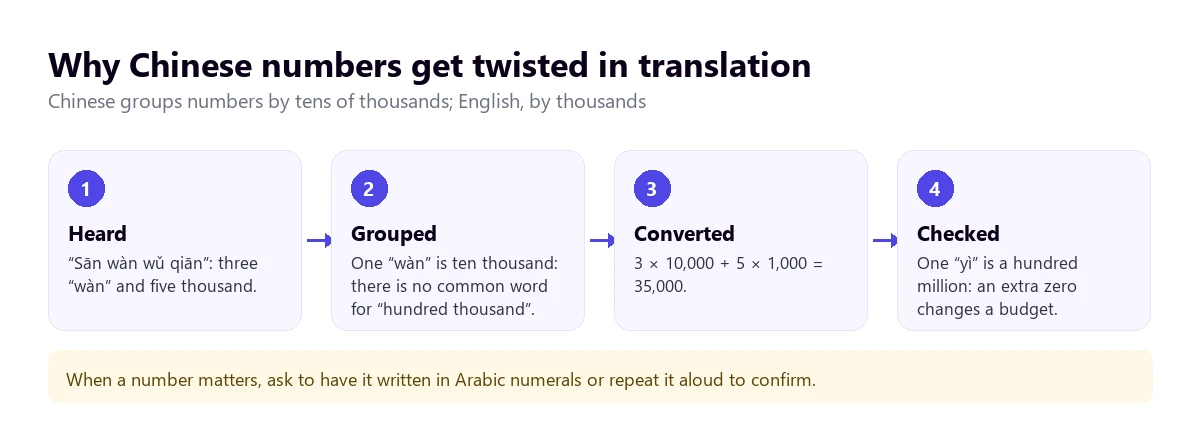
- Large numbers. Chinese counts in blocks of ten thousand (“wàn”) and one hundred million (“yì”), not by thousands. One hundred thousand is said “ten wàn”, and one million, “one hundred wàn”. Any slip-up when converting adds or removes a zero, and in a price or a budget, that is everything.
- People’s names. The surname goes first, and many people also use an English name for work. Without context, the system can transcribe a name as separate words and translate it literally.
- Brands and places. They have their own version in Chinese, sometimes by sound and sometimes by meaning, and the English translation doesn’t always recognize it.
- Four-character idioms. Chinese uses many set phrases, chengyu, which summarize a story in four syllables. Translated word for word, they sound like a riddle.
- Politeness. In a negotiation, it is common to say that something “will be studied” or “will need to be thought about” instead of saying no. The machine translates it well, but it doesn’t warn you about what it usually means.
Dates are another classic: the Chinese order is year, month, and day, and a misinterpreted “3 of 5” leads to an appointment in the wrong month. None of this is fixed with a better tool. It is fixed by confirming in writing what matters.
How to get a cleaner translation from Chinese
- Set the source language manually. Automatic detection hesitates with short audios and mixed English; telling it that it is Chinese avoids half the stumbles.
- Ask for short sentences. If you speak with someone in turns, one idea per sentence. A long turn accumulates recognition errors that no one corrects later.
- Look at the original text if you know some Chinese. The characters immediately give away a poorly recognized name, even if the translation sounds reasonable.
- Repeat numbers out loud. Say the number in English and ask them to confirm it, or better yet, to write it in Arabic numerals in the chat.
- Prepare a list of names. Before an important meeting, write down the names of the people, the company, and the products in Chinese and in their Western version.
- Take care of the audio. A headset with a microphone instead of the laptop speaker. In Chinese, a poorly captured tone changes the word, so sound quality carries more weight than in other languages.
And a rule for serious decisions: an automatic translator is useful to understand and move forward, not to close a contract. For that, you still need an interpreter or a translation reviewed by a person who knows both languages.
More questions about translating Chinese by voice
How to translate Chinese audio to English?
It depends on where the audio is. If it plays on the computer, a voice translator for PC converts it into English subtitles or voice while it plays. If it is a video in Chrome, the browser’s translated subtitles are free. If it is a file you want to keep as text, the best option is a transcription service that returns the Chinese and the translation.
What is the best Chinese to English translator?
There isn’t one for everything. To speak with someone in front of you, the Google Translate app in conversation mode. For meetings, the built-in translation in Zoom or Teams if your company pays for it. For any other Windows application, a Chinese to English voice translator that listens to the PC audio. If the speaker uses Cantonese, check beforehand that the tool lists it by name.
How can I translate from English to Mandarin Chinese?
To speak, the conversation mode in Google Translate reads the translation into Mandarin out loud. In a video call, Zoom Voice Translator and the Teams Interpreter translate your voice if the feature is subscribed to, and in other Windows applications you can use a translator with a virtual microphone. For texts, choose Simplified Chinese if the recipient is from mainland China and Traditional if they are from Taiwan or Hong Kong.
How can I translate from Chinese to English online?
On the Google Translate website you can dictate with the microphone in Chrome, sentence by sentence, but not hold a conversation. For a video playing in the browser, Chrome’s automatic subtitles with live translation work without installing anything. For long audios, a web transcription service where you upload the file.
So, which one do we use?
For the Chinese that reaches the computer—supplier videos, calls on apps other than Zoom or Teams, recorded classes—we use our own voice translator on Windows, with Chinese set manually and the original text visible to catch names. Face-to-face, the Google Translate app on the phone, which is free and fast. And when numbers or dates are involved, we always confirm them in writing, regardless of what the tool says. If you want to calmly compare the options for PC, you have our voice translators comparison.
Understand the Chinese playing on your PC
English subtitles and voice from any Windows application, with the original text in sight. 15 free minutes a day, no credit card required.