A French to English audio translator works well with the clear French of a news broadcast or a class, and starts to fail with fast street French, a Quebec accent, or a noisy video call. The good news is that French is one of the languages best handled by platforms: almost all of them translate it in some way. What changes is where it plays and what you get.
In this guide, we review what French is behind the word “French” in the menus, why its pronunciation confuses speech recognizers, and what each method offers today: your phone, Zoom, Teams, Meet, Chrome, WhatsApp, and a computer program. We also cover the opposite direction, when you are the one speaking. The data for each platform comes from their official help pages, checked in September 2026; where the source doesn’t confirm something, we say so.
In short
- Does the French play on your computer (a video, a class, a call)? → a voice translator for PC that listens to that program (method 1).
- Is the person in front of you? → the Google Translate app in conversation mode, with data (method 2).
- Is it a Zoom or Teams meeting with the feature enabled? → their translated voice, which does support French and English (method 3).
- Is it a video in Chrome and reading is enough? → its translated subtitles, free (method 4).
In this article
- One language, many accents: what French you’ll hear
- Why spoken French tricks a machine
- Which tool to use depending on where the French plays
- 1. French in any Windows program, with a voice translator on your PC
- 2. Google Translate on your phone, for a face-to-face conversation
- 3. Meetings: French is one of the few languages with translated voice
- 4. Videos in Chrome, YouTube, and WhatsApp
- From English to French: “tu” and “vous”
- Numbers, false friends, and register: where to look twice
- How to get a cleaner translation from French
- More questions about translating French by voice
- So, which one do we use?
One language, many accents: what French you’ll hear
French is an official language in dozens of countries across Europe, the Americas, and especially Africa. In the menus of any tool, it appears as a single language, but the person speaking can sound very different depending on whether they come from Paris, Liège, Montreal, or Dakar. For a practiced human ear, that’s a nuance; for a speech recognizer, it can be the difference between a clean transcript and one full of gaps.
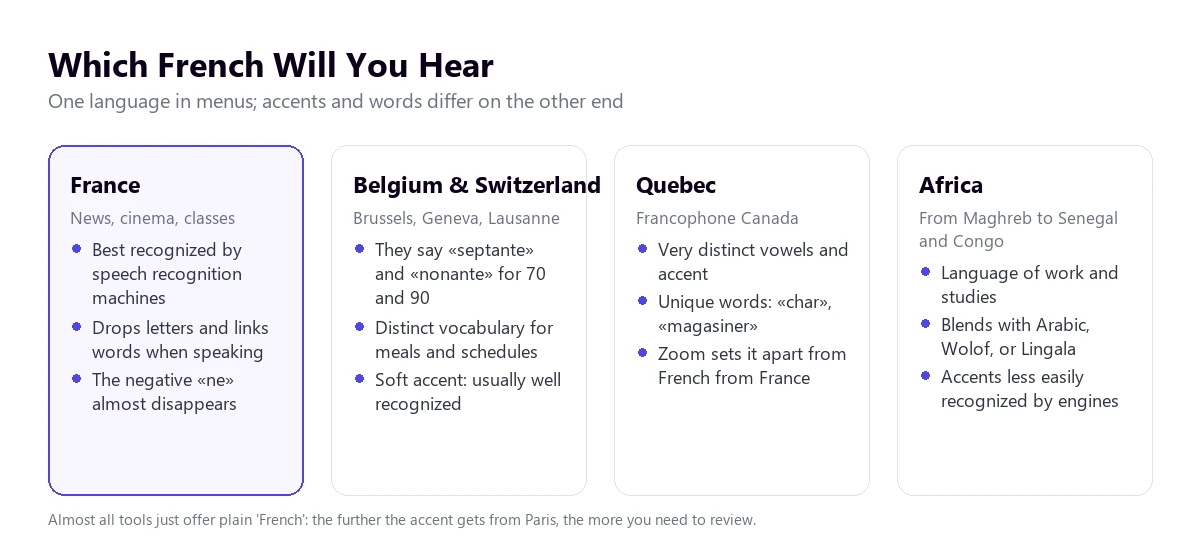
The French from France, and specifically from radio and television, is the most abundant in the data these systems learn from. It’s the easy case. The French from Belgium and Switzerland sounds very similar in accent, although it changes everyday words and, above all, some numbers: they say “septante” for 70 and “nonante” for 90, where in Paris they would say “soixante-dix” and “quatre-vingt-dix”.
Quebec French is another story. The vowels sound different, there are diphthongs that don’t exist in France, and it has its own vocabulary: “char” for car, “magasiner” for shopping, “blonde” for girlfriend. Some platforms treat it separately; Zoom distinguishes between French from France and Canada in its subtitles. Most tools, however, offer a single “French” and expect the recognizer to adapt.
In the Maghreb and Sub-Saharan Africa, French is the language of education, administration, and work, coexisting with Arabic, Wolof, Lingala, or Bambara. It’s normal for a sentence to start in French and include words from another language. If you work with suppliers from Morocco, Senegal, or Ivory Coast, expect the recognizer to be less accurate than with a Parisian, even if the person speaks flawless French.
Why spoken French tricks a machine
Any voice translator works in three steps: it converts the sound into text, translates that text, and shows or reads it in English. With French, almost all stumbling blocks happen in the first step, and they have a very specific cause: French is written one way and pronounced in another, much shorter way.
When speaking, words blend together. The “liaison” makes a final consonant sound that is normally silent when the next word starts with a vowel: “les amis” sounds like “le-zami”. Elision eats whole vowels: “je ne sais pas” becomes something like “shepa”. For the listener, there are no spaces between words, and the system has to guess where each one begins.
Then there are homophones, which are a plague in French. “Vert”, “verre”, “vers”, and “ver” sound exactly the same and mean green, glass, towards, and worm. And there’s a case that directly affects translation: “il parle” and “ils parlent” are pronounced the same. Singular and plural are only distinguished in writing, so the machine has to decide from context whether to translate “he speaks” or “they speak”. When it gets it wrong, the sentence comes out grammatically correct in English and no one notices.
Colloquial French adds its own traps. In daily conversation, the “ne” of negation almost disappears: people say “je sais pas” instead of “je ne sais pas”, and the whole weight of the negation falls on “pas”, which is a short syllable at the end. If the recognizer misses it due to noise, the sentence is translated in the positive. The pronoun “on” complicates things further: it can mean “we”, “one”, or “people”, and the translator picks one of the three.
Finally, slang. “Verlan”, which inverts the syllables of words (“meuf” for “femme”, “relou” for “lourd”), is very common among young people in France and on series and YouTube channels. An automatic translator transcribes it well, because they are standard sounds, but translates it poorly or leaves it as is.
Which tool to use depending on where the French plays
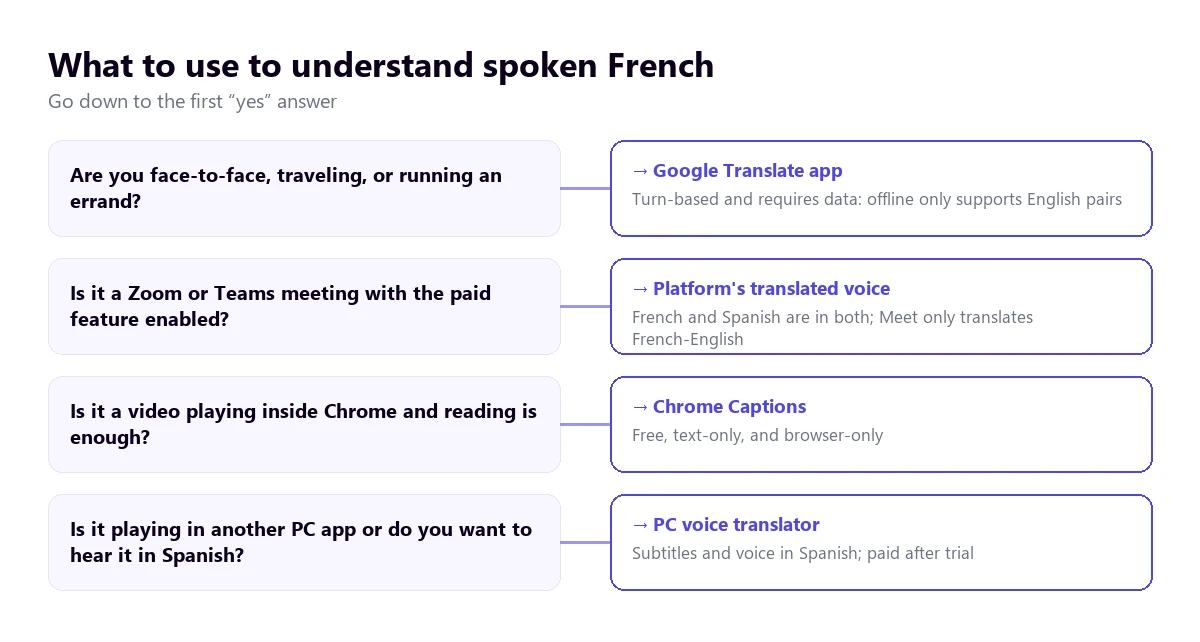
With French, there are more options than with almost any other language, so the question isn’t whether a tool exists, but which one fits your situation. The tree below orders the questions: the first affirmative answer tells you which method suits you.
| Method | Where the French plays | What you get | French to English | Cost |
|---|---|---|---|---|
| Voice translator on PC | Any Windows application | English subtitles and voice | Yes | 15 free min a day; more time, paid |
| Google Translate app | In front of you, on your phone | Turn-based conversation | Yes, with connection | Free |
| Zoom Voice Translator | Zoom meetings | Translated voice | Yes, both are among its five languages | Add-on; price not published |
| Teams, Interpreter | Teams meetings | Translated voice | Yes, both are among its ten languages | Microsoft Copilot license |
| Google Meet, translated voice | Meet meetings | Translated voice | Yes: it supports French-English | Paid Workspace editions |
| Chrome subtitles | Browser tabs | Text only | Yes, according to its help | Free |
| Text messages | Message translation | Not on Android; on iPhone, unconfirmed | Free |
The interesting thing about the table is Google Meet: it supports French in its translated voice, but always paired with English. A meeting between a team in Lyon and another in Madrid couldn’t use it, but for English speakers, it works perfectly.
1. French in any Windows program, with a voice translator on your PC
A large part of the French that reaches your computer isn’t in a company meeting: it’s an online course, a YouTube channel, a series on a platform without English subtitles, a recorded webinar, or a call on a messaging app. For all that, you can use a program that listens to the sound of the application you choose and converts it into English subtitles or voice while it plays.
Traducore works like this on Windows 10 and 11. On Windows 11, it captures only the chosen application, so the sound from another program doesn’t bleed into the translation (the browser is captured entirely: mute the other tabs with sound). French is on its language list as “French”, without choosing a variant. With French from France, which is the most common case, the result is good; with a Quebec or African accent, we haven’t tested it thoroughly, so the recommendation is to try it with your own audio before paying.
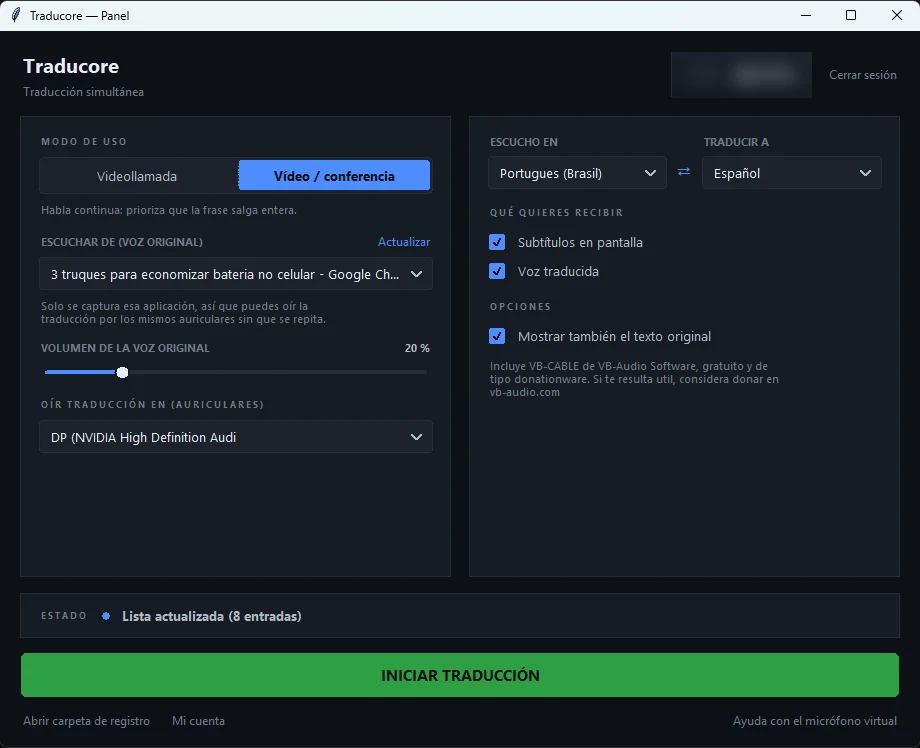
Step by step
- Open the program where the French will play and choose it in “LISTEN FROM (ORIGINAL VOICE)”.
- In “I HEAR”, select “French”. If the person mixes it with English or another language, setting it manually prevents language jumping.
- In “TRANSLATE TO”, leave English and choose subtitles, translated voice, or both.
- If you understand some French, tick “Also show the original text”: seeing the transcript lets you spot a missed “pas” or a misheard number.
- Click start and play the video or start the call.
What you should know
The translation arrives with a three to six-second delay: in a video it doesn’t bother you, and in a conversation it forces you to leave pauses. The program doesn’t save the audio or the text; if you need to keep what was said, you should convert the audio to text with a transcription service. It only exists for Windows, not for mobile or Mac.
For the opposite direction, when the other person needs to hear you in French, the Conversation mode sends your translated voice through a virtual microphone: in Teams or Zoom you choose “CABLE Output” as your microphone. It’s included in the Conversation plans and also in the Free plan, every day, with a French voice. Prices are on the pricing page.
Try it with a video in French
English subtitles or voice from the audio of any Windows application. 15 free minutes a day, no card required.
2. Google Translate on your phone, for a face-to-face conversation
Traveling through France, in a Brussels pharmacy, or helping a French customer in a store, the practical choice is the Google Translate app. Its help describes several live modes: Listening, designed to follow the translation with headphones; Conversation, turn-based and with the translation playing through the speaker; and Face-to-face, which splits the screen so each person reads in their language. The microphone detects on its own when the language changes.
French is one of the languages it responds best to, provided the person speaks with the intention of being understood. With someone who speaks fast, with chained “liaisons” and without the “ne”, errors pile up. Asking for short sentences, one idea per turn, fixes more than any setting.
Two limits to keep in mind. Offline live translation only exists on the Pixel 9, 10, and 11 and only in pairs with English, according to the help checked in September 2026: so French-English without data is supported. And the Google Translate website on the computer doesn’t allow conversations; you can only dictate a sentence with the microphone and stop it manually.
3. Meetings: French is one of the few languages with translated voice
Meetings are where French fares best compared to other languages. The two platforms that already translate voice include it alongside English, which doesn’t happen with Arabic, Russian, or Dutch. In return, they all require a license or an add-on that doesn’t come with basic accounts.
Zoom
Voice Translator, the speech-to-speech translation that Zoom announced in July 2026, currently works with English, Chinese, French, Japanese, and Spanish. Each participant chooses the language they speak and the one they want to hear, and adjusts the balance between the original and translated voice. It requires the desktop app 7.0.0 or higher and the Live Translation or ZoomMate add-on, whose price Zoom doesn’t publish.
Zoom’s translated subtitles, which are text only, list both French from France and Canada with full compatibility. They require a Business Plus account or higher, or their own add-on. A detail from their help: they don’t translate between variants of the same language, so they can’t be used to go from one French to another. All requirements are in our guide to translating a Zoom meeting.
Teams
Teams’ Interpreter agent translates speech-to-speech, and its help cites French and English among its ten languages. It requires a Microsoft Copilot license, with 20 hours of interpretation per person per month, and doesn’t work with anonymous guests or in free Teams. If you prefer people, Teams also supports human interpreters in dedicated audio channels; its own help uses the French-English pair as an example. We explain it in the Teams interpreter guide.
Google Meet
Meet’s translated voice always has English as one of the two languages. French is there, but only paired with English, and the meeting only allows a single pair. For other combinations, you’re left with translated subtitles, in paid Workspace editions and, according to its help, “in certain language pairs” that it doesn’t detail.
4. Videos in Chrome, YouTube, and WhatsApp
Chrome subtitles
If the video plays inside the browser, Chrome can subtitle it and translate those subtitles: they are activated in “Settings” → “Accessibility”, with Live Caption and Live Translate, adding French first in “Manage languages”. French appears in its help’s list of examples. The recognition is done on your computer and what travels to Google to be translated is the text, not the audio. It only works for what plays in Chrome.
YouTube
On YouTube, there are two paths, and both depend on the video. Automatic subtitle translation requires the video to have subtitles, and automatic dubbing is activated by the creator. The dubbing language table goes from English to French, but from a French video it almost always dubs only into English. We detail this in the guide to translating YouTube subtitles.
WhatsApp translates written messages inside the chat, but on Android only with six languages, and French isn’t one of them. On iPhone, it mentions “over 19 languages” without giving the list. Voice notes aren’t translated, and its transcription doesn’t support French either. If you receive audio messages, the alternatives are in our guide to translating a WhatsApp audio.
A clarification about Windows 11: its Live Captions do translate any PC audio on the device itself, but only on Copilot+ PCs and only into English or Simplified Chinese.
From English to French: “tu” and “vous”
The other half of searches go in the opposite direction: you want the other person to hear you in French. Here the problem isn’t recognition, because any system understands your English well, but formality. French distinguishes between “tu” and “vous”, and English just has “you”.
In English, we use “you” for everyone; in France, a client, a supplier, or someone you just met is addressed as “vous” for quite some time. If you say “can you send me the quote?”, the translator might choose “tu” and the sentence sounds too familiar. In Quebec, “tu” is used more often, and in Francophone Africa, “vous” is maintained even with close acquaintances.
There’s a second trap: “vous” is also the plural. “Are you coming tomorrow?” said to a group, and “are you coming tomorrow?” said to one person, are translated differently in French, but the machine has to guess from your English. In a meeting, this rarely causes offense, but in an important email, it’s worth reviewing.
- With the person in front of you: in the Google Translate app, each speaks in their language by turns and the phone says the translated sentence.
- On Zoom or Teams: with the platform’s translated voice, each chooses the language they speak and the one they hear.
- In other Windows calling programs: a voice translator with a virtual microphone that sends your sentence to the other side already in French.
The translated voice almost always produces standard French from France. A Quebecer or a Senegalese will understand it without a problem, even if it sounds like Paris radio to them.
Numbers, false friends, and register: where to look twice
No tool, no matter how good, completely resolves certain features of French. Knowing them beforehand tells you which sentences to always check, especially when money, dates, or commitments are involved.
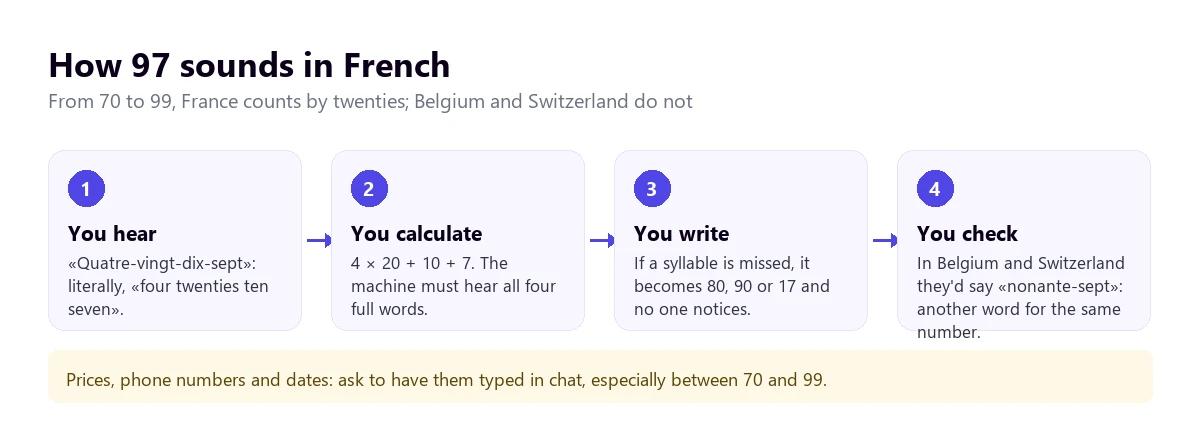
- Numbers from 70 to 99. In France, they count by twenties: 80 is “quatre-vingts” and 97 is “quatre-vingt-dix-sept”. That’s four words for one figure, and if the recognizer misses one, a different number comes out. In Belgium and Switzerland, they use “septante” and “nonante”, and in parts of Switzerland, “huitante” for 80.
- False friends. “Actuellement” means currently, not actually; “attendre” means to wait, not to attend; “blesser” means to injure, not to bless; “demander” is to ask, not to demand. The machine usually gets these right. The risk is for you, if you understand some French and trust the original instead of the translation.
- Times and dates. In France, the 24-hour format is widely used, and the day goes before the month. “Le 03/10” is October 3, not March 10 as it would be in the United States.
- Acronyms. “TVA” is VAT, “SARL” is an LLC, and “RIB” are bank details. The translator might leave them untranslated or translate the acronym letter by letter.
- Irony and politeness. “Ce n’est pas mal” sounds like “it’s not bad”, but coming from a French person, it’s usually a compliment. A literal translation won’t tell you that.
Paying more doesn’t change any of this. What works is confirming in writing the details that matter: amounts, deadlines, proper names, and addresses.
How to get a cleaner translation from French
- Set the language manually. Automatic detection hesitates with short sentences and when someone throws in an English word.
- Find out where the person is from. With Quebec or African French, leave more margin for error and review more.
- Take care of the audio. In French, a poorly captured “s” or “t” changes the number of the sentence; a headset with a microphone helps more than any setting.
- Complete sentences. Ask for one idea per turn: long sentences, with chained “liaisons”, are where recognition gets lost.
- Look at the original text. If you read some French, seeing the transcript next to it lets you catch a missed “pas” or a poorly resolved plural.
- Prepare a list of names. Names, companies, and cities with their spelling, so you recognize them when they come out distorted.
For important matters, a clear limit: the machine helps you follow the conversation, but a contract, a medical consultation, or a procedure with the French administration deserves an interpreter or a text reviewed by someone fluent in both languages.
More questions about translating French by voice
How can I listen to audio and translate it into English?
If the audio plays on your computer, a French to English audio translator for PC converts it into subtitles or voice while you listen, without having to download anything. If it plays in the browser and reading is enough for you, Chrome’s translated subtitles are free. If it’s a person in front of you, the Google Translate app in Listening or Conversation mode.
How can I translate what this audio says?
First, find out the language: if it’s French, set it manually in the tool instead of leaving it on automatic detection. Then, choose based on the format. If it’s a file you want to keep, a transcription service gives you the text and its translation. If you just want to understand it, simply play it on your PC with a voice translator open, or put it near your phone with Google Translate in Listening mode.
Does Google have a French to English voice translator?
Yes, in the Google Translate app for Android and iOS: the live mode translates French and English in both directions, by turns and with a connection. On the computer website, you can only dictate a sentence and stop it, with no conversation. Chrome also subtitles and translates French from videos playing in the browser.
So, which one do we use?
For French playing on the computer (courses, videos, calls on apps other than Zoom or Teams), we use our own voice translator on Windows, with French set manually and the original text in sight. Face-to-face, the Google Translate app, with data. In a Zoom or Teams meeting with the license already paid, the platform’s own translated voice, which works well with French. And in all cases, numbers and names in writing. If you want to calmly compare the options for PC, you have our comparison of voice translators.
Understand the French playing on your PC
English subtitles and voice from any Windows application, with the original text in sight. 15 free minutes a day, no card required.