Palabra AI and Traducore both translate speech live, but they put it in different places: Palabra AI adds an agent to the meeting so the whole room can understand each other, while Traducore installs on your PC and translates for you. Palabra is a voice-model company that sells this technology in four ways: an agent for Zoom, Meet and Teams, a service for in-person events, another for live broadcasts, and an API for developers. Traducore is a Windows program that listens to the application you pick, without adding anyone to the call.
The short version: if you run meetings where several people need translation, if you broadcast to an international audience, or if you want to build speech translation into your own product, Palabra AI is aimed right at you. If you are one person who wants to understand and reply on a call or follow a video, and you have no say over what the host does, a program on your computer is the better fit. Palabra’s details come from its official website, checked in November 2026. We did not test its agent in a real meeting for this article, so its latency and quality figures are the ones the company publishes, not our own measurements.
Traducore is our product
You should know that before reading on. We compare against what Palabra publishes, point out where its website contradicts itself, and also say where it beats us, which is in quite a few places.
In short
- Several people in a meeting need translation and the host accepts an agent: Palabra AI.
- You are putting on an in-person event or a broadcast in several languages: Palabra AI, with a custom quote.
- You want to add translated speech to your app: its API, at $0.04 per minute.
- You are one person on Windows and need to translate whatever plays in any application: Traducore.
- You want to start without paying and with no expiry date: Traducore gives you 15 minutes a day; Palabra, a 7-day trial.
In this article
- What exactly is Palabra AI?
- Traducore and Palabra AI, side by side
- An agent in the meeting versus a program on your PC
- How the agent gets started
- Under one second versus three: what the delay means
- Cloned voice, library voices and the original voice in the background
- Replying in another language
- Languages: three figures on the same website
- Pricing: hours per meeting versus hours per person
- Privacy and certifications
- How to run a fair test
- Where each one wins
- Which one suits you, case by case
- More questions about Palabra AI
- So, which one do we use?
What exactly is Palabra AI?
Anyone who comes to Palabra AI looking for a translator finds something bigger. Behind it is a lab, Palabra Lab, that develops its own speech recognition, translation and synthetic voice models, and on top of them it sells several products with different pricing rules:
- Video call agent: joins Zoom, Google Meet or Teams. You pay a subscription with a monthly allowance of hours.
- In-person events: attendees scan a QR code, pick a language and listen on their phone, with subtitles. No booths or receivers.
- Broadcasts: connects to OBS, vMix, YouTube, Vimeo, Castr or any SRT or RTMP stream, and the audience gets translated audio and subtitles.
- API: speech to speech, speech to text and text to speech, over WebSocket, for developers building their own product.
Its FAQ makes the target audience clear: sales teams, customer support, event organizers and companies integrating the technology. It also answers questions that matter in a corporate purchase, such as a 99.9% service agreement and the option of having an engineer attend the event.
Traducore is much narrower in scope. It is a program for Windows 10 and 11 with two modes: Video / talk for listening and Video call for conversing. It sells no API and no event service: it solves the problem of one person sitting at their PC.
Traducore and Palabra AI, side by side
| Tool | Where it lives | Who turns it on | What you get | Advertised delay | Languages | Free | Entry price |
|---|---|---|---|---|---|---|---|
| Traducore | Program on your Windows 10 or 11 PC | You, without telling the host | Voice and subtitles, with the original voice in the background | 3 to 6 seconds | Translates into 78 | 15 min a day | €7.95 / 2 h a month |
| Palabra AI | Agent on the call, web and API | Whoever adds the agent to the meeting | Cloned or library voice, live subtitles and transcript | Under 1 second | Advertises 60+ and 70+ | 7-day trial | $60 / 3 h a month |
An agent in the meeting versus a program on your PC
The basic difference is where the translation happens. Palabra says on its home page that its agent joins the call “as a participant”, so nobody installs anything. That is a huge advantage when there are eight people in the meeting and none of them wants to touch their computer: one setup serves everyone.
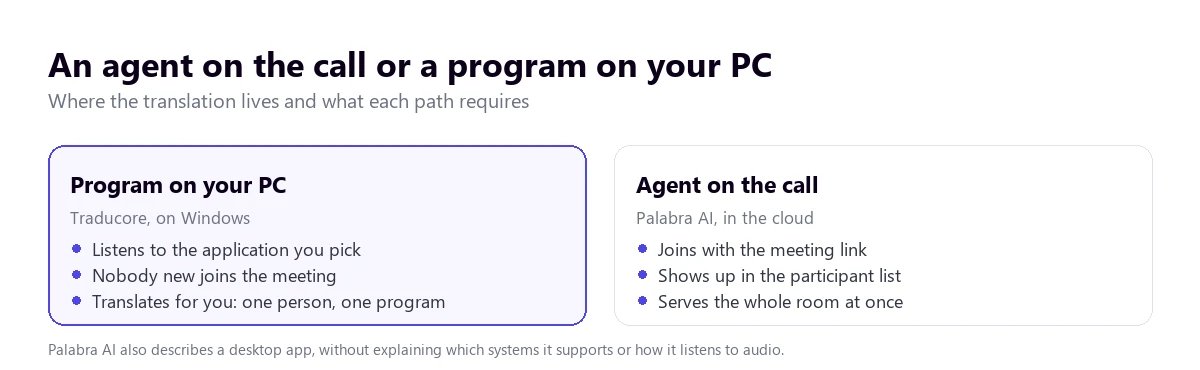
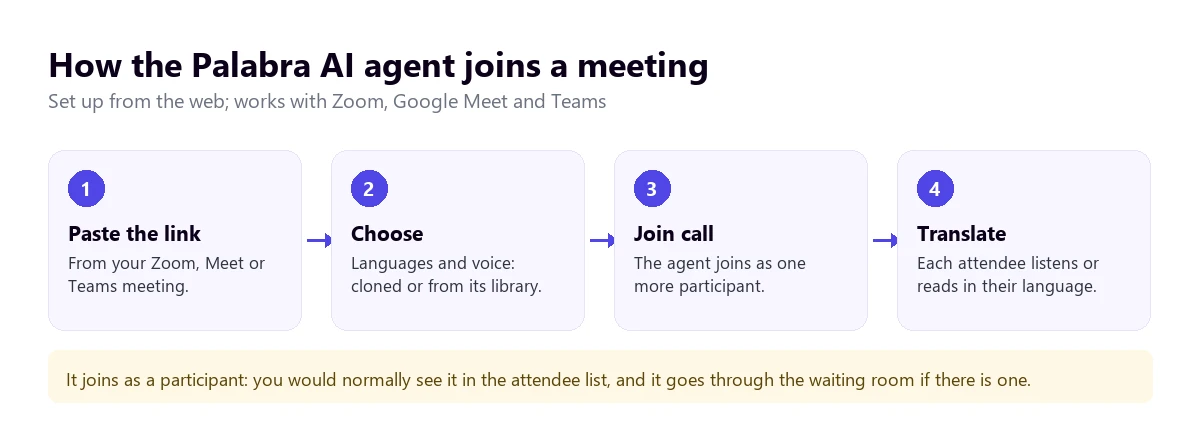
The price of that approach is a new participant. You would normally see it in the attendee list, and if the meeting has a waiting room, someone has to let it in. That depends on the host. On a call with a large client whose IT department restricts bots, it may never get in. Palabra’s website does not explain what happens in those cases, or whether any attendee can invite the agent to someone else’s meeting; its Zoom page talks about connecting your account and choosing target languages.
A program on the PC works the other way round. Traducore does not join the meeting: on Windows 11 it captures the sound of the application you pick, and if you pick the browser all its tabs come through, because Windows separates audio by application. On Windows 10 it captures a whole audio device. It needs no platform integration, so it works the same for Zoom, a recorded seminar or a video player. The trade-off is clear: it only translates for you.
How the agent gets started
Palabra describes three steps: paste the meeting link, choose languages and voice, and press “Join call”. According to its Zoom page, setup takes under five minutes, and for webinars the audience opens a link, picks a language and listens or reads. There are two modes: conversation, with translation in both directions, and presentation, from one speaker to many listeners.
One confusing point deserves clearing up. The home page asks whether there is an app to download and answers yes, “the Palabra App for desktop”, and the Zoom page mentions “our desktop solution” for other platforms. But we could not find which systems it supports or how it listens to audio. Nor did we see a mode described for translating what plays on your computer if you are not the one broadcasting: its broadcast service connects to the broadcaster’s feed, not the viewer’s. If that is your case, ask before you pay.
Under one second versus three: what the delay means
This is where Palabra shows off. The home page talks about “less than one second of latency”, and the Zoom page goes down to under 500 milliseconds and adds that the delay is not noticeable. Those are two different figures, with no published measurement conditions: it does not say which language pair was used or from what point in the sentence the time is counted. If they hold up in your meeting, that is a real advantage, because the conversation feels more like talking than taking turns.
It helps to understand why this is hard. Translation that fast cannot wait for the sentence to end, and Palabra talks about a “predictive algorithm”. In German or Japanese, the verb that decides the meaning often comes last, so whoever translates before hearing it has to anticipate, just as a human interpreter does in the booth. When it guesses right, it runs almost in step. When it does not, it has to correct on the fly. You can read more about that craft in the guide to the human interpreter.
Traducore takes the other route: it waits until it has the sentence, and 3 to 6 seconds pass between its end and the translation. That is slower, and we say so plainly. You notice it most in a fast chat, with short back-and-forth sentences. When you are following a presentation or a video it bothers you far less, because you do not have to answer.
Cloned voice, library voices and the original voice in the background
Palabra AI is strong here. It automatically picks a voice similar to the speaker’s, offers automatic cloning, and uses diarization to tell speakers apart and give each one their own voice. Its plans also list prerecorded voices, noise suppression and music isolation. What it does not have yet is emotion transfer: its home page presents that as a planned feature.
For a listener, a different voice for each speaker helps a lot in a panel discussion. For an organizer, there is a common-sense caution: cloning someone’s voice means handling something very personal, so ask the speakers’ permission before turning it on, especially if they are external.
Traducore does not clone voices. It uses a synthetic voice and keeps the original voice in the background at 65%, so you hear the real person’s tone beneath the translation, plus floating subtitles on your screen. That is less striking than hearing your client speak English in their own timbre, but in exchange there is nothing to configure for each person you talk to.
Replying in another language
Both cover the case where the other person needs to understand you, each in its own way. Palabra’s conversation mode translates in both directions within the call, with the agent in between, and voices and languages are chosen during setup. Its website adds that all its languages can be used at once in the same meeting, not just two.
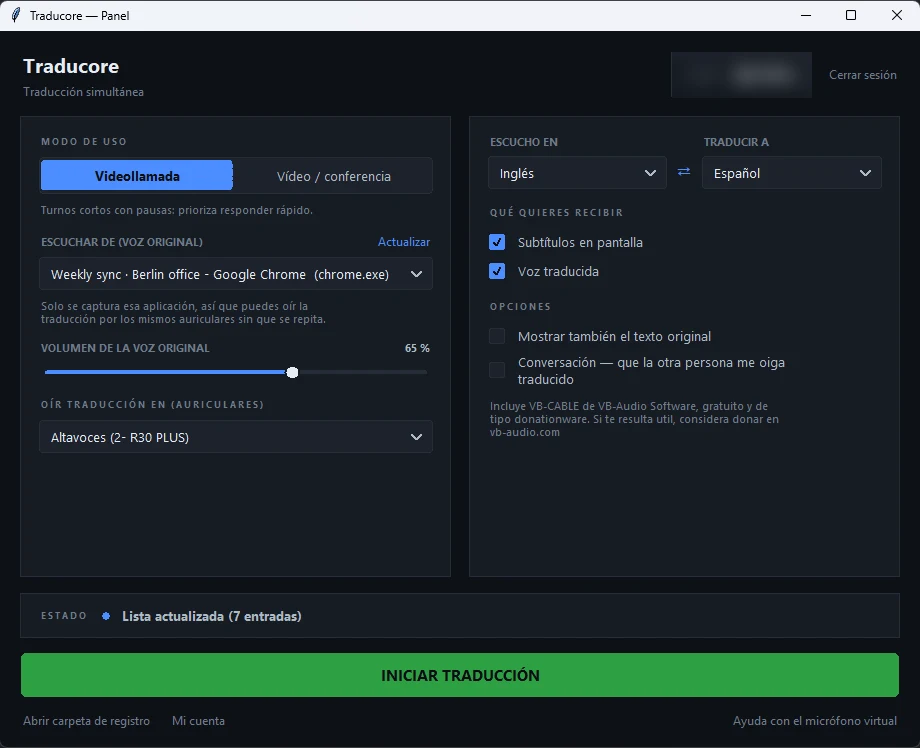
Traducore solves this from your side. In Video call mode, your voice is translated and comes out through a virtual microphone that the program installs the first time, with Windows administrator permission. In Teams, Zoom or Meet you select “CABLE Output” as your microphone. With speakers it works in turns, because your microphone is not sent while something is playing; with headphones it flows better. This feature is part of the free plan every day, although the free voice only exists in Spanish, English, French, German, Italian and Portuguese.
Languages: three figures on the same website
Palabra AI’s home page says “70+ languages” plus regional variants. Its pricing page and solution pages say “60+”. And the detailed list on its blog, by our count, has 48 speaker languages and 5 listener-only ones, such as Swahili and Zulu. On top of that, the names shown on the pricing page do not fully match that list. That does not mean anyone is lying: each page was probably updated at a different time. It does mean you should check your specific language.
Spanish appears as “Spanish (ES/MX)”, with the variants for Spain and Mexico, and Portuguese, English and French have their own too. Its list states that every language comes out in audio and text at the same time, and Palabra adds that you can ask it for a language that is missing.
Traducore detects the source language and translates into 78, without promising the same quality in all of them: between widely used languages such as English, Portuguese and Spanish it works very well, and with rare pairs you have to test it. With both products, accents, noise and overlapping voices matter more than the number on the list.
Pricing: hours per meeting versus hours per person
Palabra AI publishes prices for meetings, which is unusual in this market. According to its website, in November 2026:
- Starter: $60 a month for 3 hours ($20 an hour), or $45 billed annually.
- Pro: $150 a month for 10 hours ($15 an hour), or $113 billed annually.
- Team: $500 a month for 50 hours ($10 an hour), or $375 billed annually. It adds a multi-user workspace, single sign-on and an account manager.
- Business: custom, with deployment on regional servers.
- Events and broadcasts: now by quote, through sales. In September its website gave starting prices; in November it no longer does.
- API: speech to speech at $0.04 per minute, speech to text at $0.002 and text to speech at $0.012 per 1,000 characters, with $50 in credits on sign-up and up to 10 simultaneous sessions.
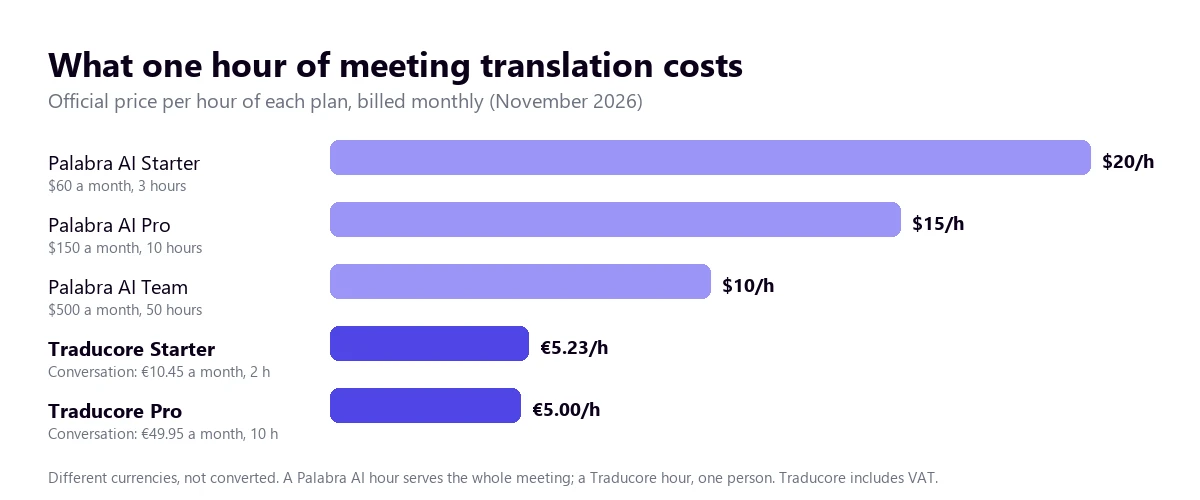
Two details from that page. The “save up to 62%” claim seems to come from comparing against struck-through prices of $200 and $1,000; between monthly and annual billing, the real discount is around 25%. And the page does not explain what happens if you go over your hours, or whether prices include taxes.
Traducore is paid by the hour and per person, with VAT included: the Video plan at €7.95 (2 h), €36.95 (10 h) or €108.95 (30 h), and the Conversation plan, where the other person hears you translated, at €10.45, €49.95 or €146.95. You will find them on the pricing page, along with the free plan of 15 minutes a day, no card, no expiry.
The per-hour comparison misleads if you ignore how many people it serves. One hour of the agent serves the whole meeting; one hour on the PC serves one person. Comparing each product’s Pro plan, from three or four people needing translation on the same call, the agent costs the same or less. For one person, the program costs about a third. And for anyone who can code, Palabra’s API works out at $2.40 an hour: the $50 welcome credit equals about 20 hours of speech to speech, although you then have to build the product.
Privacy and certifications
Palabra AI has a good argument here. Its website promises zero retention: audio and text are processed in memory, not stored, and do not train its models. The home page cites ISO/IEC 27001, SOC 2 Type II and GDPR with processing in the EU, plus a HIPAA agreement on the Enterprise plan. For advanced needs it offers a private cloud or installation on your own servers. Its Zoom page is more cautious: it says its security framework “aligns with” SOC 2 and ISO 27001, so if your company requires certificates, ask for the documents.
One question remains open: its plans include “Live captions & transcripts”, but with zero retention it is worth asking how and where that transcript is kept if you want it after the meeting.
Traducore does not store audio or text either: the translation exists while it lasts and then disappears, with no record afterwards. It does not have the certifications Palabra lists or private deployment, so with a demanding procurement department the advantage is Palabra’s. What a local program does spare you is having to justify a third party joining the meeting.
How to run a fair test
Palabra gives a 7-day trial on its meeting and broadcast plans, with easy cancellation, although the pricing page does not say whether it asks for a card. Make the most of it with a rehearsal meeting that resembles your real ones:
- Use a real conversation, with interruptions and two people talking at once, not a clean voiceover.
- Time the delay from the end of the sentence to when you hear the translation, in your language pair.
- Try sentences with the verb at the end if you work with German or Japanese, and see whether the translation corrects itself.
- Check proper names, figures and dates, which is where a mistake hurts most in a negotiation.
- Ask someone outside your team to host and check what they see when the agent joins.
With a translator on your PC, the same rehearsal works: the 15 daily minutes of the free plan let you repeat it over several days with different audio, with no countdown.
Where each one wins
- Palabra AI wins on advertised delay, on cloned voices separated by speaker, on serving a whole meeting at once, on nobody having to install anything, on QR-based events, on RTMP and SRT broadcasts, on an API for developers, on certifications and on private cloud options.
- Traducore wins on not depending on the host, on not adding anyone to the call, on translating any Windows application and not just meetings, on a free plan with no expiry, on an entry price of €7.95 versus $60 and on a lower cost per person.
Your next call, with no new guests
Translate on your PC whatever plays in the application and reply with a translated voice. 15 free minutes every day, no card.
Which one suits you, case by case
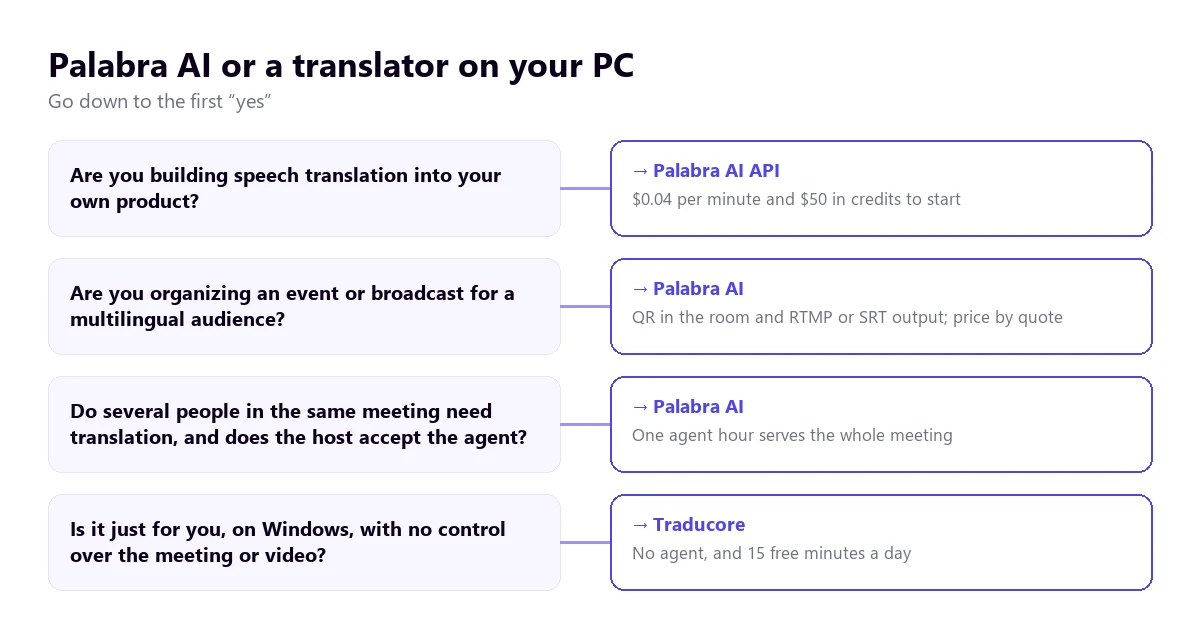
- A sales team running its own calls with clients in other countries: Palabra AI fits if the client accepts the agent and a fast conversation matters.
- A broadcast or event for a multilingual audience: Palabra AI, asking for a quote and a demo with your own audio.
- A company building an app with translated speech: the API, which does not even compete with a desktop program.
- A freelancer with foreign clients, when the other side calls the meetings: a translator on your PC, because you do not depend on their room. There are steps to translate a Zoom meeting and the options for Teams.
- A student or viewer of a course, a recorded seminar or a video: the program again, because there is no meeting to put an agent in.
- Mac or mobile: Traducore does not work there, only on Windows. Palabra works from the browser.
If you are weighing up more options, see the comparison of speech translators for PC or the head-to-head comparisons with DeepL Voice, which also uses a bot in meetings, and with JotMe.
More questions about Palabra AI
How much does Palabra AI cost?
For meetings, from $60 a month for 3 hours, or $45 billed annually, according to its website in November 2026. The Pro plan is $150 for 10 hours and Team is $500 for 50 hours. Events and broadcasts are by quote, and the speech-to-speech API costs $0.04 per minute.
Does Palabra AI have a desktop app?
Its website says yes and mentions downloading “the Palabra App for desktop”, but the pages we checked do not explain which systems it supports or how it captures audio. For meetings, what it describes in detail is the agent you set up from the browser. If you need the app, confirm it during the trial.
How does the Palabra AI translator work?
It recognizes speech, translates it and generates it again with its own models, in a cloned or library voice, plus subtitles. In meetings, you paste the link, choose languages and voice, and the agent joins the call. At events, the audience scans a QR code and listens on their phone.
So, which one do we use?
We use Traducore, naturally, and for a specific reason: we are almost always guests in other people’s meetings or watching something on the PC, and there we do not decide who joins the call. If we ran meetings every week with several people who do not share a language, or had to broadcast live to several countries, we would ask for the Palabra AI trial without thinking twice, and we would measure its delay with our own audio. The useful question is not which one translates better on paper, but who is in charge of the meeting.
Understand and reply from your PC
Voice and subtitles from any Windows application, with no agents in the meeting. 15 free minutes a day.