An Arabic to English audio translator gets it right when it hears standard Arabic, the one on the news, and stumbles as soon as the person speaks their dialect: Moroccan Darija, Egyptian, or Gulf Arabic. The tool you need depends on where the Arabic is playing: in a face-to-face appointment, in a meeting, in a message, or on your computer.
In this guide, we explain what Arabic hides behind the word “Arabic” in menus, why a machine struggles with it more than with French or Spanish, and what each method offers today, along with its limits. We also cover the opposite direction, when you are the one speaking and the other person needs to hear you in Arabic. The data for Google, Zoom, Microsoft, and WhatsApp comes from their official help pages, checked in September 2026; when the source doesn’t clarify something, we say so.
In short
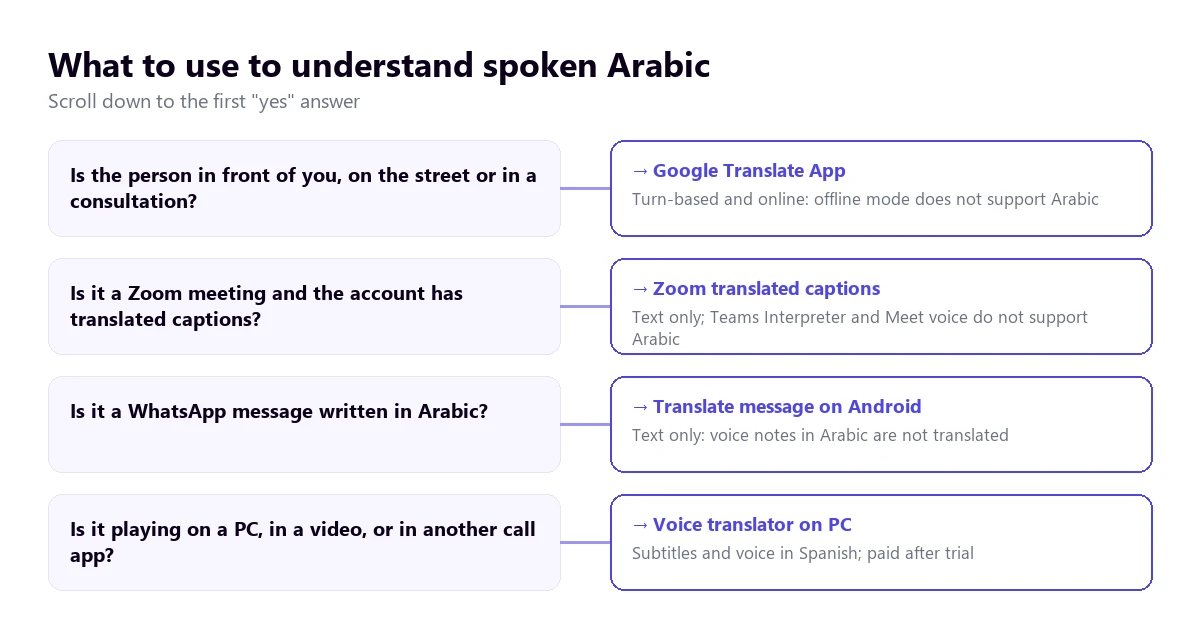
- Is the Arabic playing on your computer (a video, a call, a class)? → a voice translator for PC that captures the audio of that program (method 1).
- Is the person right in front of you? → the Google Translate app in conversation mode, using mobile data (method 2).
- Is it a Zoom meeting with the feature enabled? → its translated captions, which do include Arabic (method 3).
- Is it a written message on WhatsApp? → the “Translate” option on Android (method 4). Arabic voice notes are not translated.
In this article
- Standard Arabic and dialects: what Arabic you’ll hear
- Why spoken Arabic resists machines
- What tool to use depending on where the Arabic is playing
- 1. Arabic in any Windows program, with a voice translator on your PC
- 2. Google Translate on your phone, for talking to someone in front of you
- 3. Meetings: Zoom yes, Teams and Meet only halfway
- 4. Chrome videos and WhatsApp messages
- From English to Arabic: when you are the one speaking
- Numbers, names, and courtesy formulas: where to look twice
- How to get a cleaner translation from Arabic
- More questions about translating Arabic by voice
- So, which one do we use?
Standard Arabic and dialects: what Arabic you’ll hear
Arabic is the official language in about twenty countries, from Morocco to Iraq, but it isn’t spoken the same way in any of them. There is a common Arabic, Modern Standard Arabic, which is learned in school and used for writing, on the news, in speeches, and in official documents. At home, at the market, or on a call with a relative, each country speaks its own variety, and some are as similar to each other as Spanish and Italian.
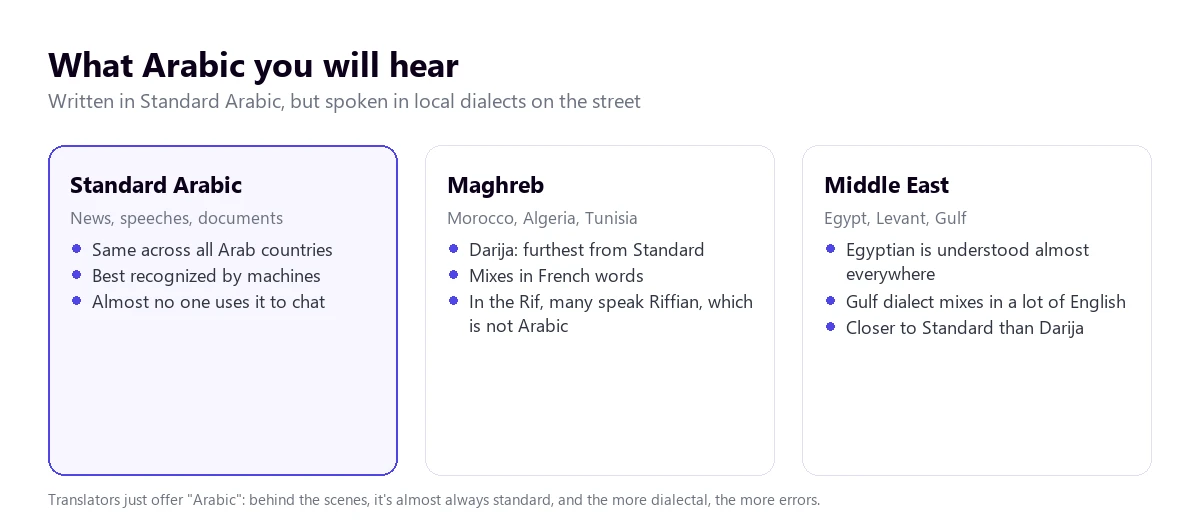
Linguists call this situation diglossia: two registers coexisting and splitting uses. For an automated system, this is a serious problem because almost all the written text it learns from is in standard Arabic, while people speaking on a video call use their dialect. The further the speech moves from the standard, the more words go unrecognized or get confused with others.
In Spain, for example, the most frequent case is Darija, the Moroccan Arabic, which is precisely one of the furthest from the standard. It has its own vocabulary, drops many vowels when spoken quickly, and mixes in French and, in the north, Spanish words. An Egyptian or a Saudi needs time to understand it, and a machine faces the same issue. In the Americas, on the other hand, it’s more common to deal with suppliers or clients from the Gulf and the Levant, who tend to stick closer to the standard at work.
There is a nuance worth knowing before blaming the tool. A large part of the population of the Rif, in northern Morocco, has Riffian as their mother tongue, an Amazigh (Berber) language that is not Arabic. If the person speaks Riffian to each other or with their family, an Arabic recognizer won’t understand them, no matter how much the rest of the conversation is in Darija.
Why spoken Arabic resists machines
A voice translator does three things in a row: listens and transcribes, translates the text, and writes it or reads it out loud in English. With Arabic, the stumbling blocks are concentrated in the first step, and have little to do with microphone quality.
The first reason is the writing system. Arabic is written from right to left and, in everyday use, doesn’t mark short vowels: consonants and long vowels are written, and the reader deduces the rest from context. The same sequence of letters can be read in several ways. When transcribing, the system has to choose one, and if it chooses poorly, the translation carries the error.
The second is the sound. Arabic has consonants that English doesn’t have: the “ayn”, pronounced in the throat, several different H sounds, and the so-called emphatic consonants, which darken the surrounding vowels. In clean audio, they are easily distinguished. With noise or over the phone, two different words can sound almost the same, and context isn’t always enough to separate them.
The third is mixing. In the Maghreb, it’s normal to start a sentence in Darija and finish it in French; in the Gulf, to insert English terms into every work sentence. If you set Arabic as the source language, those parts might be transcribed incorrectly, and if you leave it on automatic detection, the system might jump languages mid-sentence. There is no perfect setting: what works is knowing this happens and watching those sections more carefully.
And the fourth is names. Since vowels aren’t written, the same name has many spellings in Latin letters: Mohamed, Muhammad, Mohammed, or Mehdi versus Mahdi. Surnames compounded with “Al” or “El”, and place names, are sometimes translated as ordinary words. If a line of the translation makes no sense, chances are there was a proper name there.
What tool to use depending on where the Arabic is playing
There is no single tool that is good for everything. What decides is the place: your phone for face-to-face, the meeting platform if you already pay for it, WhatsApp for written messages, and a computer program for everything else. The tree below summarizes the order in which you should ask yourself the questions.
| Method | Where the Arabic plays | What you get | Arabic in official help | Cost |
|---|---|---|---|---|
| Voice translator on PC | Any Windows app | English subtitles and voice | Yes, as “Arabic”, without choosing dialect | 15 min free per day; more time, paid |
| Google Translate app | In front of you, on your phone | Turn-based conversation | Yes, no dialects or offline mode | Free |
| Zoom, translated captions | Zoom meetings | Text only | Yes, fully supported | Business Plus or higher, or add-on |
| Zoom Voice Translator | Zoom meetings | Translated voice | Announced for “later in 2026” | Add-on; price unpublished |
| Teams, Interpreter | Teams meetings | Translated voice | No | Microsoft Copilot license |
| Google Meet | Meet meetings | Translated captions | Yes for captions; no for voice | Paid Workspace editions |
| Text messages | Message translation | Yes, on Android | Free |
Anyone looking for an Arabic to English audio translator for meetings gets a surprise in this column. In the realm of meetings, everything changes with Arabic: two of the three major platforms don’t translate it by voice, and the third only has it announced.
1. Arabic in any Windows program, with a voice translator on your PC
A lot of the Arabic that reaches your computer isn’t in a corporate meeting. It’s a call on a messaging app, a video from a client, a recorded class, or a news broadcast someone shares. For those cases, you can use a program that listens to the audio of the app you choose and turns it into English subtitles or voice while it plays.
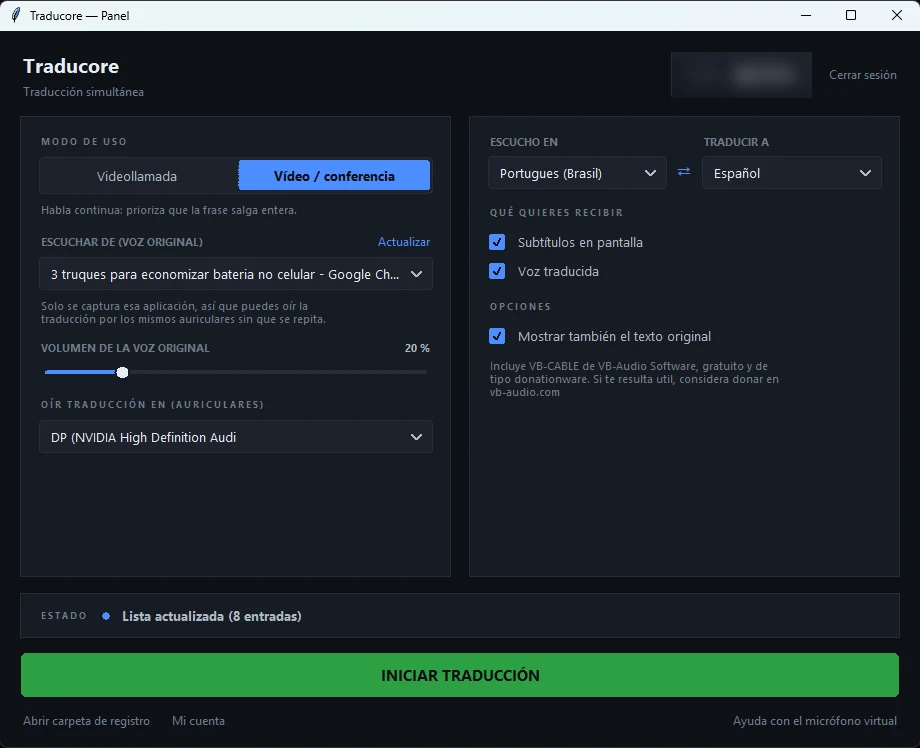
Traducore does that on Windows 10 and 11; on Windows 11 it listens only to the chosen app, so a notification or another program with music won’t mix with the translation. In its list, the language appears as “Arabic”, with no option to choose a dialect. The engine we use lists it among its languages, but we haven’t tested it thoroughly with Darija or Egyptian, so we don’t promise the same result with a news broadcast as with a conversation between friends.
Step by step
- Open the app where the Arabic will play and select it in “LISTEN FROM (ORIGINAL VOICE)”.
- In “I HEAR”, choose “Arabic” instead of leaving automatic detection, especially if the person mixes in French or English.
- In “TRANSLATE TO”, leave English and decide if you want subtitles, translated voice, or both.
- If you read some Arabic, tick “Also show the original text”: seeing the transcript helps spot a poorly recognized name.
- Click start and play the audio or start the call.
What you should know
The translation arrives with a three to six-second delay: in a video it’s barely noticeable, and in a conversation you have to leave pauses. The program doesn’t save the audio or the text, so if you need to keep what was said, you should transcribe the audio to text with a transcription service. It’s only for Windows. And since quality varies between language pairs, the reasonable thing to do is test it with your own audio in the dialect you deal with before paying.
For the opposite direction, when the other person needs to hear you in Arabic on a video call, Conversation mode sends your translated voice through a virtual microphone: in Teams or Zoom you choose “CABLE Output” as your microphone. It’s included in the Conversation plans and also in the Free plan, every day. Note: on the Free plan, the translated voice only exists in English, Spanish, French, German, Italian, and Portuguese, so for them to hear you in Arabic you need a paid plan. Prices are on the pricing page.
Try it with real Arabic audio
English subtitles or voice from any Windows app. 15 minutes free a day, no card required.
2. Google Translate on your phone, for talking to someone in front of you
At a doctor’s office, a ticket window, or a store, the practical option is the Google Translate app. Its help page describes several live modes: Listen, to follow the translation with headphones; Conversation, where each takes turns speaking and the translation plays through the speaker; and Face-to-face, which splits the screen in two so each person reads in their language. The microphone only detects when the language changes.
Arabic is on the list of live mode languages, but just as “Arabic”: the help page doesn’t mention dialects. With someone who speaks slowly to you and wants to be understood, they usually get closer to the standard and the app responds well. With a nervous person speaking in their home dialect, errors multiply.
There are two limits you should be clear about before relying on it. Live offline translation does not include Arabic: according to the help page checked in September 2026, it only works on some Pixels and with ten languages paired with English. And on the computer it doesn’t work the same way, because the Google Translate website doesn’t allow conversations: you can only dictate a sentence with the microphone and stop it.
A usage trick that helps a lot: ask the other person to say one idea per turn. Long sentences, with several chained ideas and a French word thrown in, are where the recognition gets lost.
3. Meetings: Zoom yes, Teams and Meet only halfway
If the Arabic comes up in a work meeting, the temptation is to use the platform’s own translation. With this language, each responds very differently, and you should look into it before inviting anyone.
Zoom
Zoom’s translated captions convert the automatic captions to the language each attendee chooses, and its help page lists Arabic with full support. They are text only. The host needs a Business Plus or Enterprise account, or the translated captions add-on, for which the help page refers you to the sales team for pricing.
Voice translation, Voice Translator, currently only works with English, Chinese, French, Japanese, and Spanish. The Zoom blog announced in July 2026 that Arabic will arrive “later in 2026”, with no set date. Until then, on Zoom, Arabic is read, not heard. All the requirements for each feature are in our guide to translating a Zoom meeting.
Teams
Teams’ Interpreter agent, which translates voice to voice, does not include Arabic among its ten languages. In live translated captions, which require Teams Premium for the organizer, there is a discrepancy: the English help page adds Arabic as a target language and the Spanish one doesn’t mention it. If your meeting depends on it, test it beforehand. What Teams does allow is bringing human interpreters into dedicated audio channels, and that is the serious option for an important meeting. We explain it in the Teams interpreter guide.
Google Meet
Meet’s voice translation always works with English as one of the two languages, and the other can only be French, German, Hindi, Italian, Portuguese, or Spanish. Arabic is not there. In translated captions, however, the Spanish help page does include Arabic, provided the organization has a paid Workspace edition and with the warning that it only works “in certain language pairs”.
4. Chrome videos and WhatsApp messages
Chrome captions
For a video playing inside the browser, Chrome can generate captions and translate them: they are enabled in “Settings” → “Accessibility”, with Live Caption and Live Translate, adding the language first in “Manage languages”. The Spanish help page names Arabic in a list of examples, but that list is in the Chromebook Plus section and the English version doesn’t include it. On Windows and Mac, whether it recognizes Arabic is unconfirmed: test it with a short video before counting on it.
WhatsApp translates written messages inside the chat, and on Android, Arabic is among its six languages. The translation happens on the phone itself. What it doesn’t do is translate voice notes, and audio transcription, which turns voice to text in the same language, doesn’t support Arabic either according to its help page. If you receive audio files, you have alternatives in our guide to translating WhatsApp audio.
From English to Arabic: when you are the one speaking
The other half of the searches go the opposite way: you want the other person to hear you in Arabic. Here a problem appears that doesn’t exist in the Arabic-to-English direction. In Arabic, the “you” changes depending on whether you are talking to a man or a woman, and verbs and adjectives change with it. In English we say “are you tired?”, and the pronoun is the same; in Arabic, the pronoun changes too.
A machine translator that doesn’t know who you are addressing usually chooses the masculine. With a female interlocutor, the sentence is understood, but sounds weird. If the situation is sensitive, you should state it explicitly at the beginning or use impersonal sentences.
The other detail is what Arabic comes out. Translated voice almost always produces standard Arabic, correct and formal. A Moroccan person understands it, but it will sound like a news broadcast to them. For an administrative task or a work meeting, it’s appropriate; for a one-on-one chat, it might feel distant.
- Face-to-face: Google Translate’s conversation mode works in both directions and reads the translation out loud.
- On Zoom or Teams: today there is no translated voice into Arabic; you are left with human interpreters or captions.
- In all other Windows calling programs: a voice translator with a virtual microphone, which sends your sentence already translated into Arabic to the other side.
Numbers, names, and courtesy formulas: where to look twice
Whichever tool you use, there are points that fail with Arabic in all of them. It’s not a matter of paying more: they are features of the language that the machine resolves without context, and knowing this beforehand tells you what to always check.
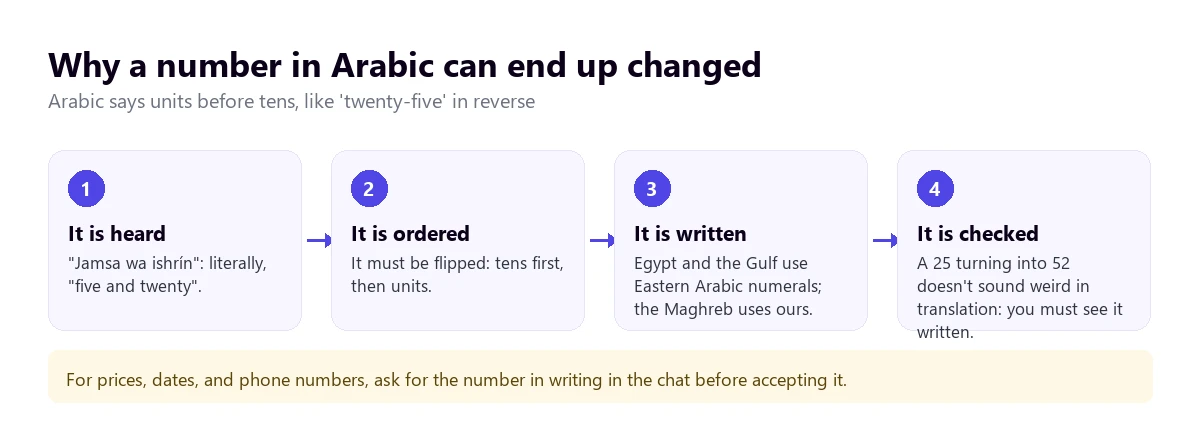
- Numbers. Arabic says the units before the tens: twenty-five is “five and twenty”. In Egypt and the Gulf, they are also written with Eastern Arabic numerals, which are different from ours. A poorly ordered price or phone number doesn’t sound weird in the translation, which is why it goes unnoticed.
- Religious formulas. “Inshallah”, “alhamdulillah”, or “bismillah” come up in daily conversation without special religious weight. Translated literally, “God willing” or “praise be to God” sound more solemn than they were. The Spanish word “ojalá” (hopefully), by the way, comes from Andalusian Arabic and means the same thing.
- The “yes” that isn’t a yes. “Inshallah” is also used to avoid committing. The machine translates it correctly, but it doesn’t tell you if it was a promise or a polite way to postpone.
- Names of people and places. Without written vowels, each system chooses its transcription, and surnames with “Al” or “El” can appear translated as words.
- Dates. In some countries and documents, the Gregorian and Hijri calendars coexist. If a date seems absurd, ask which calendar it’s in.
None of this is fixed with a better tool. It’s fixed by asking for what matters in writing: numbers, dates, names, and addresses.
How to get a cleaner translation from Arabic
- Find out what dialect the person speaks. If they are Moroccan, expect more errors and leave more margin; if they can, have them stick closer to the standard when speaking to the machine.
- Set the language manually. Automatic detection hesitates with short sentences and when French or English is mixed in.
- One idea per sentence. In turn-based conversations, short, complete sentences reduce errors more than any setting.
- Take care of the audio. A headset with a microphone is better than the laptop speaker; in Arabic, one poorly captured consonant changes the whole word.
- Prepare a list of names. Before an important meeting, write down names, companies, and places with their usual spelling in Latin letters.
- Confirm numbers. Repeat the number out loud in English or ask them to type it in the chat.
And a rule for serious matters: machine translation is for understanding and moving forward, not for signing a contract, giving a medical diagnosis, or closing a legal procedure. For that, you need an interpreter or a translation reviewed by a person who knows both languages and, if possible, the dialect.
More questions about translating Arabic by voice
How to translate Arabic audio to English?
It depends on where the audio is. If it plays on your computer, an Arabic to English audio translator for PC turns it into subtitles or voice while it plays. If it’s a file you want to keep, a transcription service gives you the Arabic text and its translation. If it’s a WhatsApp voice note, the app doesn’t translate it: you have to play it on your computer or upload it to a service that accepts files.
What is the best Arabic to English translator?
There isn’t one for everything. Face-to-face, the Google Translate app in conversation mode. In Zoom meetings, its translated captions, which include Arabic. For the audio of any other Windows app, a voice translator that listens to that window. In all cases, the result improves a lot if the person gets closer to standard Arabic.
How to activate the voice translator?
In the Google Translate app, you tap the live or conversation mode, choose the two languages, and start speaking. In Zoom, the admin enables translated captions and each attendee chooses their language from the “Show Captions” arrow. In a PC translator, you choose the app that will play the sound, the source language, and the target language, and click start.
So, which one do we use?
For Arabic playing on the computer—videos, calls on apps other than Zoom or Teams, recorded classes—we use our own voice translator on Windows, with Arabic set manually and the original text visible. Face-to-face, the Google Translate app on our phone, using data. In a high-stakes meeting, a human interpreter, because no platform translates Arabic by voice today. And always, numbers and names in writing. If you want to compare PC options at your own pace, check out our voice translators comparison.
Understand the Arabic playing on your PC
English subtitles and voice from any Windows app, with the original text visible. 15 minutes free a day, no card required.