The best JotMe alternative depends on what JotMe is missing for you. If its 20 free minutes a month fall short or you need the other person to hear you translated, Traducore on Windows or VoxisLive on Windows, Mac and Linux. If you want the same on all your platforms, TransyncAI or Whisperr. If it’s for a whole company on Teams, Zoom or Meet, DeepL Voice. And if what you use most is meeting notes and subtitled files, Maestra.
We went through six JotMe alternatives with the same criteria we use in our comparisons: how they access the audio, whether they give a translated voice, whether the other person understands you, how many minutes they give for free and how much it costs to keep going. The data comes from each one’s official website, checked between September and November 2026; VoxisLive and Whisperr were checked on November 17.
Before we start: Traducore is ours
That’s why it’s first on the list. To make the comparison useful, the data for the others comes from their official websites, and for each one we also say where it beats us.
In this article
Why people look for a JotMe alternative
JotMe is a good product: it captures the computer’s audio without putting a bot in the meeting, has apps for Windows and Mac, and adds transcription, notes and AI meeting minutes. But reading its terms, three reasons come up that explain why so many people look for something else:
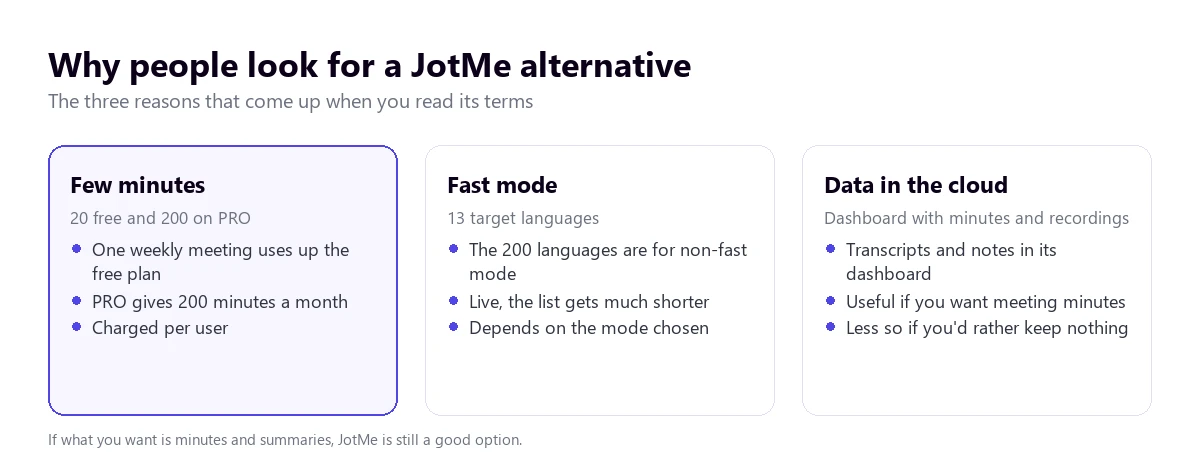
- Few translation minutes. The free plan gives 20 minutes of live translation a month, and PRO, 200 minutes a month for $20 per user ($10 paying for the whole year). With a one-hour weekly meeting, the free plan runs out in the first one.
- The 200 languages aren’t for live use. Fast mode, the real-time one, offers 13 target languages; the big number is for non-fast mode.
- Everything stays in its dashboard. Transcripts, notes and recordings are kept in JotMe’s cloud. That’s what you want if you’re after meeting minutes, and the opposite if you’d rather nothing were kept.
If your reason is the third one in reverse, that is, you value the minutes and summaries, the best JotMe alternative may be to stay with JotMe and pay for the plan you need. The list below is for the other cases.
The 6 JotMe alternatives at a glance
| Tool | How it listens | Translated voice | They hear you translated | Languages | Free | From |
|---|---|---|---|---|---|---|
| Traducore | Audio from the app you pick, no bot (Windows) | Yes | Yes (free plan and Conversation plans) | 78 | 15 min a day | €7.95 / 2 h |
| VoxisLive | All PC audio, no bot (Windows, Mac, Linux) | Yes | Yes, with a paid plan | 79 | 10 min a day (no meeting mode) | $9.99 / month (3 h) |
| TransyncAI | Microphone and computer audio, no bot | Yes | Yes, with a virtual microphone | 60 | 40 min on sign-up | $8.99 / month (10 h) |
| Whisperr | PC audio (Windows and Mac), microphone or a bot | Yes, reads the translation aloud | — | 100+ per its website | To get started | $79.99 / year (App Store) |
| DeepL Voice | A bot in Teams, Zoom or Meet | Yes, with a licence per listener | No | 40+ in subtitles, 30 in voice | 14-day trial | €12 / user / month (yearly) |
| Maestra Live | Browser; Chrome extension for PC audio | Yes (paid) | — | 125+ | Subtitles only | $49 / month |
“—” means the official website doesn’t say. Dollar prices are those published by each company; VoxisLive’s include tax.
How many free minutes each one gives
It’s the most common reason for leaving JotMe, so it deserves its own chart. Converted to minutes a month on the free plan, the gap is large:
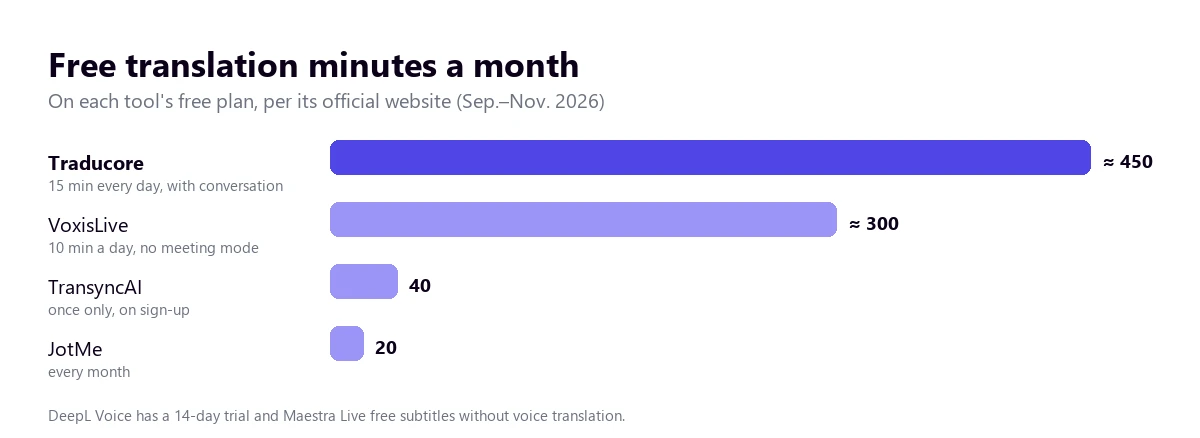
Careful with comparing the number alone. VoxisLive’s minutes are for its video and game mode, not for meetings where you speak; TransyncAI’s are given only once, and Traducore’s top up every day and include two-way conversation, though with a synthetic voice in six languages.
The JotMe alternatives, one by one
1. Traducore
A program for Windows 10 and 11 that listens to the audio of the application you pick (on Windows 11; on Windows 10, an audio device) and gives the translation as voice and subtitles. Like JotMe, it doesn’t put any bot in the meeting. Unlike JotMe, the other person can hear you translated through a virtual microphone, and it keeps neither the audio nor the text of the sessions.
- Compared with JotMe: many more free minutes (15 a day versus 20 a month) and voice in both directions. It doesn’t do meeting minutes or summaries, and there’s no Mac version.
- Limits: Windows only; 78 languages of uneven quality and a delay of 3 to 6 seconds per sentence.
- Price: 15 free minutes a day, no card. Video plans from €7.95 and Conversation plans from €10.45 for 2 hours a month. We compare them head to head in Traducore vs JotMe.
Try it with your own meetings
15 free minutes every day, no card, with two-way conversation included.
2. VoxisLive
A desktop program for Windows, Mac and Linux, with a Chrome and Edge extension. It listens to all of the computer’s audio without a bot, gives the translation as voice and subtitles and, in its meeting mode, makes you heard in the other person’s language with the VB-CABLE virtual microphone.
- Where it beats us: it works on Mac and Linux, its hour is cheaper (180 minutes for $9.99 on the Plus plan, about $3.30 an hour), leftover minutes roll over to the next month and it sells packs that never expire.
- Limits: the free plan doesn’t include meeting mode; it captures the mix of the whole PC, not one specific application.
- Price: Plus, $9.99/month; Premium, $24.99 (480 min); Ultra, $49.99 (1,000 min). Packs from $6.99 for 80 minutes.
3. TransyncAI
A voice translator for meetings, calls and in-person conversations, with apps for Mac, Windows, iOS, Android and the web and data synced between them. It captures the microphone and the computer’s audio with no bot or extension, gives bilingual subtitles, reads the translation aloud and writes meeting minutes.
- Where it beats us: it’s on every platform, including mobile, and its personal plan gives 10 hours a month for $8.99, one of the cheapest hours on the list.
- Limits: 60 languages; the free plan is 40 minutes once, when you sign up; translating into several languages at once uses more minutes.
- Price: Personal Premium, $8.99/month (10 h). Enterprise, $24.99/month per seat. Compared in depth in Traducore vs Transync AI.
4. Whisperr
It started as an iPhone app and now has Windows 10 and Mac versions that capture the computer’s audio, plus Android and the web. It shows floating subtitles, can read the translation aloud, has a bot that joins Zoom, Teams or Meet, and a broadcast mode so each attendee reads on their own device.
- Where it beats us: one account on every platform, including the phone for face-to-face use, and more than 100 languages according to its website.
- Limits: its website doesn’t say the other person can hear you translated in the call; the language count changes from the website (100+) to the App Store (40+).
- Price: free to start; on the App Store, a weekly subscription from $7.99 or a yearly one at $79.99, with no hours stated.
5. DeepL Voice
DeepL’s voice product. In meetings, a bot joins Teams, Zoom or Meet and participants read the translated subtitles in the browser, without installing anything. It’s the JotMe alternative designed for companies, not for one person on their own.
- Where it beats us: every participant sees the subtitles without their own licence, it has company glossaries and a brand well known for the quality of its written translation.
- Limits: Teams, Zoom and Meet only; the organisation has to allow external participants; hearing the translated voice requires a licence per listener; a cap of 300 or 600 minutes a month.
- Price: the Voice Starter plan costs €14 per user a month, or €12 paying for the year, with 300 minutes included. Detail in Traducore vs DeepL Voice.
6. Maestra Live
The live part of Maestra, a transcription, subtitling and dubbing platform. It runs in the browser, with a Chrome extension that picks up any audio on the computer and integrations with Zoom, Teams and Meet.
- Where it beats us: more than 125 languages and the rest of Maestra for files: subtitles, dubbing and transcription of recorded videos.
- Limits: live voice translation starts on the Premium plan and its minutes are counted per language; the free plan only gives subtitles.
- Price: Real-Time Basic, $49/month ($39 paying yearly), subtitles only; Premium, $99 ($79), with 180 minutes of real-time translation. More in Traducore vs Maestra.
How to choose yours
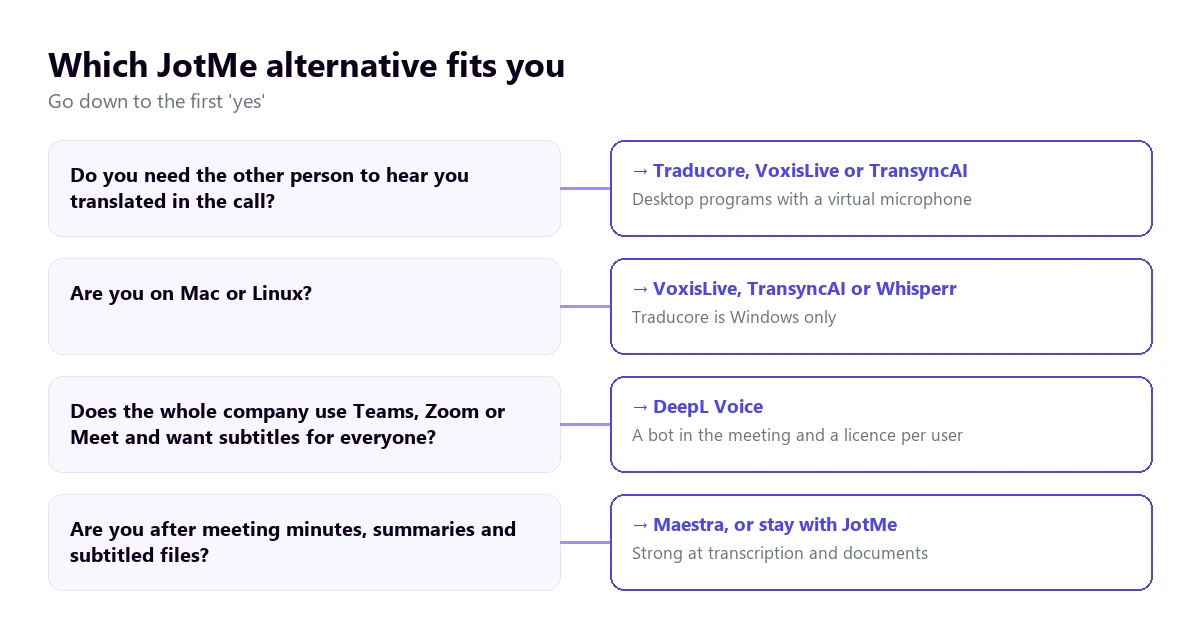
The useful question isn’t which JotMe alternative is best in the abstract, but what you’re missing. This tree sums it up:
- Running out of minutes with JotMe? Look at the real hourly cost for your volume: with two hours a month the small plan decides; with twenty, the price per hour.
- Do you speak in the meeting? You need the translation to get into the call: Traducore, VoxisLive or TransyncAI.
- On a Mac? VoxisLive, TransyncAI or Whisperr. Traducore is Windows only.
- Is it for the whole company? DeepL Voice or your meeting platform’s translation features.
- Is it the meeting minutes you value? Maestra, or stay with JotMe on a paid plan.
If you want a wider picture than the JotMe alternatives, with ten tools and the price per hour of each, it’s in the best real-time voice translator for PC.
More questions about finding a JotMe alternative
What are the best translators on the internet?
For text, DeepL and Google Translate are still the benchmarks. For live voice, which is what JotMe does, quality depends above all on speech recognition: with clear speech and a widely spoken language, almost every tool on this list translates well; with strong accents, noise or less common languages, the differences grow. The only reliable test is your own audio.
Which translators are the most reliable?
The ones that say clearly what they do with your data, how many languages they really have live and how much an hour costs. For a conversation with legal or medical consequences, none of them replaces a professional interpreter, who answers for what they translate.
What is the best free translator app?
To talk to someone in front of you, the Google Translate app in conversation mode. For the computer, among the JotMe alternatives the one with the most free minutes is Traducore, 15 a day with two-way conversation, followed by VoxisLive, 10 a day in its video and game mode.
So, which one do we use?
We use Traducore, of course, because we needed what JotMe doesn’t give on its free plan: plenty of minutes every day and the other person hearing us in their language, with no bots and nothing kept. But if you work on a Mac, VoxisLive or TransyncAI are the closest alternatives, and if what matters to you is the minutes of every meeting, JotMe is still a solid option.
See for yourself
Traducore, 15 free minutes a day and no card, with your own meetings or videos.